








 United States (English)
 Japan (日本語)
 Russia (русский)
 Germany (Deutsch)
 France (Français)
 Spain (Español)
 Italy (Italia)
 Portugal (Portugues)
 China (繁体中文)
 Turkish (Türk dili)
 Dutch (Nederlands)
 Korean(한국인)
 Saudi Arabia(عربي)
 Download HD movies & TV shows from Disney Plus.

Confused by what is disneyplus.com login/begin? Our guide explains the difference between disneyplus.com/login and disneyplus.com/begin URLs, provides step-by-step activation instructions, and solves common login issues. You can even get extra tips to watch Disney Plus on any TV models from USB without activation and network.
Disney+ has quickly become one of the most popular streaming platforms in the world, offering Marvel blockbusters, Star Wars sagas, Pixar favorites, National Geographic documentaries, and Disney classics all in one place. If you’ve just bought a new Smart TV and are prompted to activate Disney+ on your Smart TV or other TV-connected device, this article can bring help.
To access content on Disney+, first you need to log in to Disney+. You may wondering about disneyplus.com/login. Many users find these URLs confusing. So, what is disneyplus.com login/begin, and how do you actually use it? In this guide, we’ll walk you through everything you need to know about disneyplus.com/login and disneyplus.com/begin, including login steps, activation with an 8-digit code, troubleshooting, subscription details, and even how to watch Disney+ videos offline without activation.
Part 1. What is disneyplus.com login/begin?
First, let’s clear up the confusion. It’s crucial to understand that “disneyplus.com login/begin” is not a valid URL. Instead, there are two official URLs that serve different purposes:
This is the official page for logging into your Disney+ account via a web browser. It works on computers, tablets, and mobile devices.
This page is used to activate Disney+ on Smart TVs, streaming devices, and gaming consoles.
Part 2. How to Login to Disney Plus with disneyplus.com/login?
Whether you are using a computer, tablet, and mobile device, you can open a browser, log in to Disney Plus through the disneyplus.com login URL. You need to enter your email address and password associated with your Disney+ subscription.
Here’s how you can log in with disneyplus.com/login:
Step 1. Open your browser and visit disneyplus.com/login.
Step 2. Enter the email address associated with your Disney+ account.
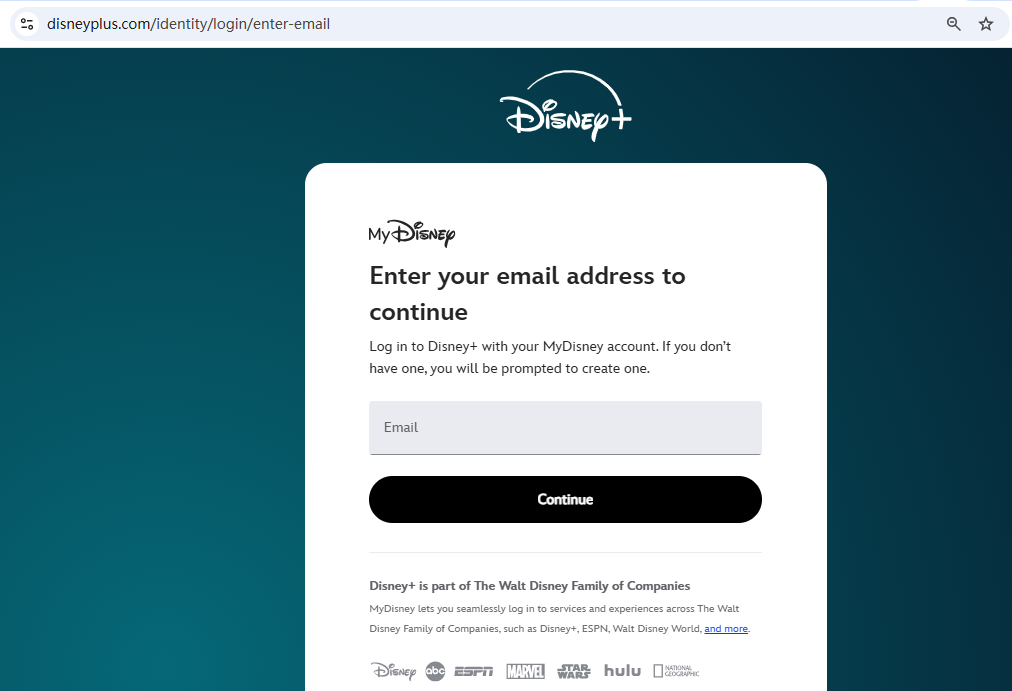
Step 3. Type in your password and click Log In.
Step 4. You can then browse and find the movies, TV series on Disney+ and stream online!
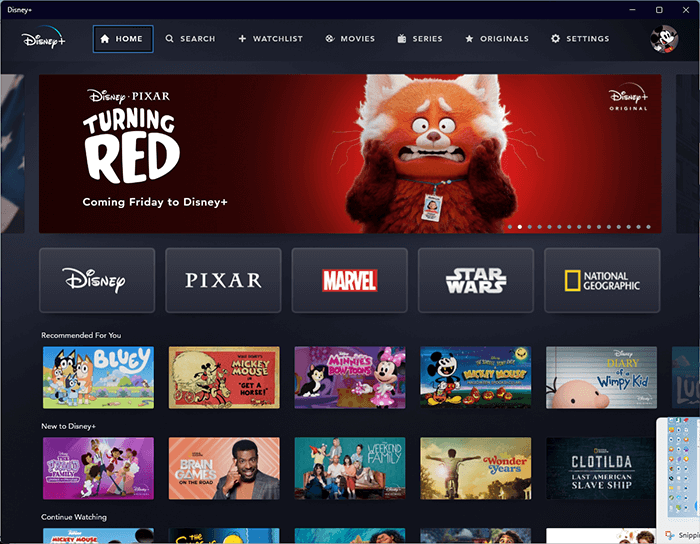
Tips: If you’re new to Disney+, click Sign Up Now to create an account.
-
Situation 1: If you cannot log in to Disney+ or forget your password, select “Having trouble logging in? Send a one-time code”, and you will recevie a 6-digit passcode via email. Use it to log in to Disney+ again.
Situation 2: If you get a “Something went wrong” error when accessing disneyplus.com/login, try a different browser. This common error can often be resolved by clearing your browser’s cache and cookies or by disabling any ad-blocking extensions temporarily.
Part 3. How to Activate Disney Plus on Smart TV?
Unlike logging into Disney+ on your phone and computer, you only need to enter your email address and password to log in. When using Disney+ on a Smart TV or device like Roku, Fire Stick, Apple TV, or PlayStation, you’ll need to activate your account via disneyplus.com/begin.
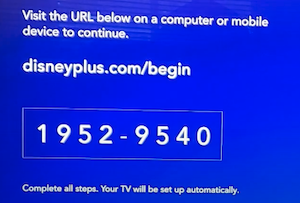
Follow below steps to activate Disney+ with the 8-digit code for TV:
Step 1. Open the Disney+ app on your Smart TV or streaming device.
Step 2. You’ll see an 8-digit activation code displayed on your screen. Keep this screen open on your TV.
Step 3. On a separate device (phone, tablet, or computer), go to disneyplus.com/begin. Log in with your Disney+ account if prompted.
Step 4. Enter the 8-digit code shown on your TV screen, and click “Continue”.
Step 5. Once confirmed, your Disney+ account will be activated on your TV.
Stepp 6. Pick “Start Streaming” to enjoy Disney+ content on your smart TV or TV-connected device
If You’re Having Trouble Accessing disneyplus.com/begin on Your Computer or Mobile Browser:
If you’re having trouble accessing disneyplus.com/begin on your computer or mobile browser, here are some notes and solutions:
Check Your Internet Connection: Ensure both your TV and the device you’re using to visit the website are connected to the internet.
Verify the URL: Double-check that you have entered the URL correctly as www.disneyplus.com/begin.
Clear Browser Cache: Outdated or corrupted cache data can cause web pages to malfunction. Clear your browser’s cache and cookies and try again.
Try a Different Device/Browser: If your computer is having issues, try using your smartphone’s browser (or vice-versa). As with the login page, switching browsers can often resolve the problem.
Check for Service Outages: In rare cases, Disney+ servers may be experiencing a temporary outage. Check official Disney+ social media channels or downdetector.com for any reported issues.
If you can’t install Disney+ on your TV, check the supported TV models.
Disney+ works on most modern Smart TVs and streaming devices, including:
- Samsung Smart TVs (2016 or later)
- LG Smart TVs (WebOS 3.0 or later)
- Roku
- Amazon Fire Stick
- Apple TV (4th generation and newer)
- PlayStation 4/5, Xbox One/Series X|S
If your TV model is older or uses a proprietary, unsupported operating system, you may not be able to install the app directly. In such cases, consider using an external streaming device mentioned above.
Don’t Confuse with disneyplus.com/login
It’s important not to confuse disneyplus.com/login with disneyplus.com/begin.
disneyplus.com/login – For signing in to your Disney+ account on browsers.
disneyplus.com/begin – For entering the 8-digit activation code on Smart TVs and devices.
If you don’t have an account yet, you must sign up at disneyplus.com/sign-up before you can use either link.
It’s important to note that if you ever get logged out of the Disney+ app on your smart TV or streaming device, you’ll need to repeat the activation process at disneyplus.com/begin before you can start watching again. While this extra step may feel inconvenient, it plays a crucial role in keeping your Disney+ account secure and preventing unauthorized access. Since your Disney+ account contains personal details and subscription information, safeguarding it is essential. So, if you find yourself unexpectedly logged out, don’t worry—just head back to the activation page, enter your 8-digit code, and within minutes, you’ll be streaming your favorite Disney+ movies and shows again without interruption.
Part 4: Know More About Disney Plus Subscription
How Much is Disney Plus?
Disney+ offers several subscription tiers to fit different needs and budgets. As of Oct. 21, 2025, Disney+ will increase its subscription fee, and offers ad-free and ad-supported plans include:
- Disney+ Basic Plan (with ads): US$11.99/month
- Disney+ Premium Plan (ad-free): US$18.99/month
How Much is the Disney Plus Bundle?
Disney Plus has partnered with other companies to offer discounted bundled prices. In addition to increasing the price of individual memberships, its bundled prices have also increased, let’s take a look.
- Disney Plus, Hulu Bundle (With Ads): US$12.99/month
- Disney+, Hulu, HBO Max Bundle (With Ads)): US$16.99/month
- Disney Plus, Hulu Premium Bundle (No Ads): US$19.99/month
- Disney Plus, Hulu, ESPN Select Bundle (With Ads): US$19.99/month
- Disney Plus, Hulu, ESPN Select Premium Bundle: US$29.99/month
- Disney Plus Premium, Hulu, ESPN Select Bundle Legacy: US$24.99/month
- Disney Plus, Hulu, HBO Max Bundle (With Ads): US$19.99/month
- Disney Plus, Hulu, HBO Max Bundle (No Ads): US$32.99/month
How to Cancel Disney Plus Subscription:
If you decide to cancel your Disney+ subscription, you can do so easily, but you will retain access until the end of your current billing period.
Step 1. Go to disneyplus.com/login a computer or mobile browser and log in to your account.
Step 2. Click on your Profile icon in the top-right corner and select “Account”.
Step 3. On your Account page, under the “Subscription” section, select “Cancel Subscription”.
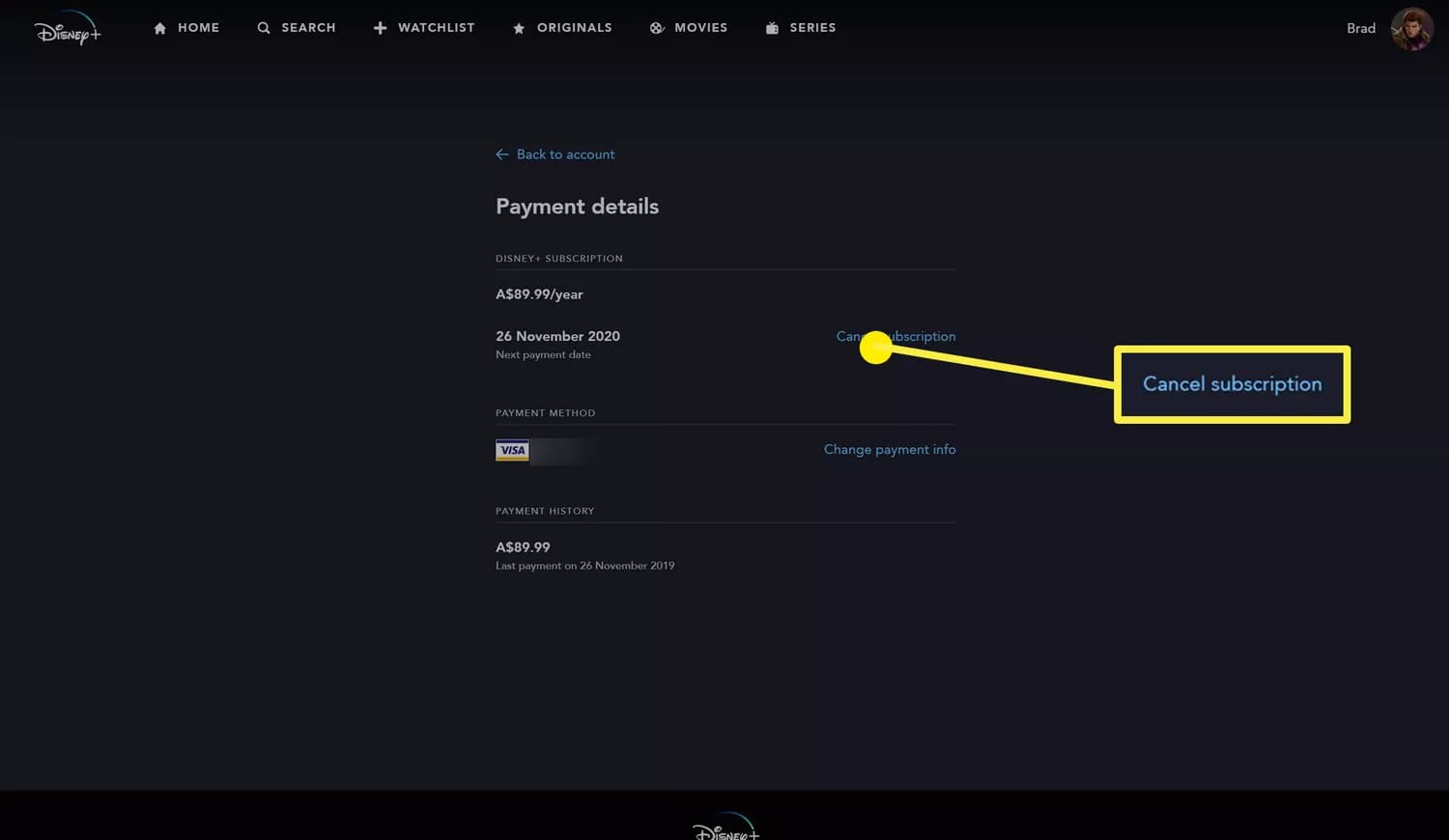
Step 4. You will be asked to confirm your choice. Follow the on-screen prompts to complete the cancellation.
After cancellation, you will receive a confirmation email. You can continue to stream until your paid period ends.
- See Also: How to Cancel Disney Plus Subscription
Part 5. How to Watch Disney Plus Videos on TV Without Activation?
As mentioned above, some TV models don’t support the Disney+ app, and a key limitation of the official service is that it doesn’t let you watch content on a TV offline. The download feature is exclusively available on the Disney+ mobile app for iOS and Android devices. To watch Disney+ videos offline on TV without needing an activation or even an internet connection, you can use a third-party tool like TunesBank Disney+ Video Downloader.
What is TunesBank Disney+ Video Downloader?
TunesBank Disney+ Video Downloader allows you to download Disney+ videos to MP4 or MKV format on your computer at up to 50X faster speed. It can download Disney+ movies and TV series in high definition, up to 720p quality, ensuring a great viewing experience on your TV! What’s more, the downloader can retain the original audio tracks (including Dolby Atmos 5.1 surround sound in some cases) and subtitles in multiple languages.
After downloading, whether you want to transfer the Disney+ videos to USB drives and play them on any TV with a USB port, or transfer them to any other device, all without ever needing to activate an app or connect to the internet again! Even if you cancel your Disney+ subscription, you can still enjoy your offline content forever!
Great Features of TunesBank Disney+ Video Downloader:
- Download Disney+ movies and shows in MP4/MKV format.
- Provides a built-in web browser to access the whole library.
- Save Disney+ movies and series with the best HD quality.
- Batch-download Disney+ movies and shows on Windows and Mac.
- Keep multi-language audio and subtitles for your downloads.
- Play downloaded Disney+ content on any device offline.
The following is the detailed guide to download movies and TV shows from Disney+ to a computer with TunesBank Disney+ Video Downloader.
Step 1. Sign In Disney+ Account
Install TunesBank Disney Plus Video Downloader on your Windows PC or Mac computer. When you launch the program, you will see a built-in web browser. Log into your Disney+ account directly within this browser.
Step 2. Search for Disney Plus Videos
You can turn to “Browse” or “Search” tab to find the Disney Plus movie or series you want to download. You can browse the content online, search for any title by entering a name, or pasting a URL onto the search field.
Step 3. Customize Download Settings
Access the settings window by clicking the “Gear” icon. Select your desired video format, quality, audio and subtitle options. To watch Disney+ on TV from USB, here we choose MP4 format.
Step 4. Start Downloading Disney+ Videos to MP4
Click “Download” button to save the video as an MP4 file to your computer. You can see the download progress at any time in the download bar. For downloading TV series from Disney+, you need to choose your desired episodes and seasons, then click “Download” button.
Step 5. Get Downloaded Disney+ Videos
When finishing downloading Disney+ videos, move to the “History” section and click the “Blue Folder”, or directly go to the specific folder you set, to get the well downloaded Disney+ videos.
Step 6 (Optional). Transfer Disney+ Downloads to USB Drive
Now, insert a USB drive to your computer’s USE port, create a Video folder in the USB drive, and copy & paste these Disney+ MP4 video files to a USB drive! Once done, eject the USB drive from computer.
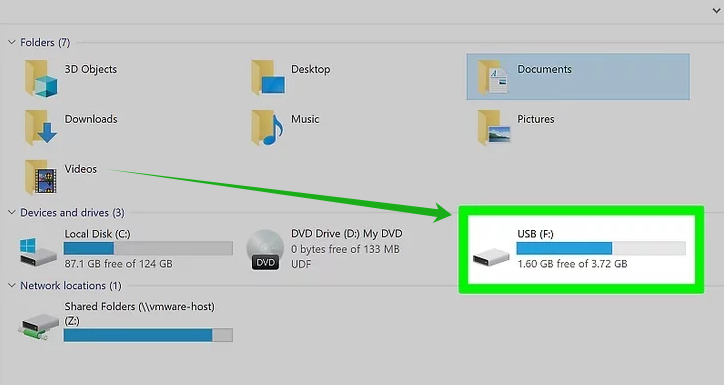
Step 7 (Optional). Watch Disney+ on Your TV Offline
Plug the USB drive into a USB port on your TV or connected device. Use your remote control and press the “Source” button. Select “USB Device”, then press “OK” or “Enter” on your remote to confirm.
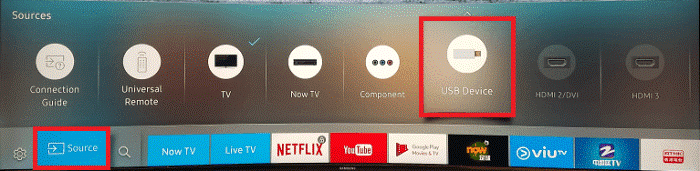
You can now enjoy your Disney+ content on the big screen, completely offline and without any activation required.
Part 6. Final Words
So, what is disneyplus.com login/begin? It’s actually a mix of two different URLs: disneyplus.com/login (for account login) and disneyplus.com/begin (for device activation with an 8-digit code). Understanding the distinction between these two URLs can enhance your Disney+ experience across all your devices.
For users who want permanent, flexible access to their favorite Disney+ content, TunesBank Disney+ Video Downloader is a powerful desktop software solution. It empowers you to download unlimited videos from Disney+ to your computer as local MP4 or MKV files. Thus you can easily build a permanent, personal library of your favorite content, and watch your favorite Disney+ videos on your smart TV, game console, projector, car screen, laptop and more devices without activation and network!

Disney+ Video Downloader
An excellent tool to download Disney Plus movies or TV series for offline watching anywhere anytime. Supports downloading Disney+ videos to MP4 or MKV files with up to 720P/1080P quality and Atmos/EAC3 5.1 audio.







