








 United States (English)
 Japan (日本語)
 Russia (русский)
 Germany (Deutsch)
 France (Français)
 Spain (Español)
 Italy (Italia)
 Portugal (Portugues)
 China (繁体中文)
 Turkish (Türk dili)
 Dutch (Nederlands)
 Korean(한국인)
 Saudi Arabia(عربي)
 Download from Netflix, Disney+, Prime Video, YouTube, and more.

Discover 3 easy ways to download Alien: Romulus for offline viewing on your mobile, computer or other devices, including using official streaming apps, professional downloaders like iMovieTool All-in-One Video Downloader, and free websites.
If you are a fan of sci-fi horror, Alien: Romulus is a movie worth adding to your watchlist. As the seventh Alien installment in the Alien series, this film follows young colonizers who encounter a terrifying life form aboard a derelict space station. While watching the Alien: Romulus full movie on streaming platforms are convenient, you are tied to a smooth internet connection.
To get the best viewing experience, you can also download Alien: Romulus from Disney Plus, Hulu, and other platforms. This article will introduce three practical ways of that, including a reliable desktop software – iMovieTool All-in-One Video Downloader – to get all 9 Alien movies download to enjoy these excited horror scenes!
• Alien (1979)
• Aliens (1986)
• Alien 3 (1992)
• Alien: Resurrection (1997)
• Alien vs. Predator (2004)
• Aliens vs. Predator: Requiem (2007)
• Prometheus (2012)
• Alien: Covenant (2017)
• Alien: Romulus (2024)
Way 1. Download Alien: Romulus in Streaming Apps
The easiest and safest way to download and watch Alien: Romulus offline is through an official streaming or digital platform. Depending on your region, you can stream it on Disney+ and Hulu, or rent or buy it from YouTube, Apple TV, Fandango, or Amazon Prime Video. If downloads are supported, use the platform’s official app to save the movie for offline viewing. Below, we will take the Disney Plus app as an example.
Step 1. Open the Disney+ app on your supported mobile device.
Step 2. Sign in with an active Disney+ Premium subscription account.
Step 3. Search for Alien: Romulus.
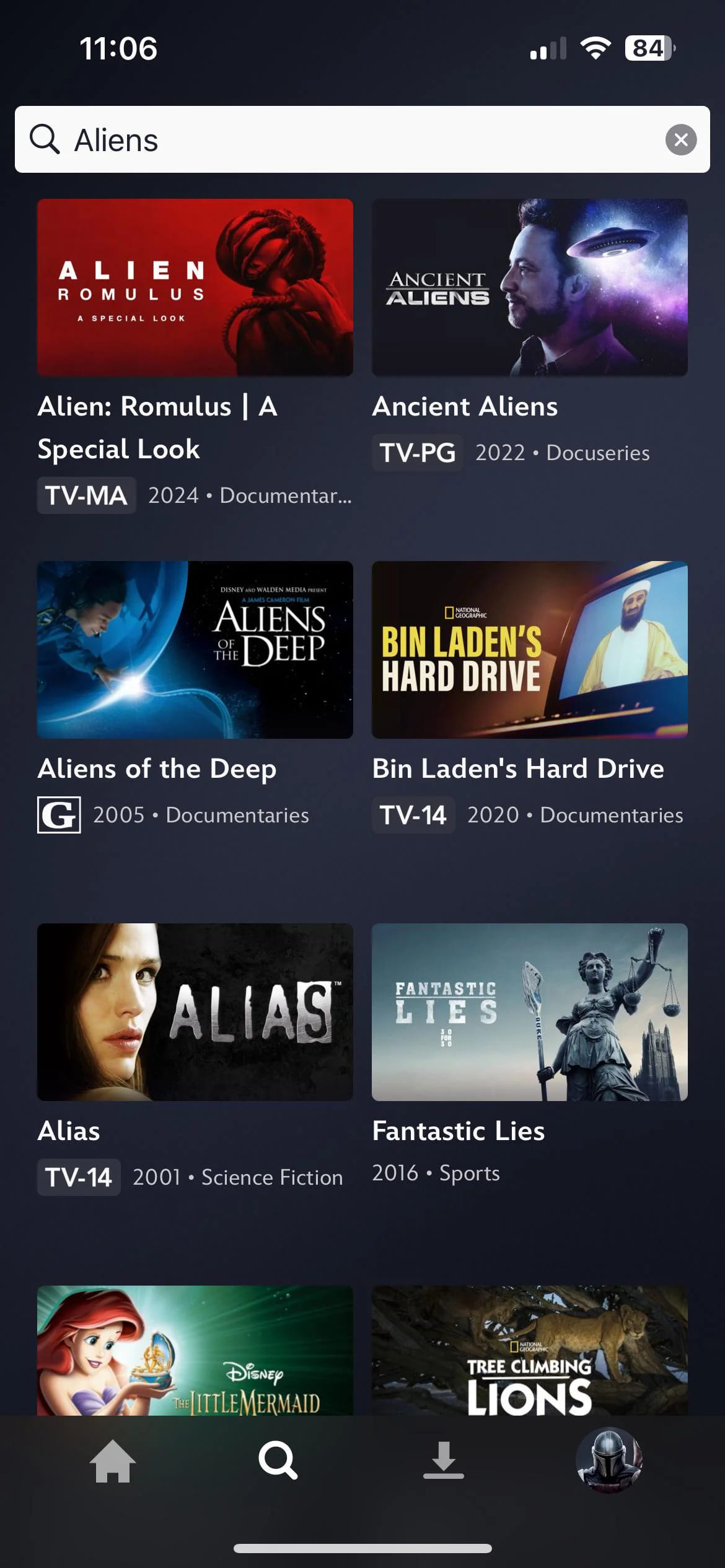
Step 4. Open the movie details page. Tap the “Download” button if it is available.
Step 5. Select your preferred video quality. Wait for the download to finish, and then access it from the “Downloads” section of the app.
If you want an Alien: Romulus full movie download as a local file for greater playback flexibility, a desktop solution may be more suitable. Scroll down to Way 2.
Way 2. Download Alien: Romulus to HD MP4 Using iMovieTool
To bypass streaming app limits and get the ultimate offline viewing experience, iMovieTool All-in-One Video Downloader is your go-to option! This professional desktop application for Windows and Mac works with multiple popular streaming platforms like Disney+, Apple TV+, Hulu, Amazon Prime, Netflix, YouTube, Max, and more. It lets you choose output formats, video quality, subtitles, and audio tracks before downloading. Using it, both ad-free or ad-supported users can download Alien: Romulus full movie to HD MP4 or MKV file for permanent offline viewing. No expiration, no playback restrictions, no ads interruption!
Key Features of iMovieTool All-in-One Video Downloader:
- Multiple Platforms: Access supported content from various popular streaming services.
- HD Video Download: Save supported movies in high-definition video quality.
- Popular Formats: Download videos as MP4 or MKV files for flexible offline playback.
- Batch Download: Add multiple movies or entire TV episodes and download them together.
- Subtitles & Audio: Keep preferred subtitles and available audio tracks.
- Built-In Browser: Search and play supported streaming content directly.
- Fast Downloading: Accelerated 50X speed with optimized processing technology.
- Flexible Output: Customize video format, quality, codec, subtitles, and audio settings.
Step-by-step: Download Alien: Romulus in HD MP4 with iMovieTool
Step 1. Run iMovieTool and Choose Disney+
First, download and install iMovieTool All-in-One Video Downloader on your Windows PC or Mac. After opening the program, choose a service from the available streaming services.
Alien: Romulus is available in Disney+, so here we select Disney+ to go on. A built-in browser will appear, allowing you to access Disney+ and log in with your basic or premium account credentials.
Step 2. Customize Output Settings
Before searching for the movie, go to Menu and select Preferences to configure output format (MP4, MKV), video quality, preferred audio language, and subtitle settings. For flexible playback, MP4 is a practical choice. If you want an Alien: Romulus download in HD, select the highest supported video quality available for the title.
Step 3. Search for Alien: Romulus
iMovieTool provides several ways to find the movie, so you can choose whichever is most convenient.
Using Name:
Tap “Search” tab, enter Alien: Romulus in the built-in search field and let iMovieTool locate the corresponding movie.
Using URL:
Copy the URL of the Alien: Romulus movie page and paste it into iMovieTool to load the title directly.
Browse Online:
You can also go to “Browse” tab, browse Disney+ content through the built-in browser and navigate to the Alien: Romulus movie page manually. Once located, open its page and click “+” icon to add it to the download queue.
Tips: Once the movie is detected, click the settings icon to customize its quality, audio tracks, subtitles, and output preferences.
Step 4. Begin Download Alien: Romulus to MP4
After selecting the desired settings, click the “Download” button to start saving Alien: Romulus to your computer. iMovieTool will process the movie according to your selected output format and quality.
Step 5. Get Downloaded Alien: Romulus Movie
When the download finishes, navigate to the “History” tab and click the folder icon to open your output directory. From here, you can transfer the Alien: Romulus movie to a USB drive, add it to a media server, or play it with VLC or any other compatible player!
Way 3. Download Alien: Romulus from Free Websites
For users who don’t want to install extra software, several online websites offer free Alien: Romulus download options. For example, the Internet Archive offers downloadable content and torrent options for certain legally shared files. The main drawbacks are inconsistent availability and quality, for a reliable method, please turn to a professional desktop software such as iMovieTool.
Step 1. Visit the Internet Archive website in your browser and search for Alien: Romulus.
Step 2. Open a relevant item and check whether the movie is legally available for download.
Step 3. Look for the “TORRENT” option in the right side, click it to download the small .torrent file to your computer.
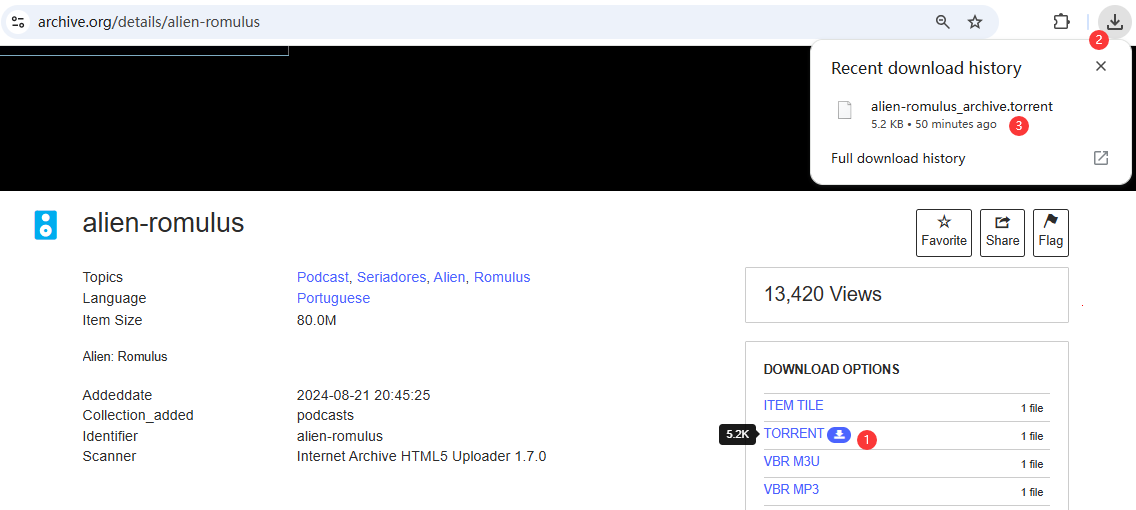
Step 4. After downloading the .torrent file, open it with a compatible BitTorrent client, such as qBittorrent. The torrent client will read the file and display the available movie files.
Step 5. Choose the files you want to download, select a save location, and start the torrent download.
Step 6. Once the download finishes, open the destination folder and locate the downloaded video. You can then play Alien: Romulus offline using a compatible media player.
FAQs of Downloading Alien: Romulus
Is it legal to download Alien: Romulus?
It depends on where you get the movie and how you use the downloaded file. Generally, downloading Alien: Romulus from official streaming platforms (Disney+ or Hulu) through their mobile apps is legal. Using a third-party tool or free website operates in a legal gray area. Make sure your downloaded movies are for personal entertainment only.
Can I download Alien: Romulus on my PC for free?
It depends on the service and method. Officially, the streaming platforms like Disney+ and Hulu do not support downloads on Windows or Mac computers. Free websites may offer downloadable copies, but you should verify that the movie is legally provided before downloading. Additionally, third-party tool iMovieTool All-in-One Video Downloader offers a free trial, but full downloads require a paid license. For a safe, high-quality Alien: Romulus full movie download, a paid software is the most reliable option.
Conclusion
This article covers three easy ways to download Alien: Romulus to watch offline, including using streaming video services like Disney Plus and third-party desktop software like iMovieTool All-in-One Video Downloader, and even free websites. For those who want a fast and high-quality downloads, iMovieTool All-in-One Video Downloader is the clear choice. It supports multiple streaming platforms, customizable output settings, HD video quality, MP4 output, subtitles, audio tracks, and batch downloading for supported content. Hit the Download button, use it to download all Alien movies and TV shows offline!
The Latest Articles
– Top 8 Solutions to Download Streaming Video
– Top 10 Free Movie Download Sites Recommended
– 3 Ways to Download Movies to Watch Offline
– 2 Verified Methods to Download X/Twitter Videos to MP4
– Download Twitter(X) Videos on PC, Mac and Mobile Phone
– Download Facebook Videos on PC, Mac and Mobile Phone
– 3 Ways to Download Facebook Video to MP4

iMovieTool Movie Downloader
Download movies to MP4/MKV in 1080P, download movies from Netflix, Amazon Prime Video, Disney+, HBO Max, Hulu, Apple TV+, YouTube, and Paramount+. Download videos from Twitter, Instagram, Facebook, and TikTok for free.