








 United States (English)
 Japan (日本語)
 Russia (русский)
 Germany (Deutsch)
 France (Français)
 Spain (Español)
 Italy (Italia)
 Portugal (Portugues)
 China (繁体中文)
 Turkish (Türk dili)
 Dutch (Nederlands)
 Korean(한국인)
 Saudi Arabia(عربي)
 Download Netflix Movies and TV shows to watch offline.
Do you want to download Netflix movies on Mac to watch offline? Learn 6 methods on how to download movies on Netflix on iMac or MacBook, including using iMovieTool Netflix Video Downloader, a screen recorder, Netflix iOS app, or iPhone Mirroring.
Question: “Can I download Netflix movies on laptop Mac? I can’t install the Netflix app on my Mac. I frequently travel long distances for work. It would be great to be able to download and watch Netflix movies offline on the plane. Any suggestions?”
Netflix is the most popular streaming OTT platform with exclusive movies, TV shows, anime, documentaries and original content. It enables users to stream a large number video titles from all over the world. But when you want to revisit thrilling movies like “Fast & Furious” or watch Netflix Originals like “Squid Game” on your iMac or MacBook, you might feel overwhelmed – because there is no a dedicated Netflix App for Mac. Mac users can only stream Netflix content through its official website in a browser.
Therefore, many Mac users have a demand for downloading Netflix movies on Mac to watch offline. You’re in the right place! In this article, In this guide, we’ll introduce six effective methods to download movies from Netflix on Mac for permanent offline playback. After reading, you can watch Netflix offline on a Mac using other players like iTunes, VLC, QuickTime, etc.
You May Like:
Quick Comparison Table: 6 Methods to Download Netflix Movies on Mac
| Method | Video Format | Video Quality | Efficiency | Offline Playback | Difficulty | Recommended |
|---|---|---|---|---|---|---|
| iMovieTool Netflix Video Downloader | MP4, MKV | Up to 1080p, or even 4K | 50X faster & batch downloads | Permanent | Very Easy | ⭐⭐⭐⭐⭐ |
| UkeySoft Screen Recorder | MP4, MOV, MKV, AVI, etc. | Up to HD | Real-Time Recording | Permanent | Easy | ⭐⭐⭐⭐ |
| iMazing + Netflix iOS App | DRM-Protected Netflix Files | Netflix Original Quality | Normal | Temporary | Hard | ⭐⭐⭐ |
| PlayCover + Netflix iOS App | DRM-Protected Netflix Files | Netflix Original Quality | Normal | Temporary | Hard | ⭐⭐⭐ |
| iPhone Mirroring | DRM-Protected Netflix Files | Netflix Streaming Quality | Real-Time Playback | No Local File | Easy | ⭐⭐ |
| Online Downloader | MP4, MKV | Netflix Original Quality | Normal | Permanent | Easy | ⭐⭐ |
Method 1. Download Netflix Movies on Mac as HD MP4 Files (Best)
Can you download Netflix on Mac? In fact, the Netflix App’s “Offline Download” feature only available for iPhone, iPad, Android phones and tablets, and Chromebook. Fortunately, some third-party Netflix video downloaders can do you a great favor.
iMovieTool All-in-One Video Downloader emerges as a revolutionary and trustworthy streaming video downloader for Mac and Windows users, specifically developed to facilitate the effortless capture of HD videos from popular OTT platforms like Netflix, Hulu, Disney+, Amazon Prime, HBO Max, Apple TV+, YouTube, Twitter and Facebook. For Netflix users, you can try the iMoiveTool Netflix Video Downloader for free. It provides Netflix unlimited download services on iMac and Macbook.
Download High-Quality Netflix Videos on Mac: When it serves as a professional Netflix video downloader, it long provides convenience for users. With the built-in Netflix web browser, users can directly download unlimited movies and TV shows from Netflix to Mac without the Netflix App. It is capable of downloading Netflix movies on Mac in MP4 or MKV format with HD 720p or Full HD 1080p resolution kept. Additionally, the program will preserve Netflix videos with 5.1 surround sound and subtitles, ensuring the best offline viewing experience.
Grab Netflix Videos to Mac With High Efficiency: Adopting an advanced decryption technology, TunesBank iMovieTool assists you to download Netflix videos to your computer at up to 50X lighting speed. The batch mode allows you to add multiple movies or even full episode/season at a time!
Watch Netflix Offline on Mac Anytime, Ahywhere:
iMovieTool makes it easy to build an offline Netflix library on your MacBook. After the download is completed, you can watch Netflix movies on your Mac through other media players, such as iTunes, VLC Player, QuickTime! Plus, you could move Netflix downloads from Mac to other devices, save Netflix videos to USB drive, or even burn Netflix movies to DVD!

Key Features of iMovieTool Netflix Video Downloader:
* Security verified. 5, 481,347 people have downloaded it.
- Effortlessly download videos from streaming sites on Mac and PC.
- Download Netflix movies and TV shows on Mac in MP4 or MKV.
- Offer full HD 1080P Netflix videos for offline watching.
- Keep Netflix videos on Mac/PC permanently without expiration.
- Embed the Netflix web player with smart searching function.
- Provide multilingual subtitles and audio tracks for Netflix videos.
- Offline watch Netflix videos on iMac/MacBook without Netflix app.
Detailed Steps on How to Download Netflix Movies on Mac to MP4 in 1080P
In this section, we will show you the detailed steps on how to download and save Netflix movies on Mac computer as local video files with the iMovieTool Netflix Video Downloader.
Video Guide – How to Use iMovieTool to Download Netlfix Movies/Shows on Mac Computer:
Step 1. Download and Launch iMovieTool Netflix Video Downloader
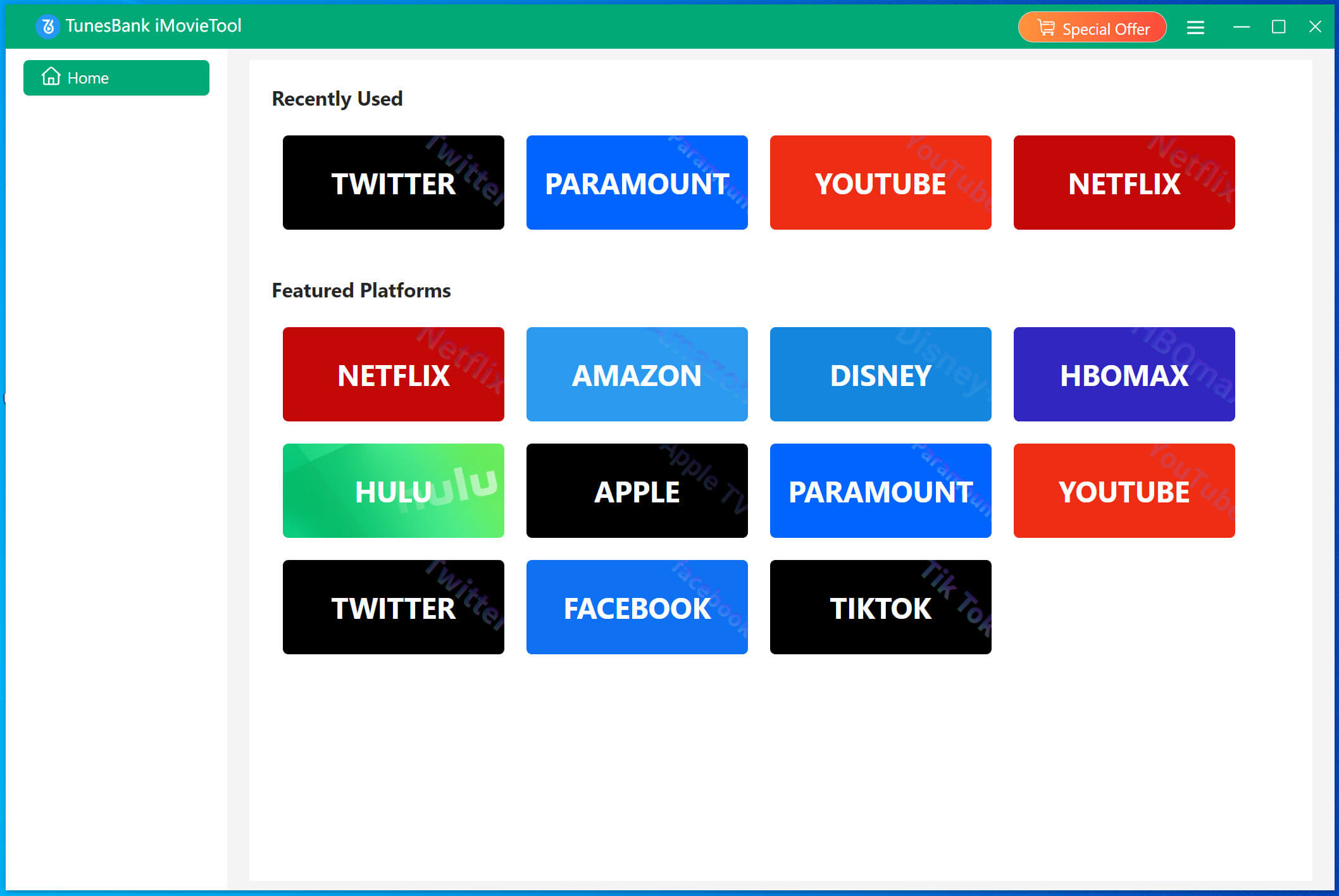
To begin with, download the iMovieTool for Mac OS X 10.11 or above. Once downloaded, install and launch the tool, you will see multiple services on its main page.
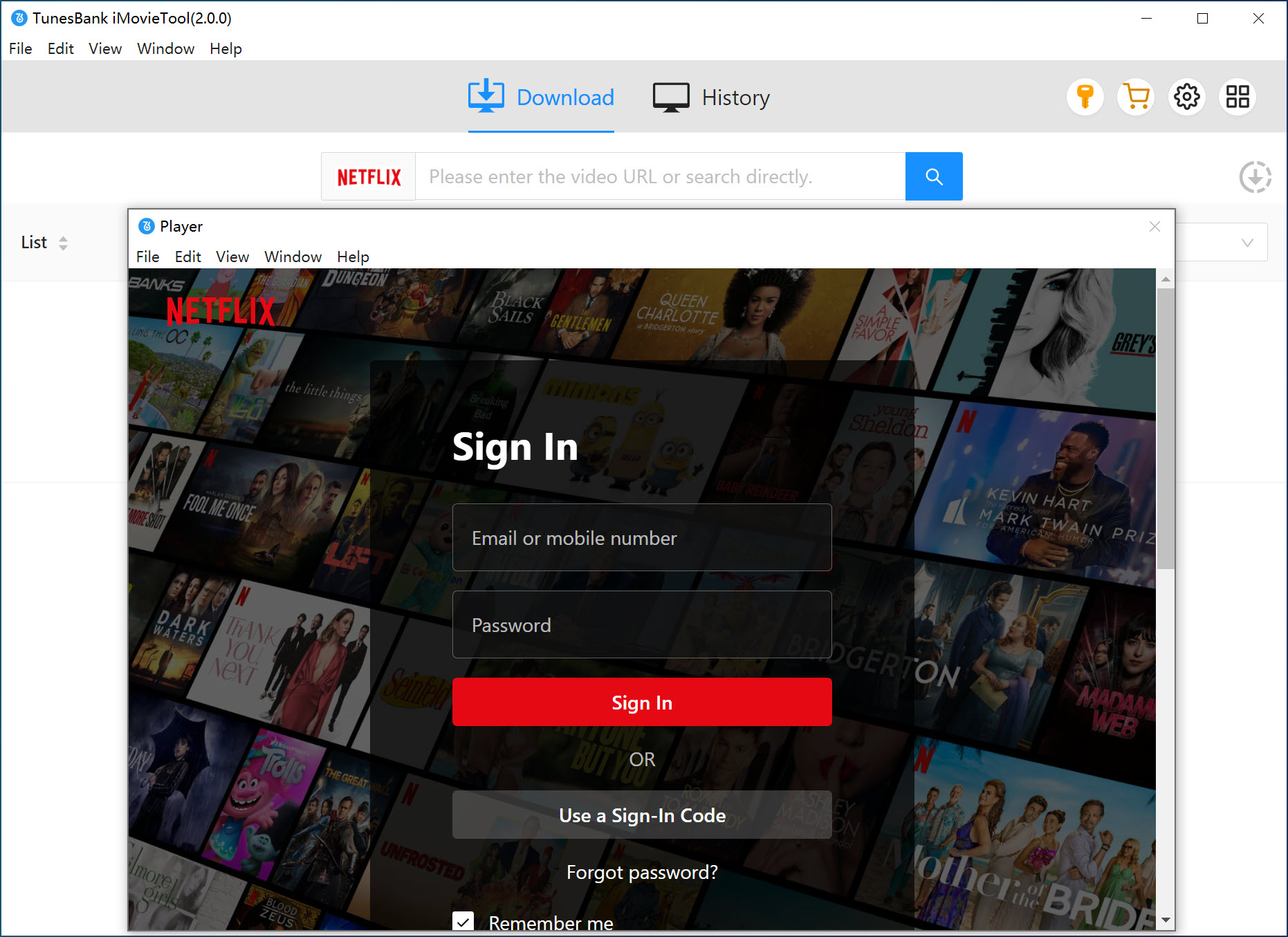
Select Netflix platform, and sign in with your Netflix account to gain access to the Netflix video library.
Step 2. Configure Output Settings
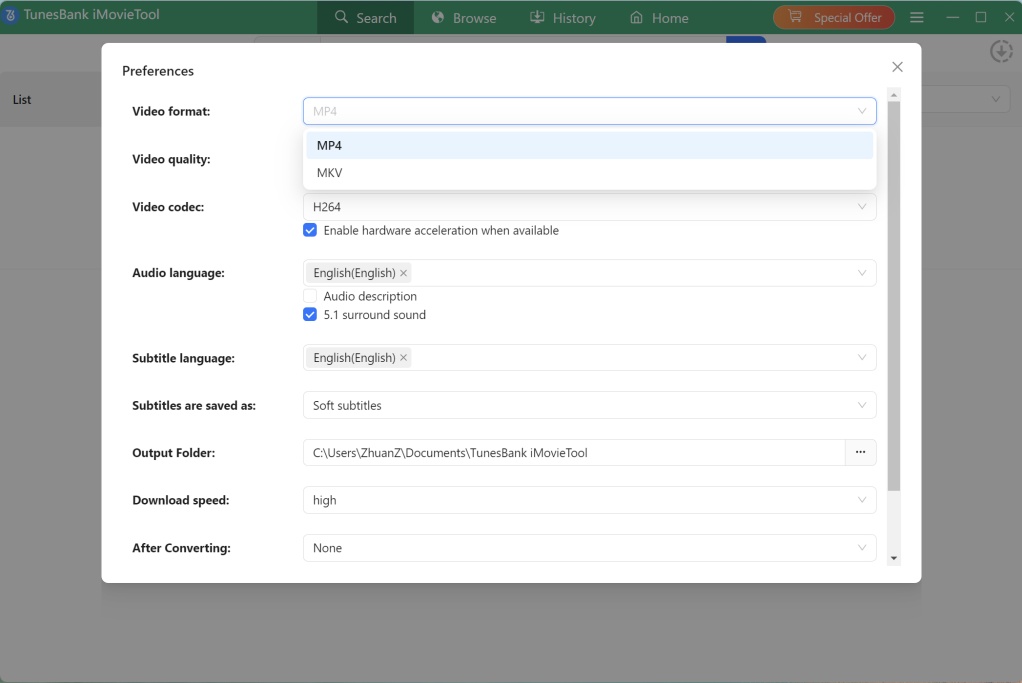
Before downloading Netflix movie to Mac, go to the settings window by clicking the “Menu” icon in the upper-right corner of the interface. Choose “Preference” option. From here you can choose you preferred video format, video quality, video codec, subtitle and audio options, etc.
Step 3. Search for Netflix Movies in 3 Ways
iMovieTool comes with a built-in Netflix web browser. You can add Netflix movies to the software in three ways:
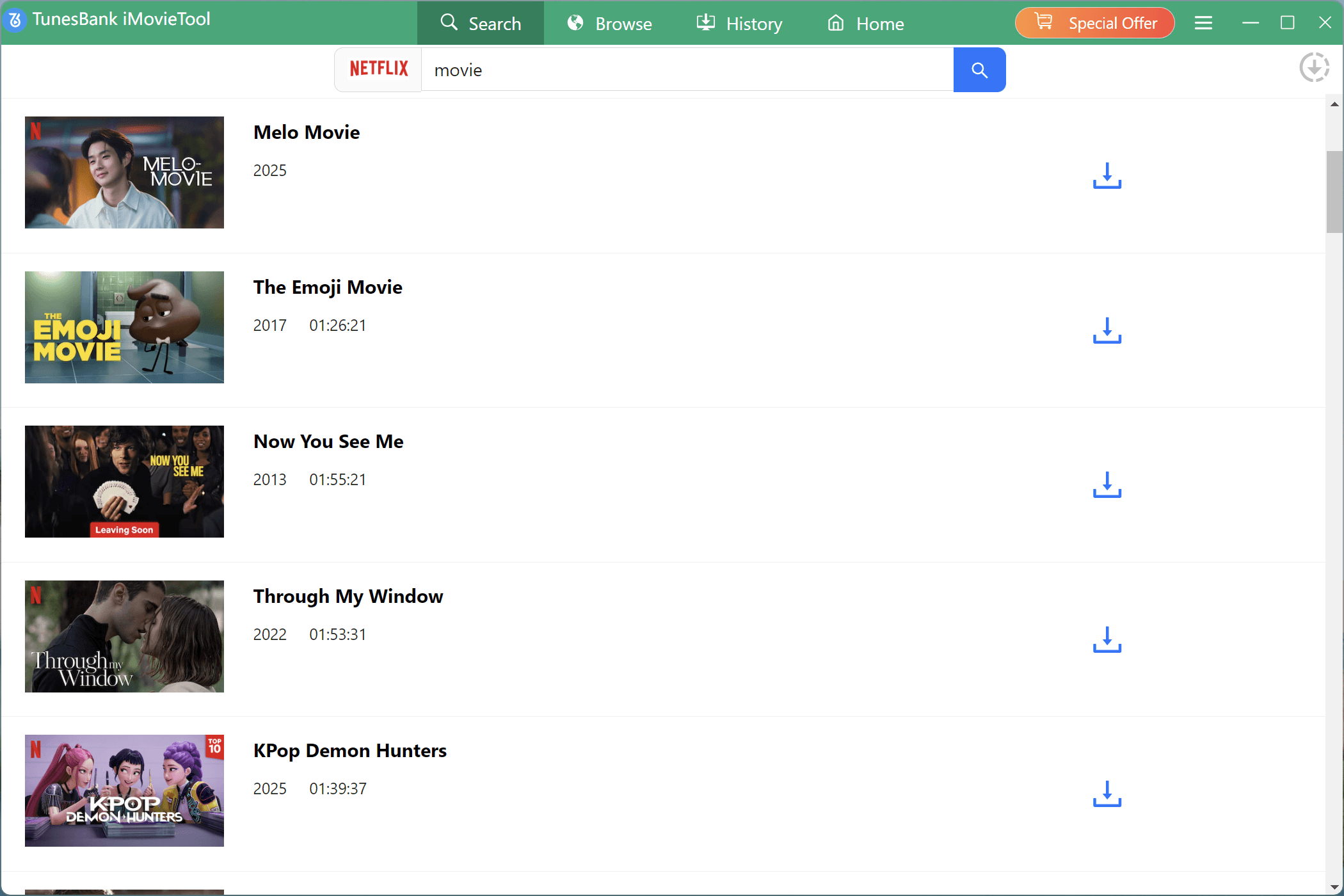
Way 1. Go to “Search” section. You can search for the Netflix movie with keywords or name in the search bar. The software will display matching results.
Way 2. Also, you may copy the movie URL from Netflix website or app, and paste it to the search bar.
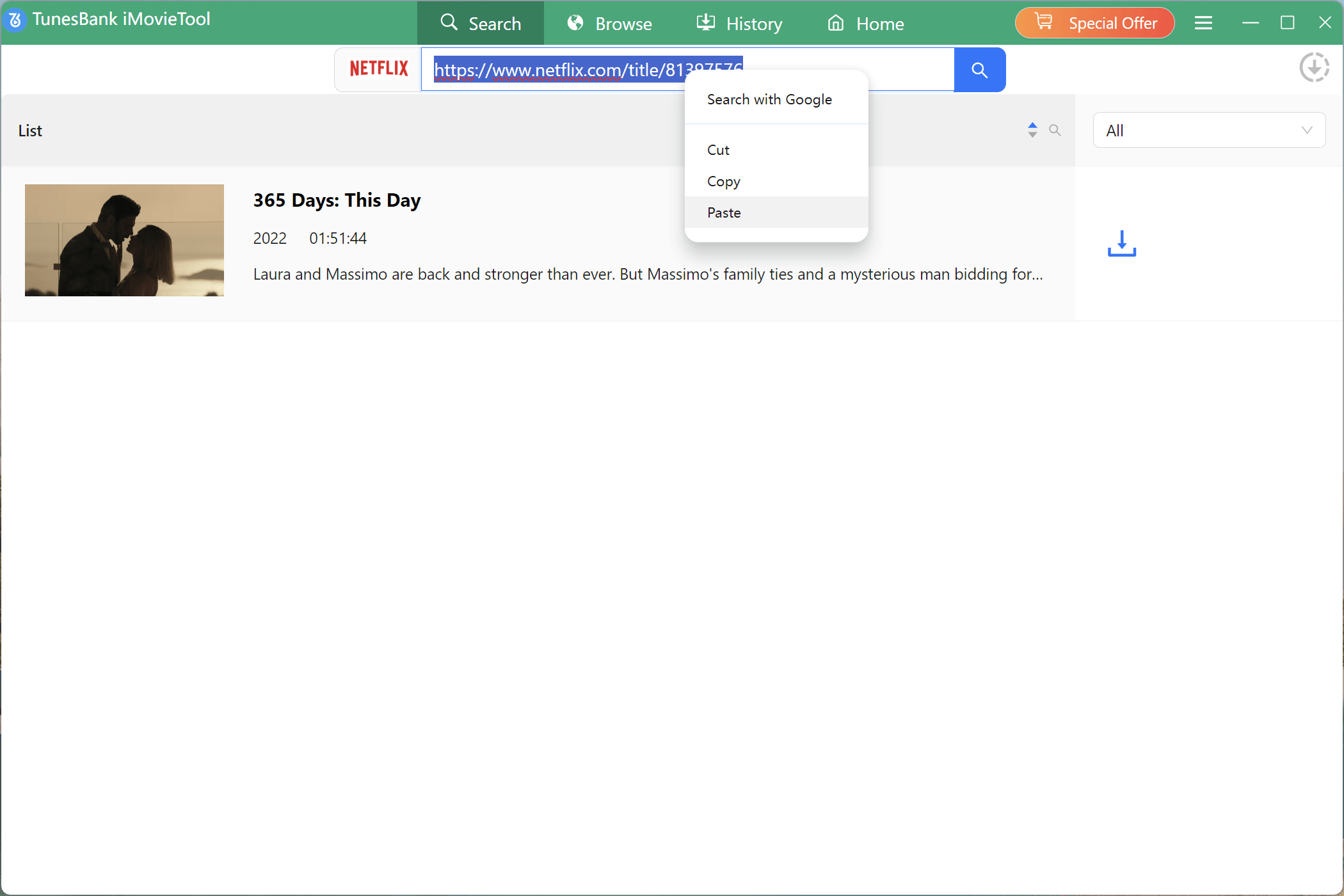
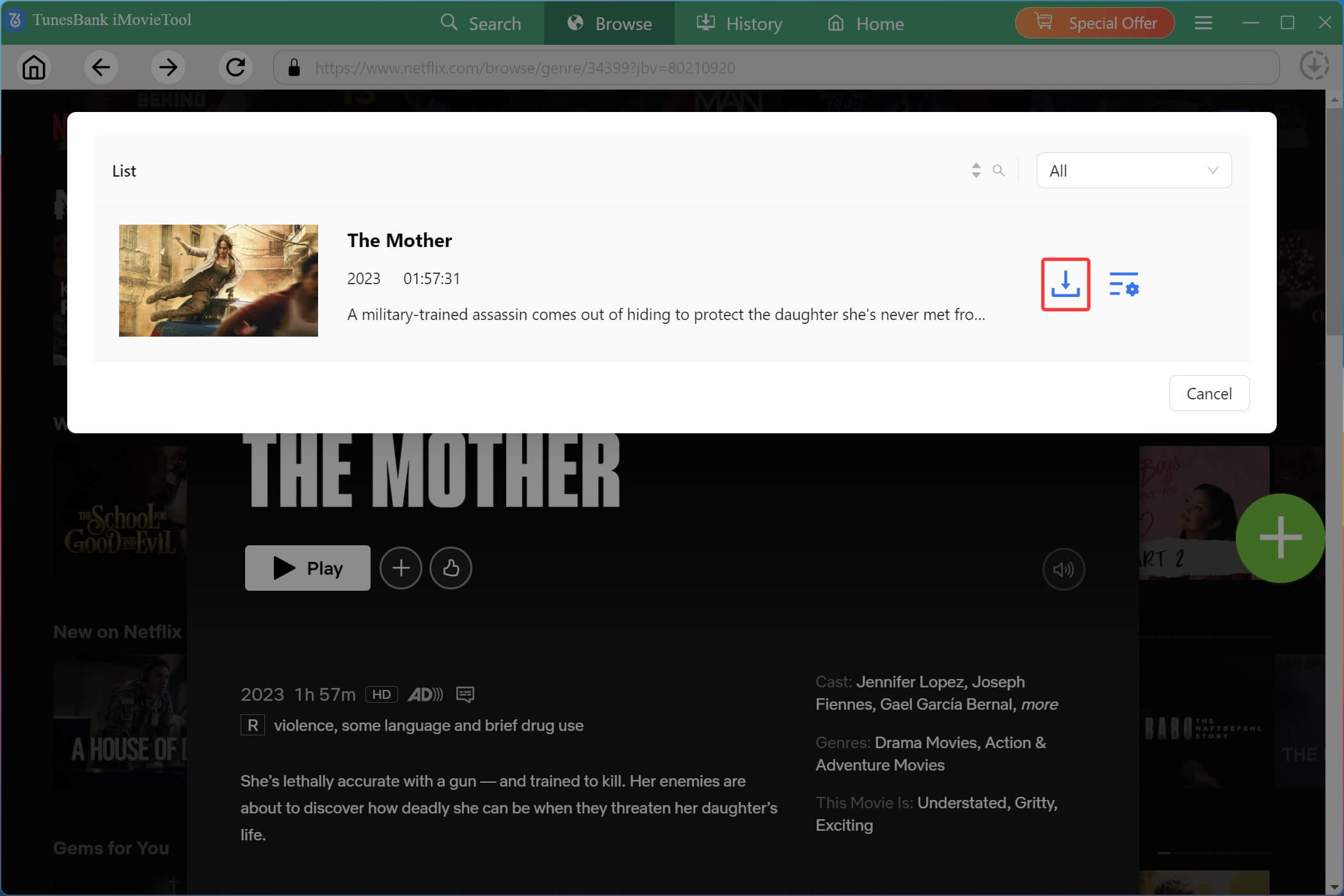
Way 3. Move to “Browse” section, scroll through Netflix’s trending videos, open your desired movie, and click “+” icon.
Step 4. Start Downloading Netflix Movie on Mac
After adding the movie to the download queue, a small window will pop up. Click the “Download” button next to the title.
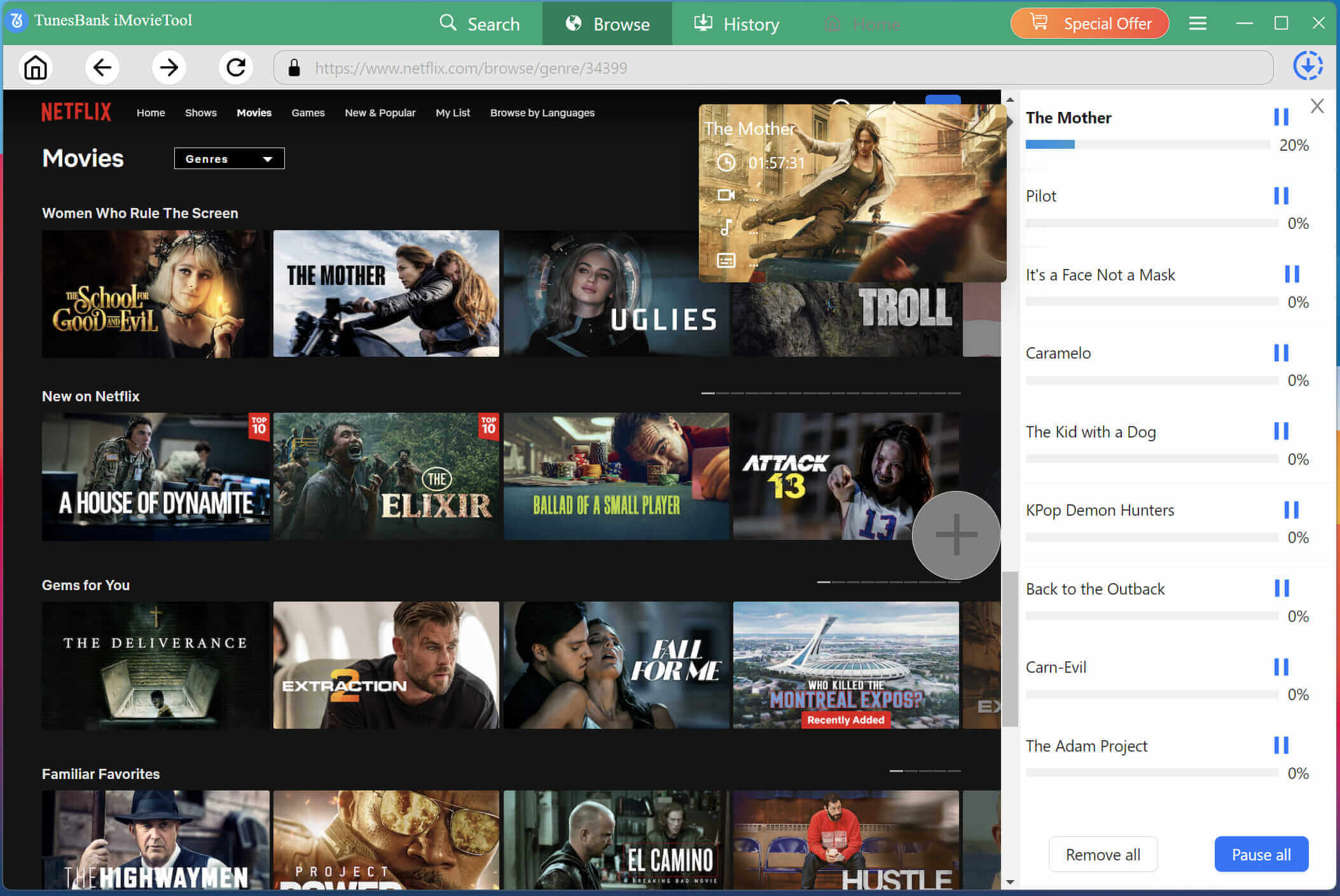
TunesBank will start downloading the movie from Netflix web browser to your Mac, and export it as MP4 file with HD resolution. Batch mode allows you to add more video titles to the program.
Step 5. Watch Downloaded Netflix Movies on Mac Offline
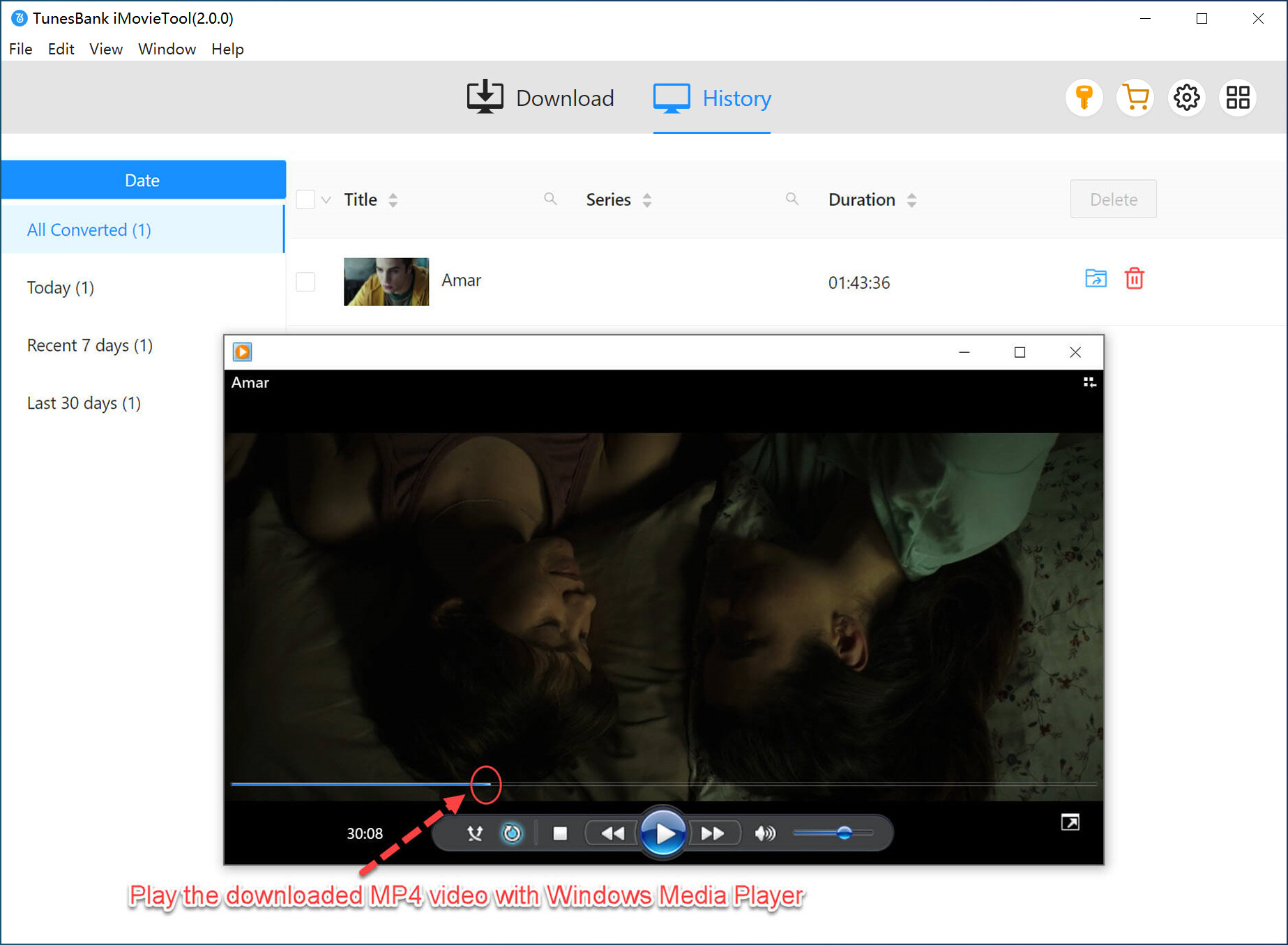
After the download is complete, you can find your downloaded Netflix movies by clicking on the “History”. Click the “Blue Folder” icon, and you can navigate to the output folder. You can now watch these downloaded Netflix movies on your Mac using other players like iTunes, QuickTime or VLC!
Method 2. Record Netflix Movies on Mac (No Black Screen)
For those who want to download specific scenes or clips from Netflix movies, you can consider using a flexible video recorder. UkeySoft Screen Recorder is a versatile screen capture solution that allows Mac and Windows users to record Netflix movies without black screen issues. The software records both video and system audio simultaneously while offering customizable recording settings. It can record Netflix movies on Mac in up to 1080p quality and outputs MP4, MOV, FLV, AVI files for permanently offline playback. In addition to Netflix, this recorder also supports other streaming platforms, including Amazon Prime, Hulu, Max, Apple TV+, YouTube, and more.
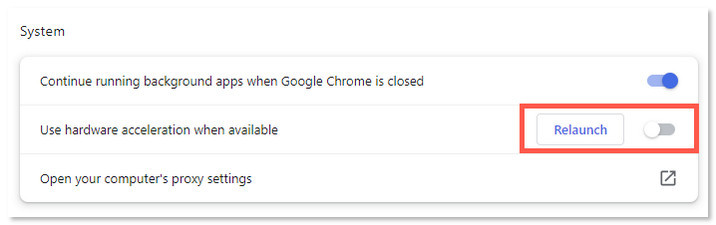
– Open Chrome, click “Settings”, go to “System”.
– Disable “Use hardware acceleration when available”. Relaunch Chrome.
Now, let’s see how to record and save movies on Netflix on Mac by using UkeySoft Screen Recorder:
Step 1. Launch UkeySoft Screen Recorder
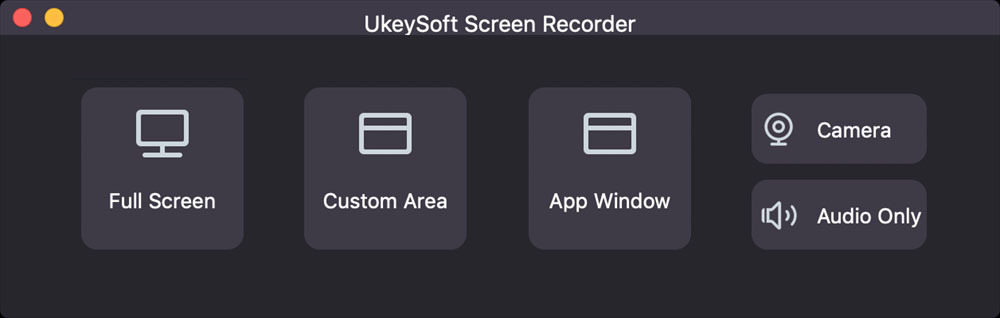
Download and install UkeySoft Screen Recorder on your iMac or MacBook. Launch the software, and select “Full Screen” or “Custom Area”.
Step 2. Enable System Audio
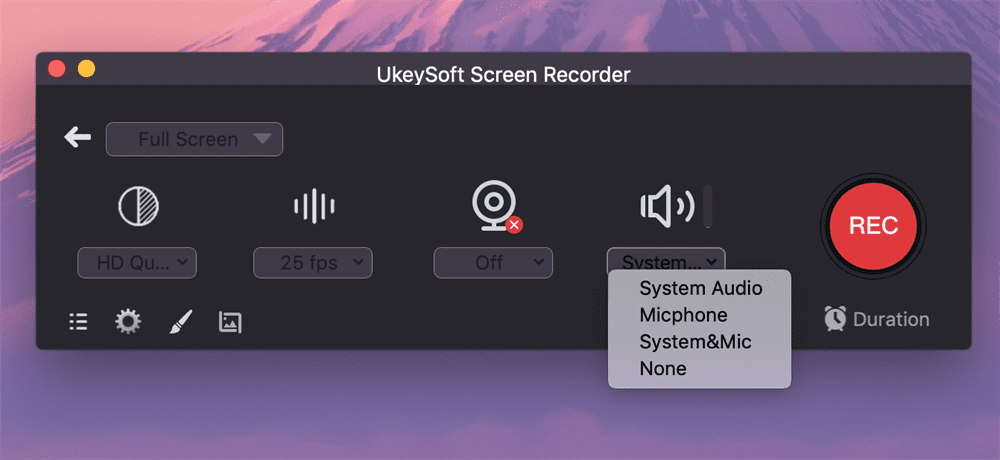
Turn on “System Audio” to record Netflix movie with original audio.
Step 3. Configure Recording Settings
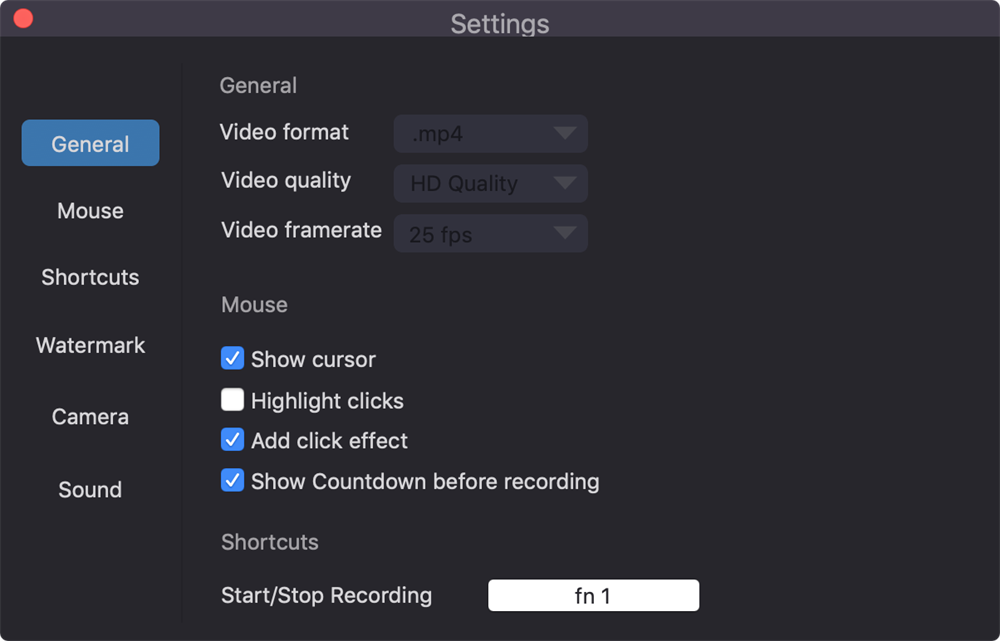
Click “Gear” icon to open the settings window. Tap “General” tab, select MP4 video format and “HD Quality” option.
Step 4. Play a Netflix Movie in Browser
Open Chrome, go to Netflix, and play the movie you want to download movies from Netflix on Mac. Make it full screen.
Step 5. Start Recording Netflix Movie on Max
Click the red “REC” button in UkeySoft. The recording will start after a 3‑second countdown. When the movie ends, click the “Stop” button to export the MP4 file to your Mac.

Method 3. Download Netflix on M Series Mac with iOS Simulator
When it comes to how to download movies from Netflix on Mac, installing an iOS device simulator is also a workable method. If you own a Mac with Apple Silicon (M1, M2, or M3), you can run iPhone and iPad apps directly on macOS. iMazing is a device management tool that allows you to download and sideload iOS apps onto compatible Macs. Thus, you can use iMazing to install the Netflix iOS app on your Mac and access Netflix’s built-in download feature.
However, this method has several limitations. iMazing requires a paid subscription or license for full functionality, setup is more complicated than using a dedicated Netflix downloader, and downloaded Netflix titles on your Mac remain DRM-protected with expiration dates and playback restrictions. To get a more flexible and convenient experience, iMovieTool Netflix Video Downloader is a better choice.
Step 1. Download and install iMazing on your Mac from the official website. Launch the software and complete the initial setup process.
Step 2. In iMazing, navigate to the App Library section and sign in with your Apple ID associated with previous iPhone or iPad app downloads.
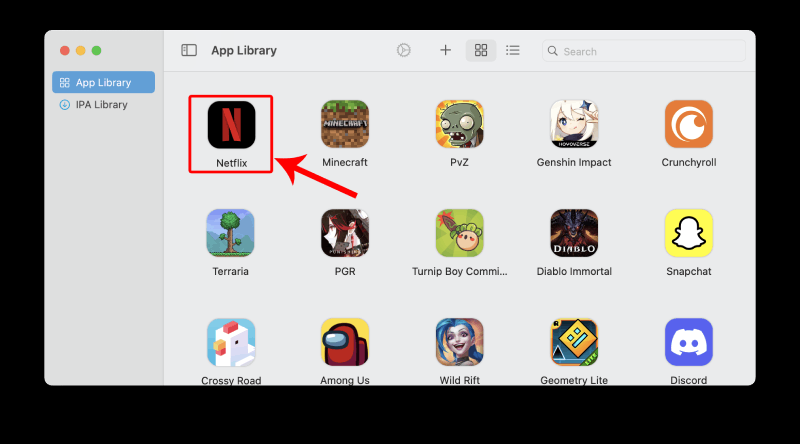
Step 3. Search for Netflix app in the library, and click on it. Select “Export .IPA”.
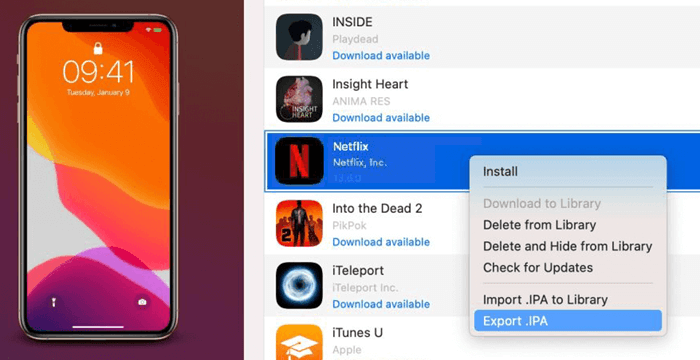
Step 4. Then run the IPA file to install the Netflix iOS app on your Mac.
Step 5. After installation, launch the Netflix iOS app from your Applications folder or Launchpad.
Step 6. Log in with your Netflix account. Find a movie or TV show that supports downloads and tap the “Download” button to save it for offline viewing.
Method 4. Download Netflix on macOS 12 or Later with iOS App
This method is very similar to Method 3 but applies to all Macs running macOS 12 (Monterey) or later, including Intel Macs. Apple introduced support for selected iPhone and iPad apps on newer versions of macOS, especially on Apple Silicon devices.
For Intel Mac users, you would need a third-party emulator like PlayCover to install the Netflix iOS app. PlayCover is an open‑source tool that allows you to run iOS apps on Intel Macs by simulating the ARM architecture. After installing the Netflix iOS app through PlayCover, you may be able to download and watch Netflix movies on your Mac using the app’s built-in offline viewing feature, just like you would on an iPad.
However, it requires disabling SIP (System Integrity Protection) and may violate Netflix’s terms. For most users, we recommend sticking with Method 1 (iMovieTool Netflix Video Downloader) for a safer and more reliable experience.
Step 1. Go to the official PlayCover website, download and install PlayCover on your Mac.
Step 2. Open the downloaded the .dmg file, and complete the initial setup process according to the on-screen instructions.
Step 3. Open PlayCover from your Applications folder. Then visit decrypt.day, search for Netflix, and download the corresponding Netflix IPA file.
Step 4. Simply drag and drop the IPA file into PlayCover to install the Netflix iOS app.
Step 5. Once installed, launch Netflix, sign in with your account, and start downloading movies or TV shows for offline viewing on your Mac.
Method 5. Download Netflix Movies on iPhone and Mirror Them to Mac
Apple has introduced the built-in iPhone Mirroring app with macOS Sequoia and iOS 18. If both your Mac and iPhone are running these versions, you can use this feature to seamlessly access and play Netflix videos from your iPhone directly on your Mac screen.
While this method does not actually download Netflix movies on Mac, it allows you to watch Netflix offline on a Mac using content stored on your iPhone, delivering a larger viewing experience without installing additional software.
-
● An iPhone or iPad with the Netflix app installed.
● Your Mac must be running macOS Sequoia or later.
● Your iPhone must be running iOS 18 or later.
● Both devices should use the same Apple ID.
● Bluetooth and Wi-Fi must be enabled on both devices.
● Netflix movies must be downloaded to your iPhone in advance.
If your devices and software do not meet the requirements, please try method one, using iMovieTool Netflix Video Downloader to download and save Netflix movies to a Mac.
Step 1. Open the Netflix app on your iPhone and download the movies or TV shows you want to watch offline.
Step 2. On your Mac, open the iPhone Mirroring app and follow the on-screen instructions to connect your iPhone.
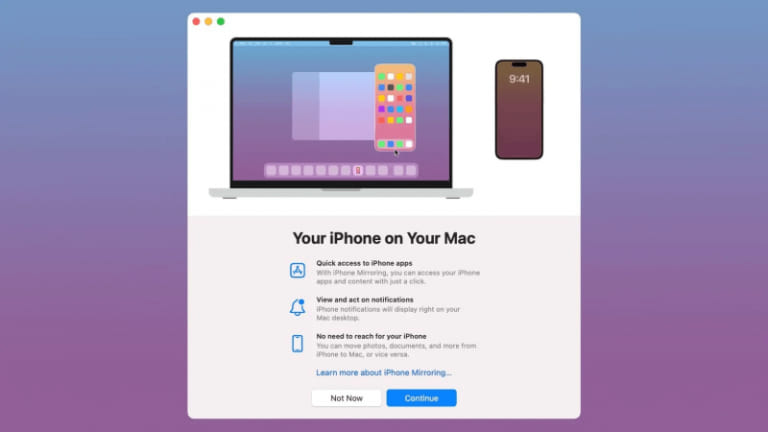
Step 3. Once connected, launch the Netflix app through the mirrored iPhone interface on your Mac.
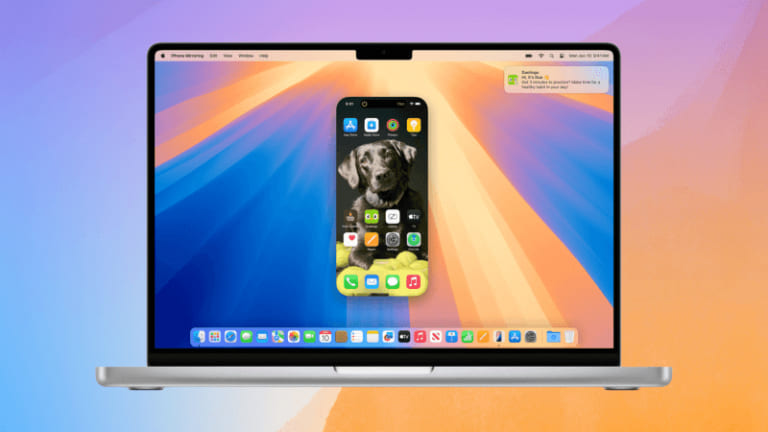
Step 4. On your iPhone, go to Netflix app and play the downloaded movie. It will play on your Mac screen in full size.
Method 6. Download Netflix Movies on Mac via Online Tool
As a a browser-based Netflix video downloader online, NetflixDownload allows you to download movies from Netflix on Mac without installation any software. It can convert and download Netflix movies, and TV shows directly in your browser. Moreover, it does not require a registration or payment. Unlike other online Netflix downloaders filled with heavy ads and pop-ups, NetflixDownload features a ad-free and neat interface.
This online tool follows a typical copy-and-paste workflow: Copy a Netflix movie link from the website, then navigate to the NetflixDownload website. Paste the link into the input field and hit “Download” button. Select the desired format and quality to start downloading.
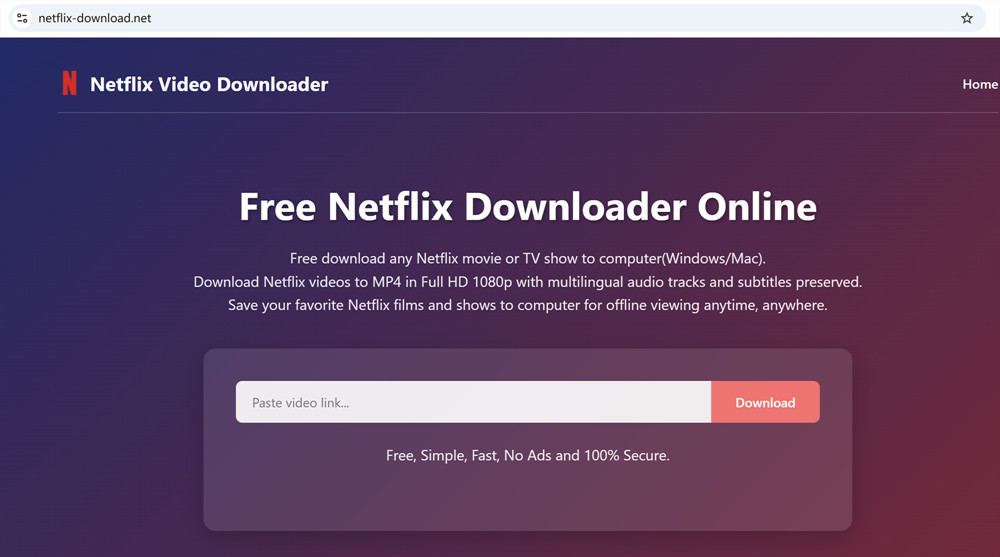
But sometimes it gets stuck in the parsing process. When it fails, you can turn to the professional desktop software – iMovieTool Netflix Video Downloader. It can maintain a consistent 1080p output and a nearly 100% success rate.
How to Watch Netflix Movies on Mac Online with Netflix Web App
Unlike iPhone or iPad, Mac users can’t download a native Netflix app from the App Store. Luckily, there’s a simple workaround: you can create a Netflix web app on Mac using Safari, allowing you to watch Netflix movies online on Mac just like using a real app. Learn how to set up and use the Netflix web app on Mac step by step.
Step 1. Launch Safari on your Mac (this feature works best on macOS Sonoma or later).
Step 2. Visit the official Netflix website. Sign in to your account to access your Netflix library.
Step 3. Click “File” in the top menu bar, then select “Add to Dock”.
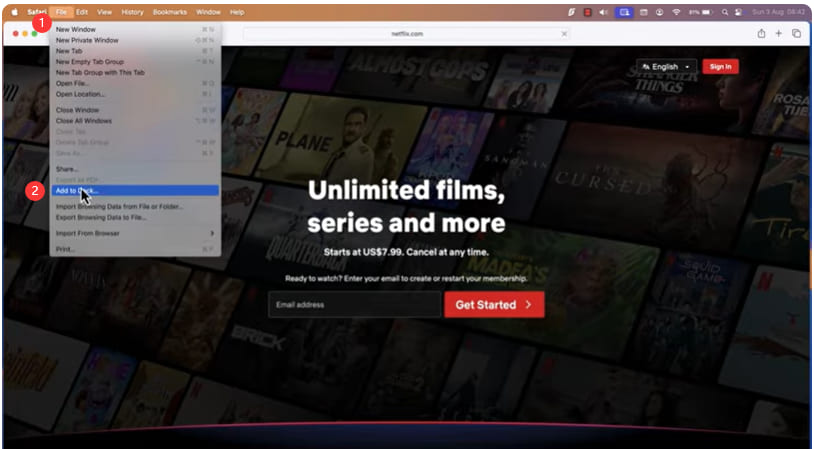
Step 4. Rename it to “Netflix” if needed, then click “Add”.
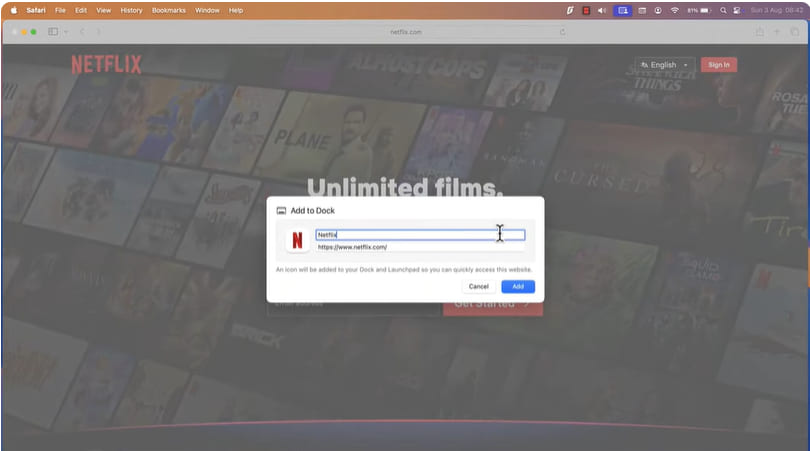
Step 5. Once you’ve created the Netflix web app, watching movies is easy on your Mac!
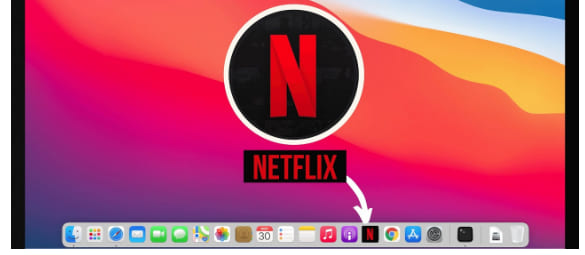
FAQs About Downloading Netflix Movies on Mac
Is There a Way to Get a Netflix App on a MacBook?
Netflix does not provide a dedicated macOS app. Most Mac users access Netflix through web browsers such as Safari, Chrome, or Firefox. Alternatively, you can download the Netflix web app as a Progressive Web App (PWA) using Chrome or Edge. Refer to above content.
Why Does Netflix Not Have an App on Mac?
Netflix primarily focuses on browser-based streaming for macOS users. Instead of developing a separate macOS application, Netflix provides full streaming functionality through its website. To watch Netflix on your Mac, you can visit its official website in your browser.
Can I AirPlay Netflix Movies From iPhone to Mac?
No. Netflix uses DRM (Digital Rights Management) technology to protect and encrypt its streaming video content. You cannot directly AirPlay Netflix movies from an iPhone to Mac or other devices. But you can use the new iPhone Mirroring app in macOS Sequoia and iOS 18. It lets you screen mirroring Netflix downloads from iPhone/iPad to Mac.
Conclusion
In short, there’s no official methods to download Netflix movies on Mac. But there are several ways for you to do that. You can utilize a third-party Netflix downloader, screen recorder, online service, Netflix iOS apps, simulators, and iPhone Mirroring. Among them, iMovieTool Netflix Video Downloader is a great tool for Netflix users to save high-quality movies on Mac without the Netflix App. It can help you download movies, TV shows from Netflix and other popular OTT sites to Mac at 50X faster speed. The downloaded Netflix videos will be stored in MP4 or MKV format in your local folder. Thus, you can keep Netflix downloads forever on your Mac and play them offline using any video player!
The Latest Articles
– Top 8 Solutions to Download Streaming Video
– Top 10 Free Movie Download Sites Recommended
– 3 Ways to Download Movies to Watch Offline
– 2 Verified Methods to Download X/Twitter Videos to MP4
– Download Twitter(X) Videos on PC, Mac and Mobile Phone
– Download Facebook Videos on PC, Mac and Mobile Phone
– 3 Ways to Download Facebook Video to MP4

Netflix Video Downloader
Download 1080p Netflix movies to MP4 on Macbook. Batch downoad Netflix videos. Easily to download your favorite movies and TV shows to watch offline.







