








 United States (English)
 Japan (日本語)
 Russia (русский)
 Germany (Deutsch)
 France (Français)
 Spain (Español)
 Italy (Italia)
 Portugal (Portugues)
 China (繁体中文)
 Turkish (Türk dili)
 Dutch (Nederlands)
 Korean(한국인)
 Saudi Arabia(عربي)
 Download Netflix Movies and TV shows to watch offline.
If you are a fan of ‘Squid Game’, you’re in the right place to get the Squid Game TV series download solutions. This guide will make a brief introduce of Squid Game season 1-3, and walk you through 2 easy methods to download all seasons of Squid Game to watch offline.
Although the most iconic Netflix original ‘Squid Game‘ (season 3) ended several months, it continues to captivate audiences worldwide. As a masterful suspense drama skillfully, Squid Game series skillfully blend intense psychological competition, high-stakes survival games, and profound social commentary. Whether you are a new viewer or an enthusiastic fan, you can’t miss this excellent thrilling suspense drama.
While watching Squid Game series on Netflix is convenient, but you need a smooth and stable network. For many fans, the ability to download Squid Game for offline viewing is essential. This article covers easy methods to download Squid Game all seasons, you can even download Squid Game series to MP4 to watch anywhere, anytime, even without Netflix.
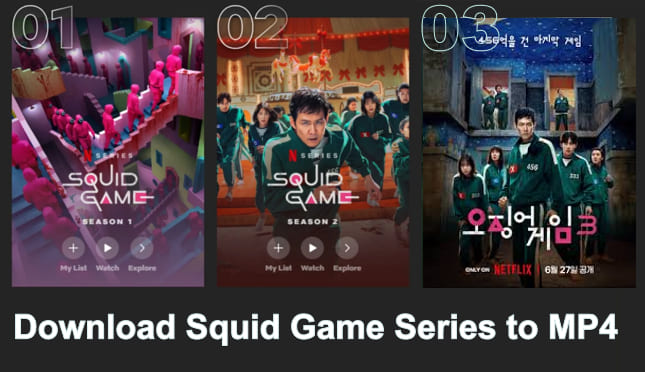
Part 1. Brief Introduction to Squid Game Seasons 1–3
‘Squid Game’ is a South Korean survival drama created by Hwang Dong-hyuk. It became a global hit immediately upon its release on Netflix, known for its intense social commentary, gripping games, and emotional character arcs. There are 3 seasons in total. Creator Hwang Dong-hyuk confirmed that the third season of ‘Squid Game’ is the final season, and there are no plans for a new sequel. You can preview the introduce of each season here:
⭐ Squid Game Season 1 (September 17, 2021, Nine episodes)
Season 1 introduces a group of debt-ridden players who compete in a deadly series of children’s games for a massive cash prize. Its groundbreaking plot and high-stakes emotional tension took the world by storm.

⭐ Squid Game Season 2 (December 26, 2024, Seven episodes)
Season 2 expanded the universe, introduced new characters, and raised the stakes. It continued the story of Gi-hun, exploring the larger forces behind the secretive organization running the games.

⭐ Squid Game Season 3 (June 27, 2025, Six episodes)
The final season draws a gripping and emotional conclusion to the entire series. It continues the thrilling saga with new deadly games, deeper conspiracies, and stronger connections to the inner workings of the Squid Game hierarchy.

Click here, watch it on Netflix Right Now!
Part 2. How to Download Squid Game Season 3 in Netflix App?
Can you download Squid Game episodes on Netflix? Of course. ‘Squid Game’ is a Netflix exclusive original series. With a Netflix subscription plan, you can watch and download Squid Game in Netflix app. As long as Squid Game remains licensed in your region, you can download Squid Game Season 1, 2, or 3 on your Android, iPhone/iPad, or Amazon Fire tablet for offline viewing. Here we will take its third season as an example to show you the detailed guide:
Step 1. Install and open the Netflix app on your mobile device. Log in to your Netflix account.
Step 2. Directly search for Squid Game, select Season 3 and open the info page.
Step 3. Tap on the “Download” icon and select the episodes to save offline.
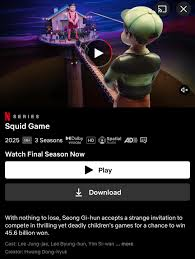
Step 4. Then, you can go to “Downloads” at the bottom of the screen, and watch the downloaded Squid Game episodes offline on your mobile.
Part 3. How to Download Squid Game Season 1/2/3 to MP4?
Netflix’s official download function is convenient, but the Netflix downloads have limitations such as expiration, playback restrictions, and device compatibility. Therefore, if you want to download and watch Squid Game episodes without restrictions, using a third-party tool is the best solution.
iMovieTool Netflix Video Downloader is oriented for Mac and Windows system, offering advanced decoding ability to go beyond Netflix app download limitations effortlessly. It empowers you to download Netflix original series Squid Game in MP4 or MKV format, so that you can enjoy unlimited viewing across devices. It supports download Netflix videos in 1080p while keeping original soundtracks, which is essential for visually intense shows like Squid Game.
What makes iMovieTool especially suitable for downloading Squid Game is its built-in Netflix Web Player. Users simply sign in once, browse and search the Squid Game seasons they want, choose an output format, and begin downloading instantly. The downloaded Netflix epsiodes and movies through iMovieTool have no expiration, and you can access and play them anytime, anywhere!
Another benefit is the full support for multilingual subtitles and audio tracks. For Squid Game fans who want both the original Korean audio and English subtitles, iMovieTool Netflix Video Downloader offers fully selectable subtitle formats, including soft subtitles, hard subtitles, and external subtitle files.
More Features of iMovieTool Netflix Video Downloader:
- Download and save Netflix movies, TV shows to Mac/PC without expiration.
- Search by keywords, URLs, or browse built-in Netflix online.
- Download Squid Game for offline viewing in MP4/MKV format.
- Save all Squid Game seasons (1, 2, 3) in HD 1080p, 720p.
- Supports multi-language audio and subtitles for downloads.
- 50X faster-downloading speed to grab videos from Netflix.
- Batch download all episodes from Squid Game season 1/2/3 at once.
iMovieTool also provides up to 50X fast speed with applied acceleration technology. Even full seasons can be downloaded within minutes instead of hours. This is perfect if you want to save all Squid Game episodes – Season 1, Season 2, and Season 3 – quickly in MP4 1080p without waiting forever. It is simple to operate. You can watch this video guide.
How to Download Netflix Squid Game Series in MP4 1080P?
Step 1. Log in to Netflix Account in iMovieTool
Download and launch TunesBank iMovieTool on your Windows or Mac computer.
Select Netflix platform and sign in to your Netflix account through the built-in Web Player. Don’t worry, this login is secure, you will then enter the official library.
Step 2. Adjust Output Settings
Go to Menu > Preference at the upper right corner. In the pop-up Settings window, choose MP4 as the output format. select high 1080p quality, subtitle type, audio language, and output folder. These settings will apply to all Squid Game episodes you download.
Step 3. Search for Squid Game in 3 Ways
iMovieTool allows you to find Squid Game episodes using multiple convenient methods for quick access and accurate search results.
Method 1: Search by Name
Tap “Search” tab, type ‘Squid Game’ into the search bar, and iMovieTool will automatically display all related seasons, episodes, and details for instant downloading.
Method 2: Search by URL
Copy the Squid Game series link from Netflix and paste it into iMovieTool’s URL field to instantly load all available seasons.
Method 3: Browse Online
Tap “Browse” tab, navigate to “Shows” at the top of the page, search Squid Game manually, browse season 1/2/3 and open it, click “+” icon to add it into the download queue.
Step 4. Start Downloading Squid Game Episodes to MP4
Click the “Download” button next to the title, it will pop up a small window.
From where you need to choose your target season and episodes, then hit on “Download” button to start saving Squid Game episodes in MP4 1080p at high speed without quality loss.
Step 5. Access Downloaded Squid Game Episodes
When the process completes, go to “History” and open the output folder to find your Squid Game MP4 files.
These video files are permanently playable, transferable, and compatible with any device or media player without Netflix limits.
Part 4. FAQs About Squid Game Download
1. Is there any way to watch Squid Game for free?
Yes. Some websites (such as JustWatch, Plex) offering free streaming for Squid Game series. However, most free TV series sites contain viruses, plug-in and even malware, so be sure to check their reliability.
2. How to watch Squid Game Season 2 without a Netflix subscription?
You can watch the full seasons of Squid Game on Netflix platform with a subscription. If you don’t have a Netflix subscription, you can watch Squid Game Season 2 on JustWatch. This website offers free online streaming.
3. Can I download Squid Game Season online?
Yes. Many free TV show download sites offer free download resources of Squid Game. However, due to security and legality concerns, we do not recommend using these online tools. Instead, you can consider using this professional desktop software – iMovieTool Netflix Video Downloader. It allows to download Squid Game season 1 & 2 & 3 from Netflix, and extract the episodes to regular MP4 or MKV files. It is 100% safe and reliable.
Part 5. The Bottom Line
To sum up, ‘Squid Game’ remains one of the most iconic Netflix originals ever created. With a subscription, you can easily download Squid Game from Netflix to watch offline. To get full control of your downloaded Squid Game episodes, downloading the Squid Game series to MP4 can be the best alternative. iMovieTool Netflix Video Downloader is the most powerful and stable tool for downloading videos from Netflix to your computer. It lets you download Squid Game season 1 & 2 &3 in 1080p MP4 or MKV without expiration, region limits, or device restrictions. This makes it easy for you to watch Squid Game offline on your phone, laptop, TV, USB drive, tablet, or airplane entertainment system! Download this software and have a free try right now!
The Latest Articles
– Top 8 Solutions to Download Streaming Video
– Top 10 Free Movie Download Sites Recommended
– 3 Ways to Download Movies to Watch Offline
– 2 Verified Methods to Download X/Twitter Videos to MP4
– Download Twitter(X) Videos on PC, Mac and Mobile Phone
– Download Facebook Videos on PC, Mac and Mobile Phone
– 3 Ways to Download Facebook Video to MP4

Netflix Video Downloader
Download Netflix video to MP4 or MKV with multi-language audio track and subtitle kept. Up to 50X downloading speed. Easily to download your favorite movies/TV shows from Netflix to your computer for offline viewing.








One Reply to “How to Download All Seasons of Squid Game (Even to MP4)”
Comments are closed.