








 United States (English)
 Japan (日本語)
 Russia (русский)
 Germany (Deutsch)
 France (Français)
 Spain (Español)
 Italy (Italia)
 Portugal (Portugues)
 China (繁体中文)
 Turkish (Türk dili)
 Dutch (Nederlands)
 Korean(한국인)
 Saudi Arabia(عربي)
 Download Netflix Movies and TV shows to watch offline.
Can you download Netflix shows to watch offline? Yes. In this guide, we’ll explore two methods available to download Netflix shows on mobile devices and computers, from the official Netflix app to professional third-party Netflix downloader.
Question: “I often watch TV shows on Netflix and would like to download my favorite TV shows to watch offline. Is there a way to download Netflix shows to watch offline on a laptop?”
Founded long before than other online video streaming services, Netflix has over 325 million paid subscribers worldwide. This leading streaming platform offers an incredible library of movies, documentaries, and original series. Netflix’s popular TV shows like Stranger Things, Wednesday, Squid Game, Bridgerton, offers viewers exciting stories, outstanding performances, and binge-worthy entertainment. While streaming TV shows on Netflix is convenient, many users prefer to download Netflix shows to watch offline during flights, road trips, commutes, or in places with poor Wi-Fi. Fortunately, Netflix offers an official download feature for subscribers.
In this article, we will round up two simple methods to download Netflix shows to your phone, table, and computer with all the detailed steps. You will learn not only the official method of downloading Netflix TV episodes, but also the alternative method of using a professional Netflix video downloader that allows you to download Netflix shows as MP4 or MKV files for permanent offline access without app playback restrictions.
Method 1. Download Netflix Shows on Phone/Tablet to Watch Offline
Netflix offers a built-in download feature that allows subscribers to download Netflix shows for offline viewing directly through the Netflix mobile app. Just remember you need an active Netflix subscription account and a compatible phone, tablet, Fire tablet, or Chromebook. Below are detailed steps:
Step 1. Install and Open the Netflix App
Download the Netflix app from the App Store or Google Play Store and sign in with your Netflix account.
Step 2. Find a Downloadable Netflix Show
Browse Netflix and open the TV show you want to save. Not all content is available for download due to licensing restrictions.
Step 3. Select Your Content
When you find a show you want to save, tap on the title to open its detail page. For example, here I open the popular show – Stranger Things. For TV series, you’ll see a list of seasons and episodes. You can choose individual episodes or select “Download Season”.
Step 4. Choose Video Quality
Before downloading, Netflix allows you to select the video quality: Standard, or Higher. Pick your option.
Step 5. Download Netflix TV Episodes
Tap the “Download” icon to begin downloading the selected episode or season from Netflix to your mobile device.
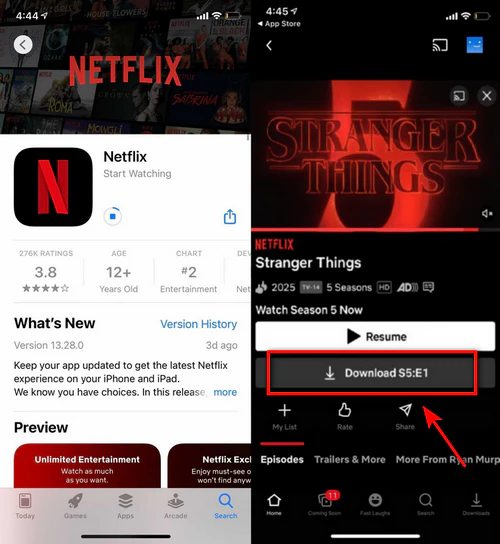
Step 6. Access Your Downloaded Episodes
Once the download completes, navigate to the “Downloads” section in the Netflix app. You can access your downloaded content and start watching the episode without internet access.
Although Netflix makes it easy to download shows on Netflix to watch offline, downloaded content can only be played inside the Netflix app. You can’t take, or transfer any downloaded titles to other devices. In addition, Netflix downloads may expire after a certain period, normally 7 days or 30 days. When your subscription ends, you will lose access to downloaded titles.
Method 2. Download Netflix Shows on Mac/PC in MP4/MKV Format
To get rid of Netflix’s official download limits, a professional Netflix downloader is the ideal solution. iMovieTool Netflix Video Downloader is a professional software designed specifically to download Netflix TV shows, movies, documentaries, and videos in MP4 or MKV format. It also preserves HD video quality, multilingual audio tracks, and subtitles for a better offline viewing experience.
This tool supports all subscription tiers of Netflix, including ad-free and ad-supported users. With its help, users can directly batch-download entire Netflix TV shows on Mac or Windows computers without the Netflix app. Thus, you can keep your downloaded content permanently without expiration and any playback limitations.
Features of iMovieTool Netflix Video Downloader:
- Download all Netflix videos to Mac or PC in 1080p without Netflix app.
- Download Netflix TV shows, movies, videos in MP4 or MKV formats.
- Save Netflix shows with original audio tracks and multiple subtitle options.
- Download entire Netflix TV show seasons or multiple episodes simultaneously.
- Up to 50X faster download speed, quickly build your offline library.
- Keep downloaded Netflix episodes, movies permanently, no expiration.
How to Download Netflix Shows on PC in MP4 1080P
Step 1. Select Netflix and Log In
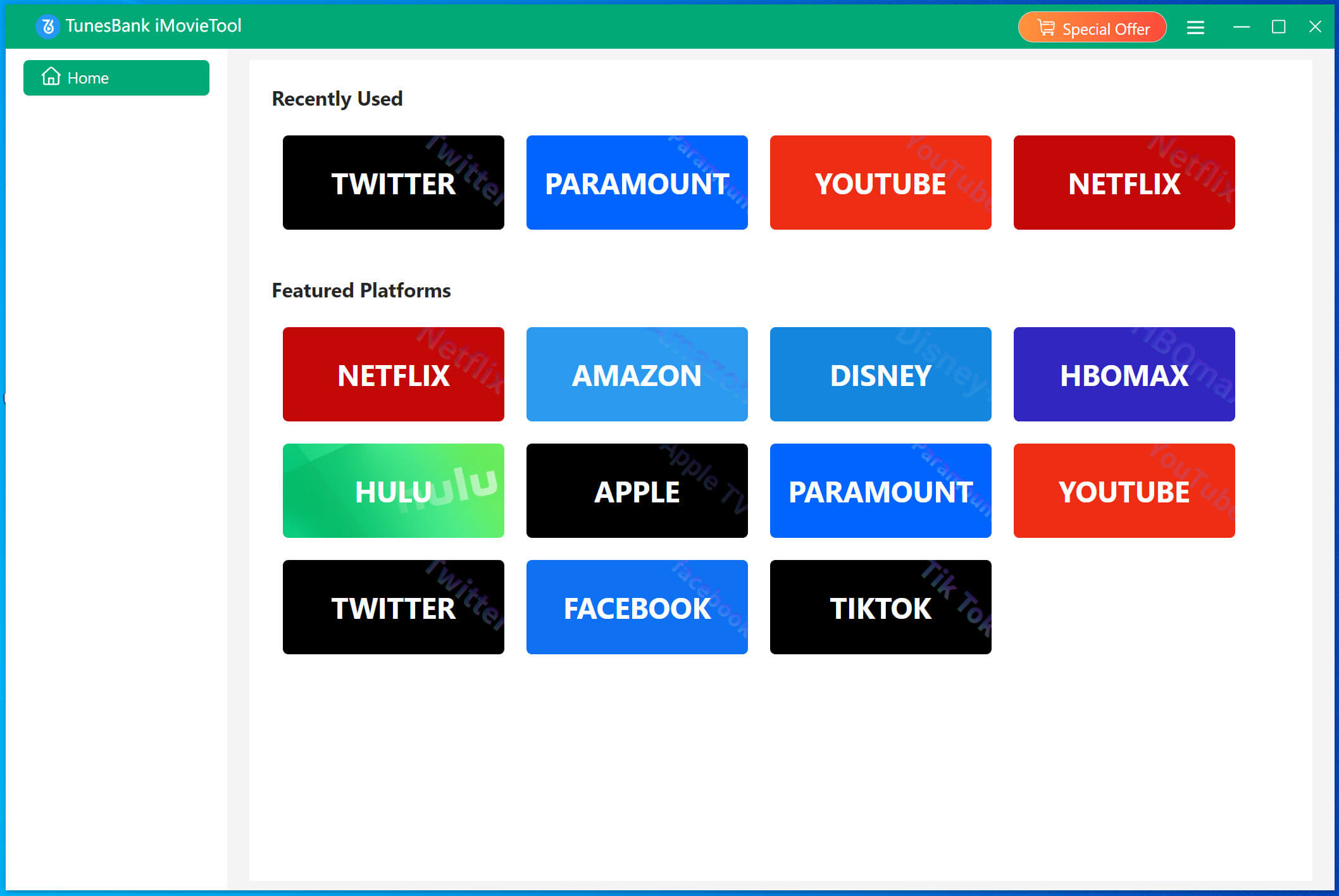
Download, install, and launch TunesBank iMovieTool Video Downloader on your Mac or PC. And select Netflix from the supported streaming platforms list.
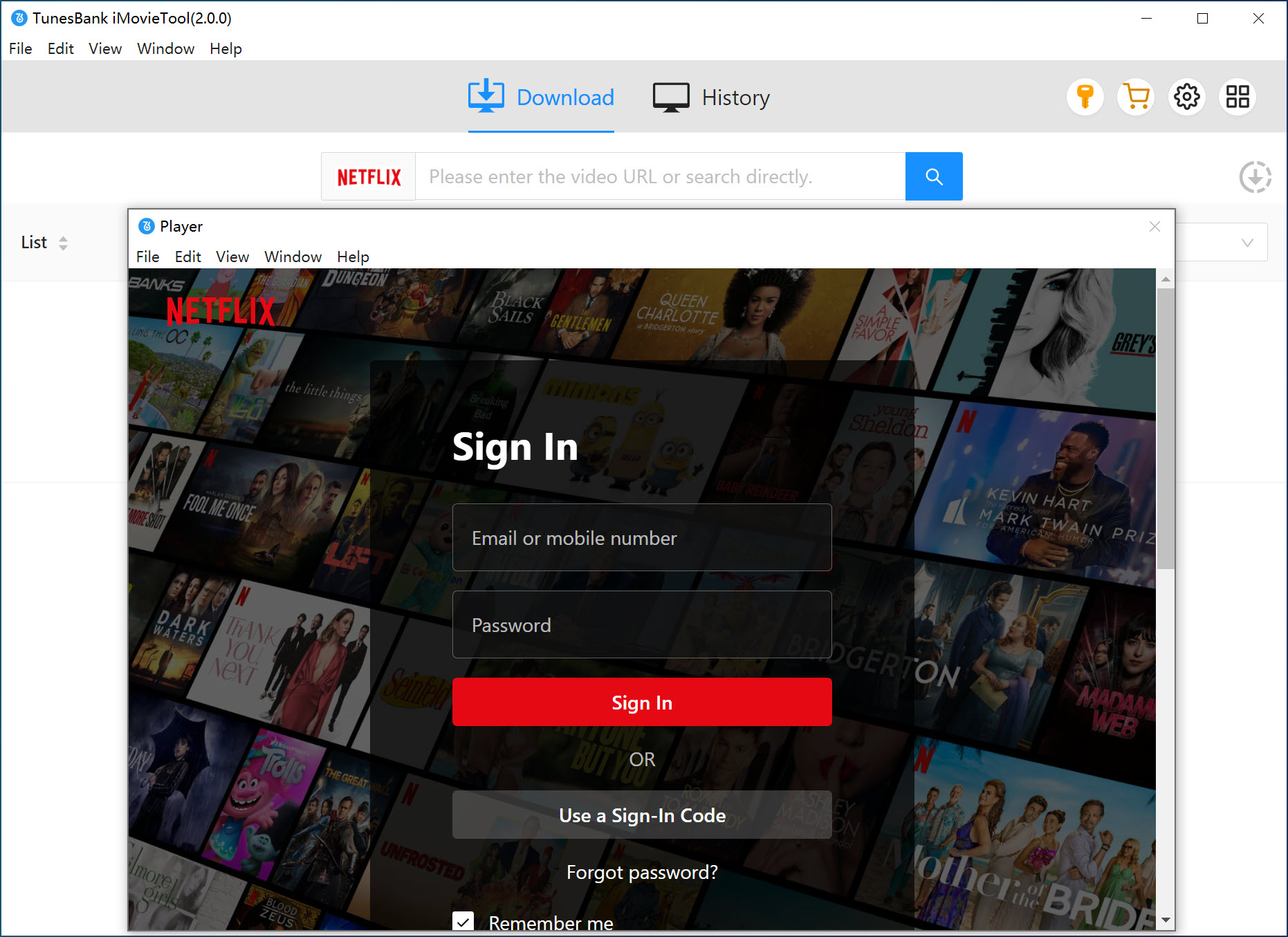
The software displays a login screen where you enter your Netflix account credentials. After logging in, you will enter the iMovieTool Netflix Video Downloader.
Step 2. Customize Output Settings
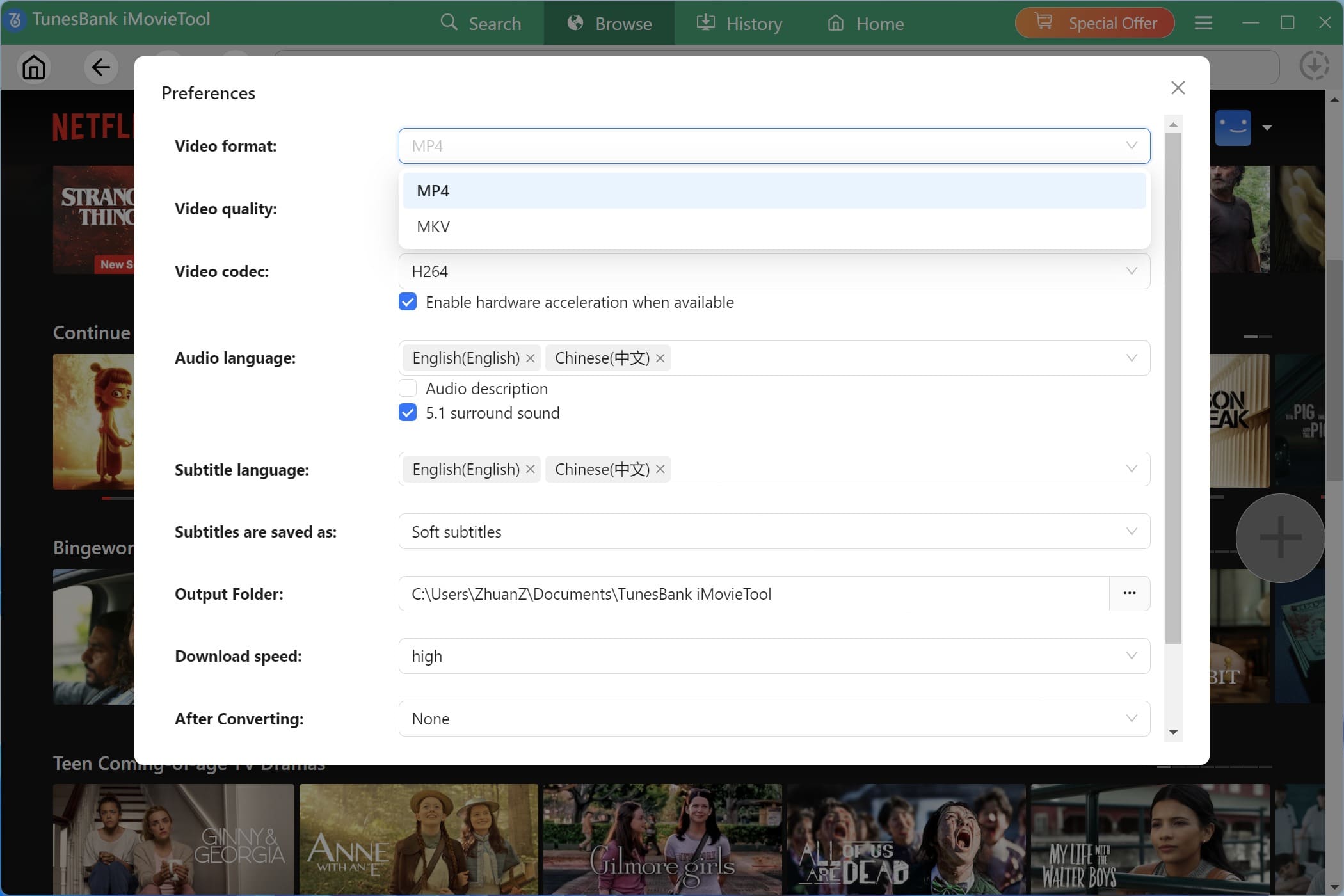
Open the Settings/Preference window by clicking the Menu icon. Then you can configure your preferred output format, video quality, subtitle type, audio language, output folder, and codec. You can choose MP4 or MKV according to your playback requirements.
Step 3. Browse Netflix Shows Online
Tap “Browse” tab at the top of the interface. Navigate to the Netflix catalog just as you would on the website. Explore categories, browse trending content, or access your saved list to find shows you want to download.
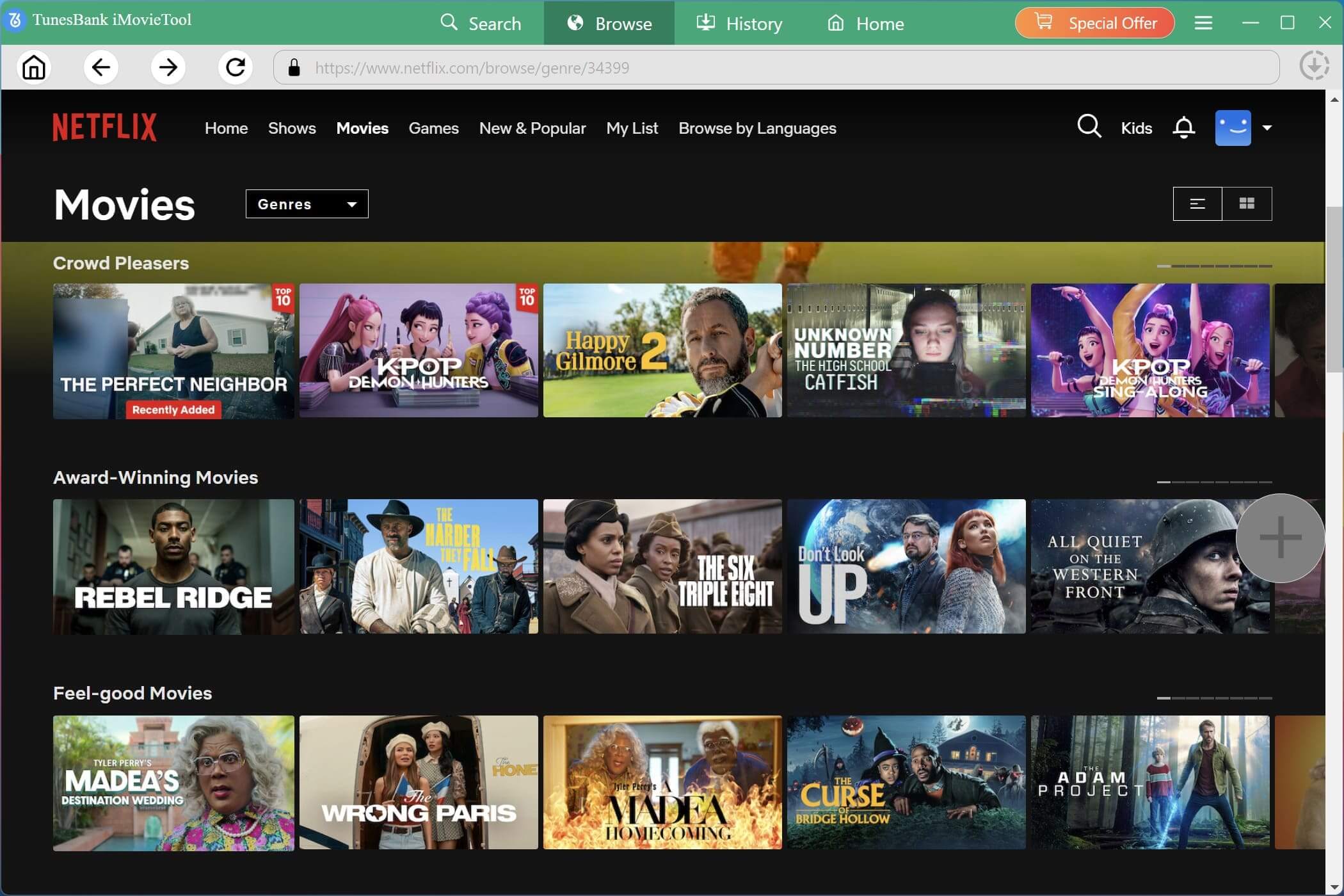
Tips: You can also turn to “Search” tab, search for Netflix shows by entering keywords, the show name, or pasting a direct video URL into the search bar. iMovieTool quickly detects the content and displays it for selection.
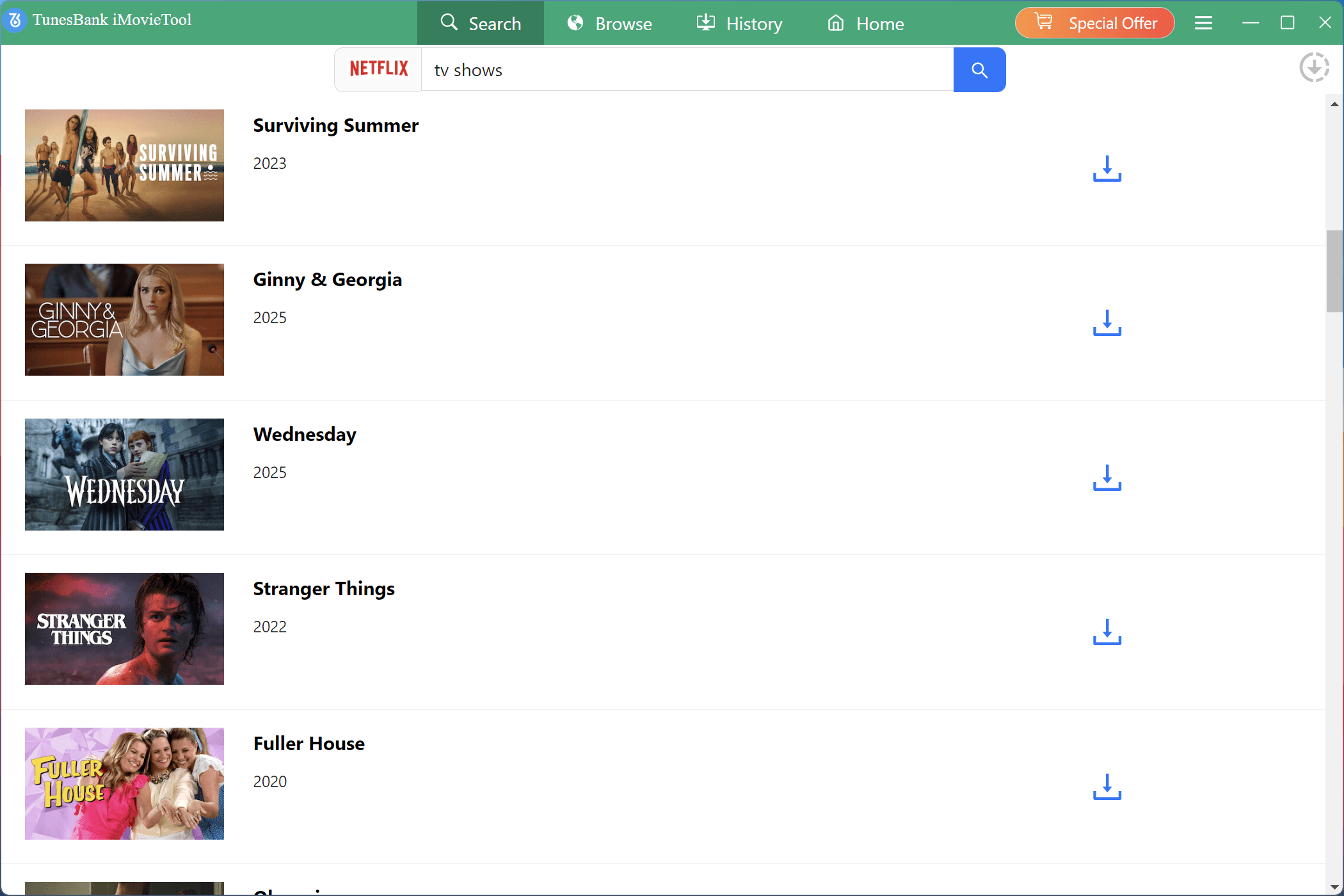
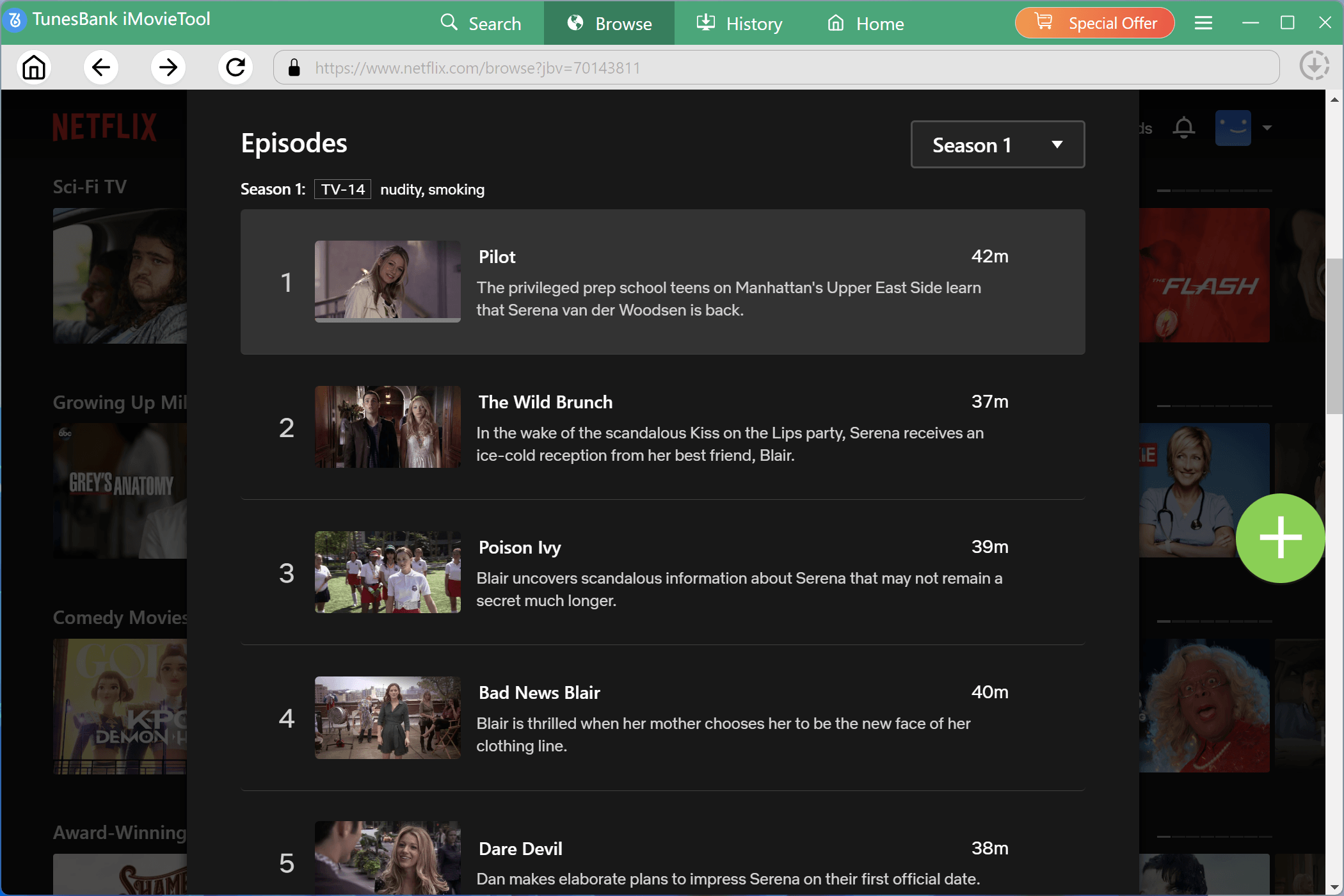
Step 4. Add and Select Netflix Shows
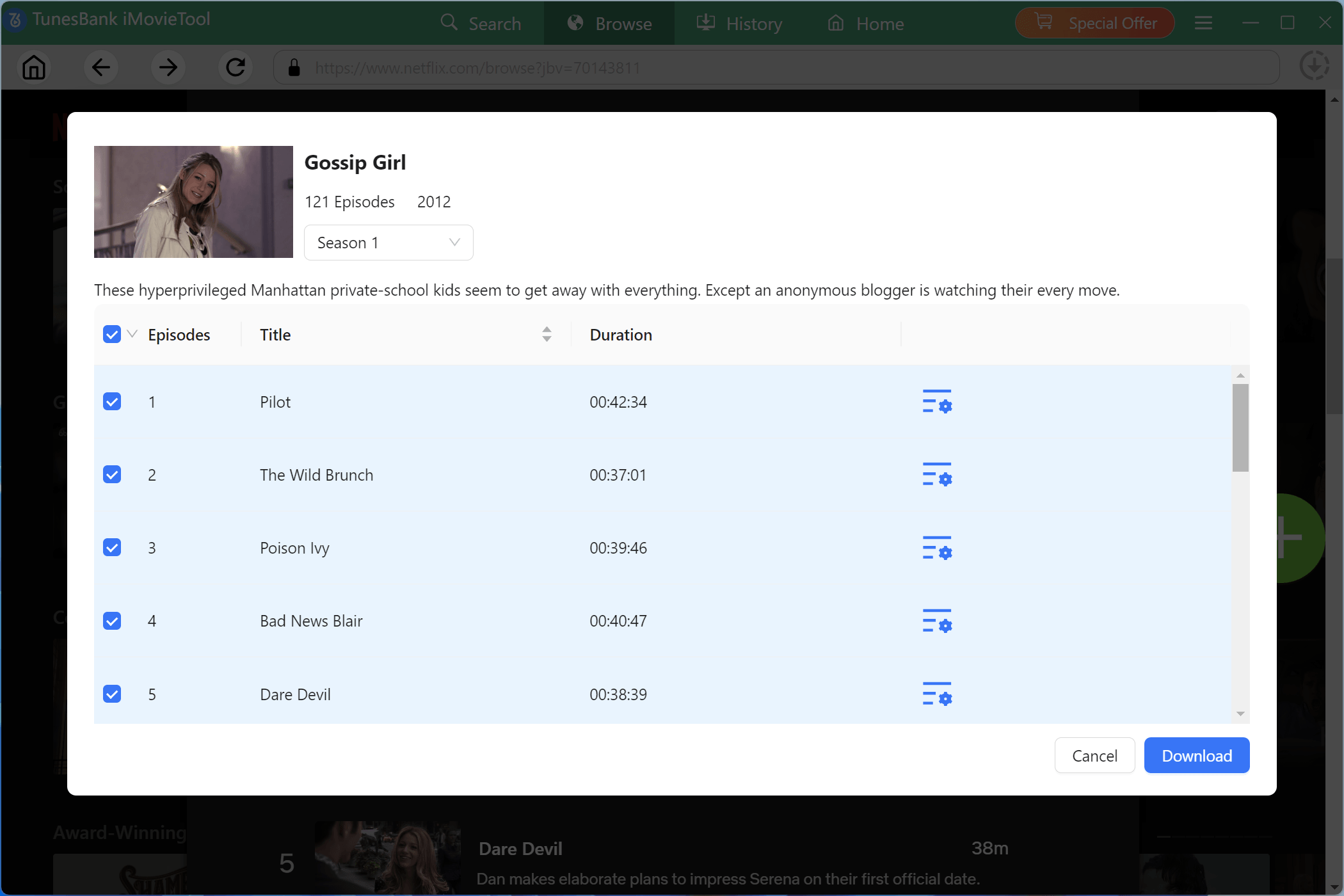
For example, here we search for the “Gossip Girl”. Enter the show’s detail page and click the “+” button.
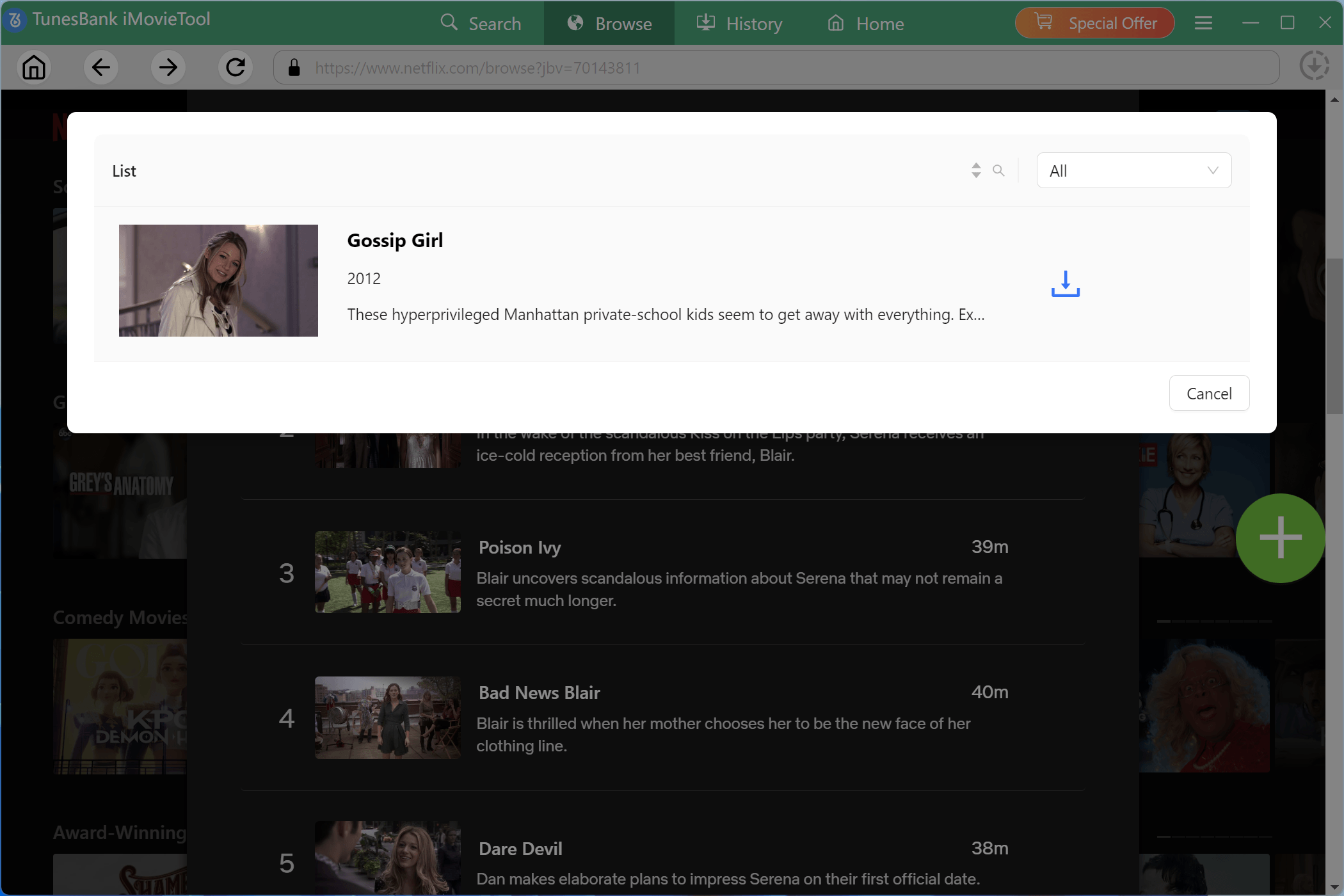
iMovieTool will automatically detect downloadable episodes and seasons. Then, it will pop up a small window. This step you need to click the “Download” icon.
For TV series, you can select specific episodes or entire seasons. You may also click the “Settings” icon next to customize subtitles, audio tracks, and output preferences for specific episodes before adding them to the download queue.
Step 5. Start to Download Netflix Shows in Batches
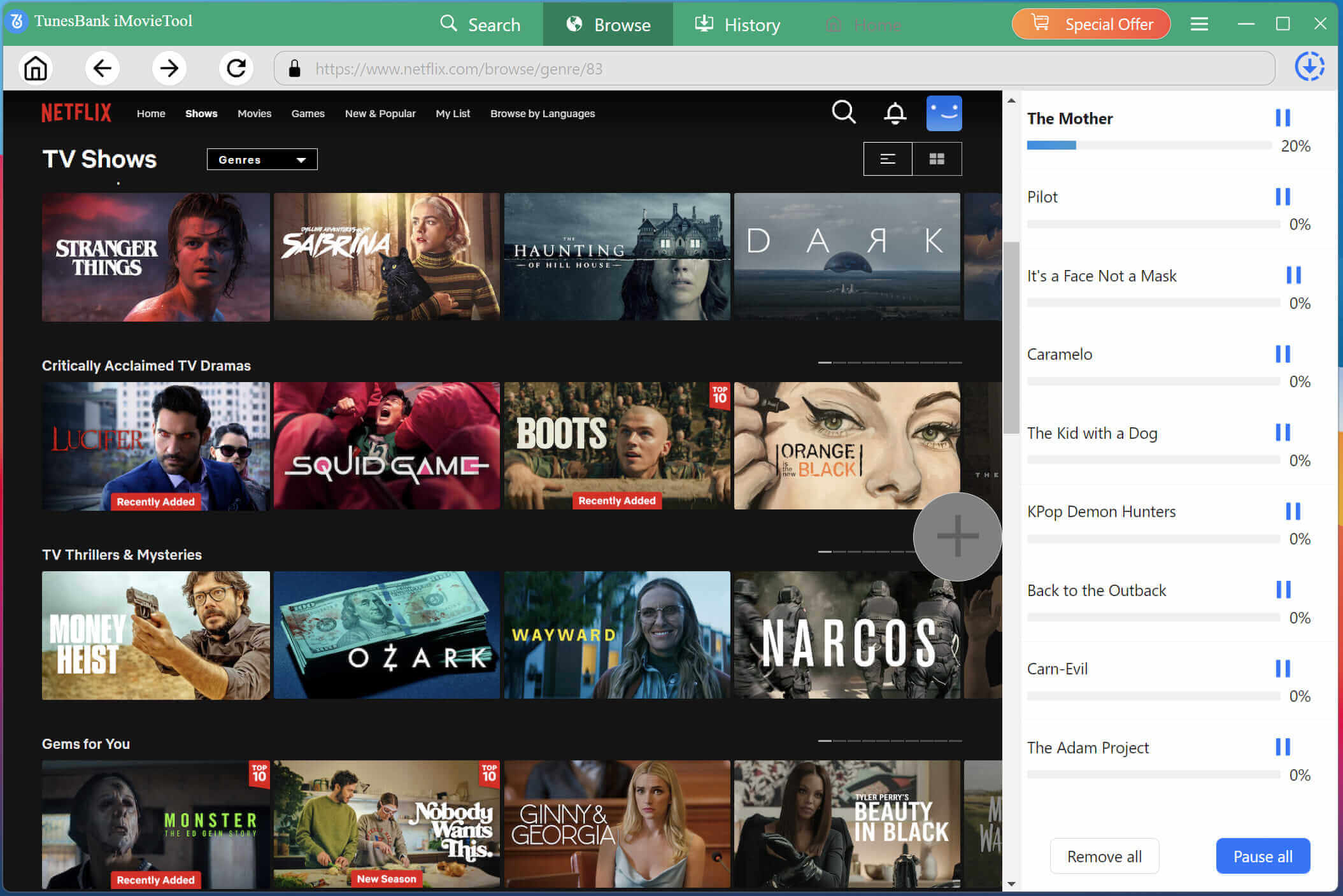
Once you’ve added all desired episodes or movies to the download queue, click the “Download” button. You can monitor progress in the right panel. At the same time, you can turn back to the “Browse” section to add more TV shows to the download queue.
Step 6. Get Your Downloaded Netflix Episodes
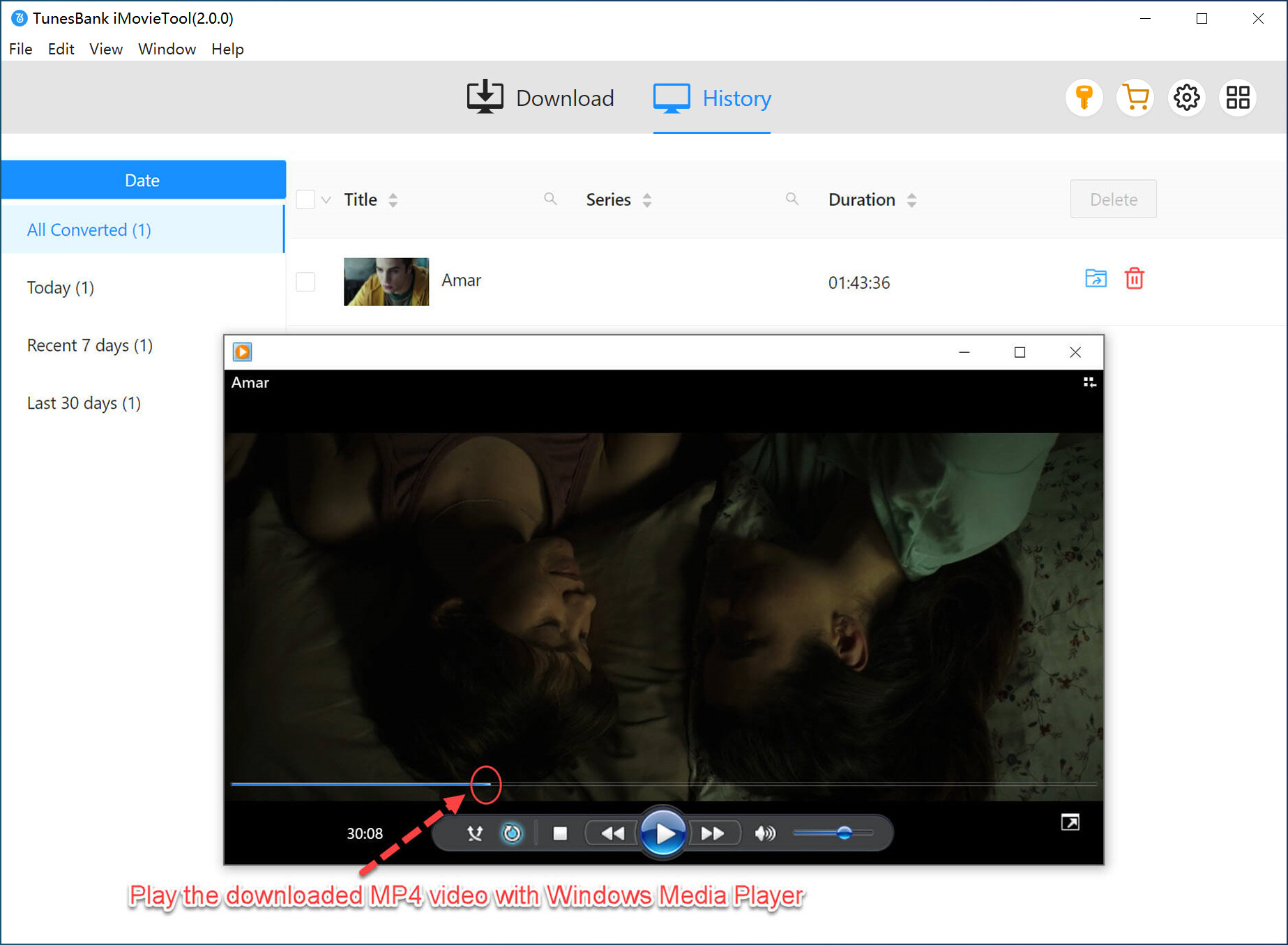
After the download completes, navigate to the output folder you specified in Step 2. Or tap “History” tab to check the well downloaded Netflix shows. Click the “Blue Folder” icon next to the title to locate the output folder. Your Netflix shows are now saved as MP4 or MKV files, and you can keep them permanently, enjoy a smooth playback!
FAQs About Netflix Shows Downloads
Can You Download Shows for Offline on Netflix?
Yes, Netflix offers an official offline download feature through its mobile app for iOS and Android devices, as well as Fire tablets and Chromebooks. Note that these official downloads are only playable within the Netflix app, expire after a certain period, and disappear if you cancel your subscription.
Can You Download Netflix Shows on a Laptop Mac?
Officially, you can only download Netflix shows on iOS, Android, Fire tablet, or Chromebook through the Netflix mobile app. To download Netflix shows on a MacBook or iMac, you need to use a third-party Netflix downloader for Mac. Professional tools like iMovieTool Netflix Video Downloader enable users to download Netflix TV shows on a Mac or PC and save them as MP4 or MKV files for unrestricted playback.
Why Can’t I See the Download Option on Netflix?
Due to licensing agreements, not all titles are downloadable on Netflix. If you don’t see the download icon next to a show or movie, it means you can only access the title online with network connection.
Is there a limit to how many shows I can download on Netflix?
Yes. It depends on your subscription plan tier. Standard with Ads users can download up to 15 titles per device, while Standard subscribers can download on up to two devices with as many as 100 active downloads per device. Premium users can download Netflix shows on up to six supported devices simultaneously.
Conclusion
Above, we have walked you through how to download Netflix shows for offline viewing, along with 2 workable methods. While Netflix’s official download feature is convenient, its also delivers several download restrictions. Therefore, iMovieTool Netflix Video Downloader is highly recommended. It can download Netflix TV shows on a Mac or PC in MP4 or MKV format with HD 1080p resolution. This way, you can keep downloaded Netflix videos permanently, avoid expiration limits, and enjoy unrestricted playback anytime and anywhere! Give it a try right now!
The Latest Articles
– Top 8 Solutions to Download Streaming Video
– Top 10 Free Movie Download Sites Recommended
– 3 Ways to Download Movies to Watch Offline
– 2 Verified Methods to Download X/Twitter Videos to MP4
– Download Twitter(X) Videos on PC, Mac and Mobile Phone
– Download Facebook Videos on PC, Mac and Mobile Phone
– 3 Ways to Download Facebook Video to MP4

Netflix Video Downloader
Download Netflix video to MP4 or MKV with multi-language audio track and subtitle kept. Up to 50X downloading speed. Easily to download your favorite movies/TV shows from Netflix to your computer for offline viewing.







