








 United States (English)
 Japan (日本語)
 Russia (русский)
 Germany (Deutsch)
 France (Français)
 Spain (Español)
 Italy (Italia)
 Portugal (Portugues)
 China (繁体中文)
 Turkish (Türk dili)
 Dutch (Nederlands)
 Korean(한국인)
 Saudi Arabia(عربي)
 Download from Netflix, Disney+, Prime Video, YouTube, and more.

This Hidive vs Crunchyroll comparison review will break down every aspect of two popular anime streaming services, from library size and pricing to simulcast speed and device compatibility. We’ll also reveal a powerful alternative – iMovieTool Video Downloader, to help you download anime from any streaming service to HD MP4 for permanent offline viewing.
If you’re a passionate anime fan, you’ve probably come across two of the most popular anime streaming platforms: HIDIVE and Crunchyroll. Both services offer high-quality anime movies and TV shows for audiences to enjoy at home. However, both Crunchyroll and HIDIVE are not free anime streaming sites, and require a subscription to access their anime library.
Which is the best anime streaming service? Before joining the service, you can read this comprehensive HIDIVE vs Crunchyroll comparison. We’ll compare their anime catalogs, pricing, user interface, simulcast availability, dubbed content, device compatibility, and more. We’ll also introduce a powerful solution for downloading anime videos for free and enjoy flexible offline viewing without platform restrictions.
1. HIDIVE vs Crunchyroll: Library
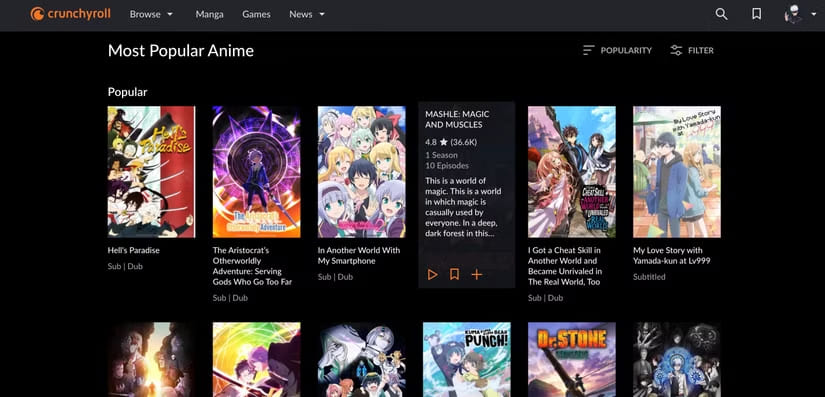
When comparing HiDive vs Crunchyroll library size, Crunchyroll can do much better than HiDive. Crunchyroll boasts over 2,000 anime series and movies, ranging from mainstream hits like One Piece, Naruto Shippuden, and Attack on Titan to seasonal simulcasts and classic series.
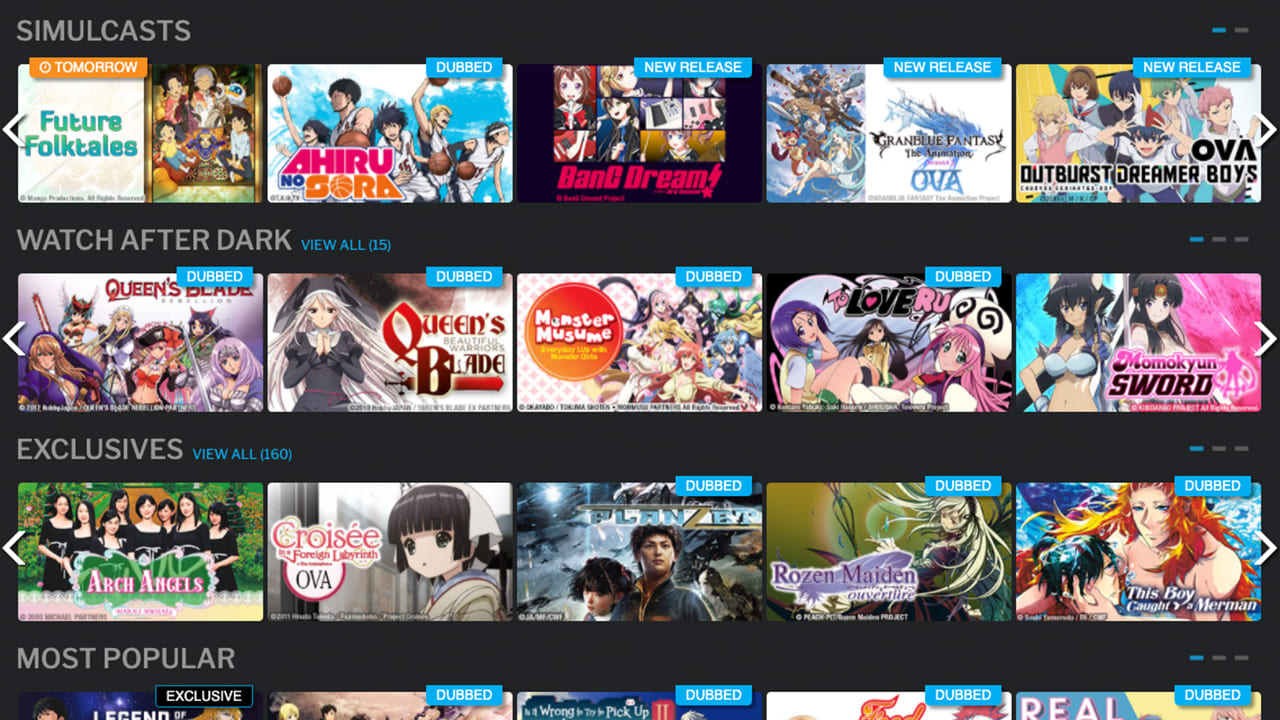
HiDive, by contrast, focuses on niche, mature, and exclusive anime content. With around 500+ series and 100+ movies, its library is smaller but carefully curated. It excels in older gems (Legend of the Galactic Heroes), underrated slice‑of‑life shows, and exclusive dubs.
Winner: Crunchyroll
2. HIDIVE vs Crunchyroll: Price
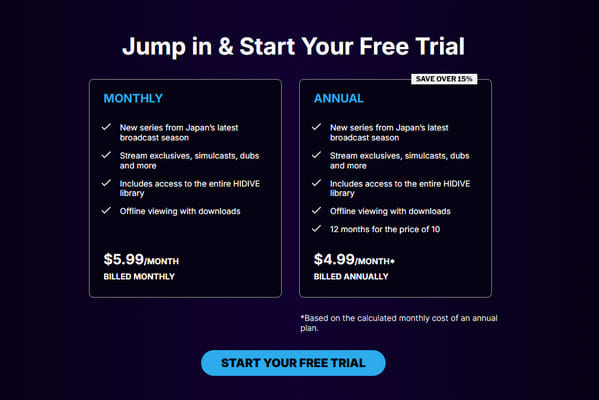
Price is another major factor in the HIDIVE vs Crunchyroll comparison. Both services offer a 7-day free trial for new subscribers, which gives you full access to ad-free anime, English dubs, exclusive simulcasts, and offline downloads. After that, users need to pay monthly or yearly.
HIDIVE Price: HIDIVE offers two affordable plans: $5.99 per month or $59.99 per year, with ad-free access to its full anime library, simulcasts, dubs, and offline viewing features.
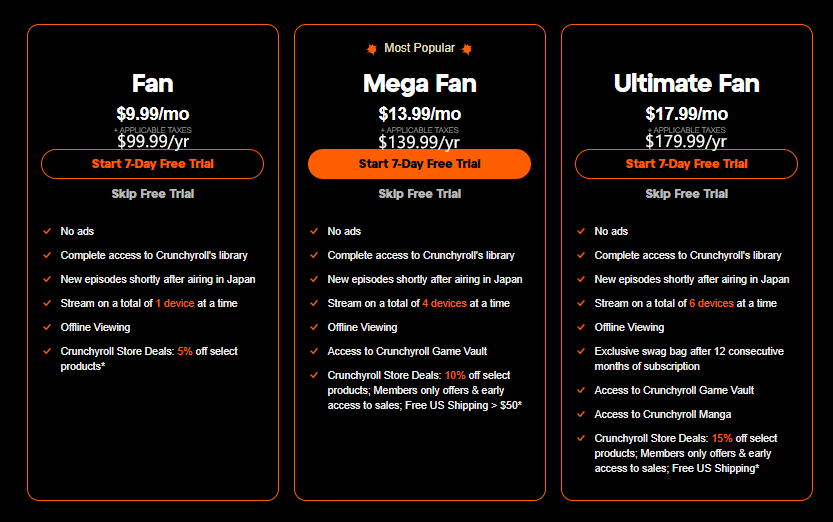
Crunchyroll Price: Crunchyroll offers three premium plans: Fan, Mega Fan, and Ultimate Fan, starting at $9.99 per month. It provides access to its extensive anime catalog, simulcasts, offline downloads, and additional membership perks.
Winner: HIDIVE for affordability, Crunchyroll for overall value.
3. HIDIVE vs Crunchyroll: Ads, Interface and User Experience
Then, let’s look at what Crunchyroll and HIDIVE can bring to us. To watch anime on HIDIVE and Crunchyroll, you now must have a paid subscription. Both services have discontinued the free viewing tiers, but new users can sign up for a 7-days free trial. All subscriptions (free trial included) offer ad-free streaming.
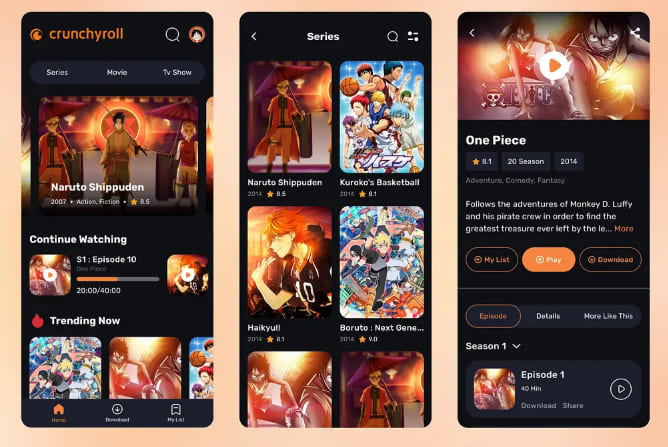
Crunchyroll’s interface is polished, modern, and available on all platforms. It features modern navigation, personalized recommendations, organized genre categories, watchlists, and cross-device synchronization. However, the mobile app can sometimes be buggy.
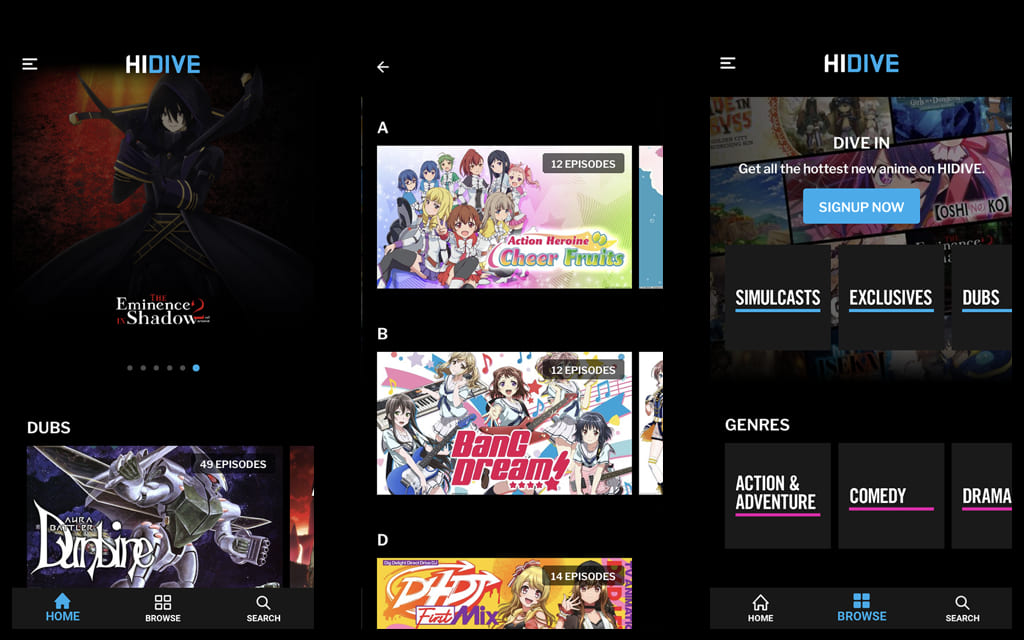
HIDIVE has improved significantly but remains simpler. While the interface is easy to navigate, some users report occasional issues with content discovery and recommendation accuracy. However, HIDIVE includes useful customization features such as subtitle styling options that many anime fans appreciate.
Winner: Crunchyroll
4. HIDIVE vs Crunchyroll: Original Content and Exclusives
When evaluating HIDIVE vs Crunchyroll 2026, original content matters just as much as exclusives. From their overall libraries, HIDIVE benefits from its partnership with Sentai Filmworks, offering a selection of exclusive anime titles, director’s cuts, and uncensored versions that cannot be found on Crunchyroll.
Meanwhile, Crunchyroll continues to expand its market-leading position by securing exclusive streaming rights to many popular seasonal anime and investing in original productions through Crunchyroll Originals. Popular exclusives often generate substantial attention each season.
Winner: Tie
5. HIDIVE vs Crunchyroll: Sub, Dub Availability and Simulcast Speed
To ensure a good anime movie or TV show viewing experience, the subtitles, dubbing, and simulcast speed should also be considered when selecting the best anime streaming service.
HIDIVE stands out for its high-quality English dubs (many produced by Sentai Filmworks) and solid subtitle support in English, Spanish, and Portuguese. Plus, it offers uncensored editions and special subtitle customization options. However, Crunchyroll pulls ahead with faster simulcast releases (often within 1-2 hours of Japan) and a much wider selection of dubbed content across multiple languages.
For viewers prioritizing the fastest access to seasonal anime, Crunchyroll generally maintains an advantage. However, dub-focused viewers may discover hidden gems on HIDIVE.
Winner: Crunchyroll
6. HIDIVE vs Crunchyroll: Available Countries
Availability can significantly impact the Crunchyroll and HIDIVE experience. First, let’s look at Crunchyroll.
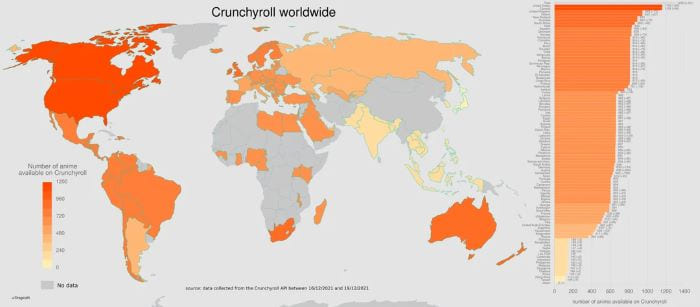
Founded in 2006, Crunchyroll has global reach and operates in over 200 countries and territories, including North America, Europe, Latin America, Australia, the Middle East, Africa, and most of Asia (excluding Japan, China, and Korea where local services dominate). The platform supports numerous languages and regional licensing agreements.
Founded in 2017, HIDIVE continues to expand into international markets, primarily in the United States, Canada, United Kingdom, Ireland, Australia, New Zealand, South Africa, and select European countries (Germany, France, Scandinavia). Additionally, HIDIVE has expanded its availability through Amazon Prime Video Channels in several international markets, allowing more anime fans to access its exclusive content directly from the Prime Video platform.
Winner: Crunchyroll
7. HIDIVE vs Crunchyroll: Compatibility
It is noted that both HIDIVE and Crunchyroll let you access, and stream anime videos through its official website and app. Let’s check their supported devices:
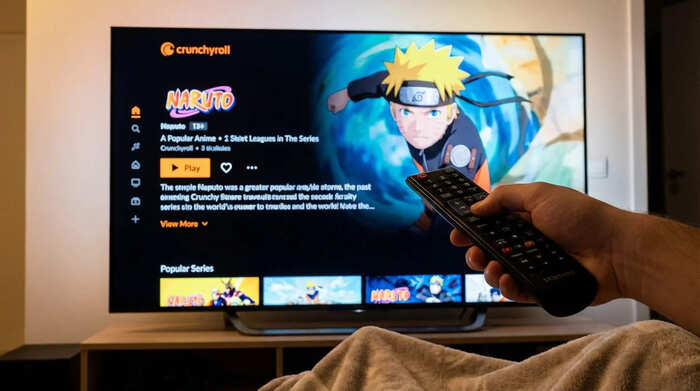
Crunchyroll: iPhone, iPad, Android phone and tablet, Android TV, Apple TV, Fire TV, Roku, Roku Channel, Chromecast, Xbox One/Series X|S, PlayStation 4/5, Fire Tablet, Nintendo Switch, Samsung Smart TVs, LG Smart TVs, Vizio SmartCast, and web browsers (Chrome, Safari, Edge, Firefox).
HiDive: iPhone, iPad, Android phone and tablet, Android TV, Fire TV, Roku, Roku Channel, Apple TV, Chromecast, Xbox, Fire Tablet, LG, Samsung TV (tizen), Samsung Galaxy, Vizio, and web browsers.
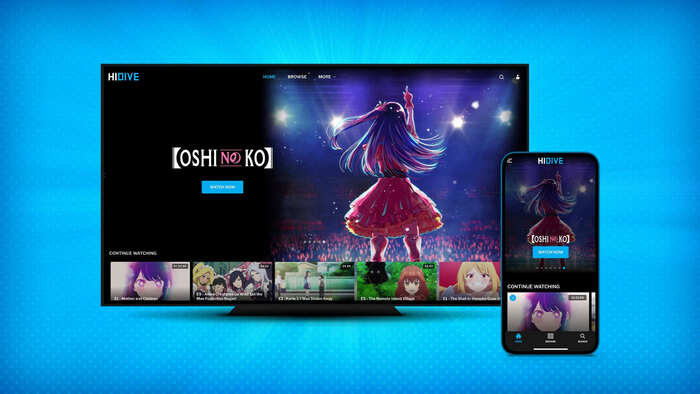
When you want to download anime videos for offline viewing, both Crunchyroll and HiDive restrict downloads to their mobile apps. Crunchyroll provides better offline support (starting at Fan tier) with quality selection, while HiDive offers mobile downloads but without the ability to choose resolution.
Winner: Crunchyroll
Round-up: Which Is Better, Crunchyroll or HIDIVE?
In this Crunchyroll vs HIDIVE comparison, it can be discovered that both Crunchyroll and HIDIVE have their pros and cons. For most mainstream anime fans, Crunchyroll is the best anime streaming service. It offers a massive library, superior interface, global availability, faster simulcasts, and wider device support. If you want want an affordable price, exclusive anime catalog, unique dub offerings, and uncensored content, you can turn to HIDIVE. If you have no budget constraints, the best way is to subscribe to both platforms to enjoy your favorite anime!
Bonus: Download Anime Videos to HD MP4/MKV
Generally, most video downloads from streaming platforms are restricted by DRM protection, making them temporary and device-locked. To download Anime videos from streaming platforms without any restrictions, you can utilize a professional Anime video downloader. Here we highly recommend iMovieTool Video Downloader.
TunesBank iMovieTool is an All-in-One Video Downloader, enabling users to download anime videos, movies, and TV shows from Netflix, YouTube, Amazon Prime Video, Hulu, HBO Max, Disney+, Paramount+, Apple TV+, and many other platforms. Unlike official downloads, it removes DRM protection, and save your anime videos as local MP4 or MKV files for unrestricted and permanent offline playback.
The software supports HD 720p and Full HD 1080p quality, preserves original audio tracks and subtitles. Whether you prefer subbed or English dubbed anime, iMovieTool provides a convenient solution for building your personal anime collection. Thanks to advanced acceleration technology, it not only offers 50X ultra-fast download speed to save anime videos, but also supports to download entire anime seasons with one click.
Features of TunesBank iMovieTool Video Downloader:
- Download anime videos from Netflix, Amazon Prime, Disney+, Hulu, and more.
- Save anime movies and shows in MP4 or MKV formats.
- Preserve HD video quality up to 720p and 1080p resolution.
- Batch download entire anime seasons or series with one click.
- Enjoy up to 50X faster download speeds with hardware acceleration.
- Keep original multilingual audio tracks for flexible viewing options.
- Retain subtitles in soft, hardcoded, or external SRT formats.
- Download unlimited English dubbed anime for offline playback anytime.
- Watch downloaded anime permanently without subscription or expiration limits.
- Compatible with both Windows and Mac operating systems.
How to Download Anime to MP4 in 1080p with iMovieTool
Step 1. Launch iMovieTool and Select a Service
Download and launch TunesBank iMovieTool All-in-One Video Downloader on your iMac, MacBook, Windows PC, or laptop. And choose your preferred streaming platform. Netflix hosts a vast and rapidly growing library of anime, so here we take Netflix as an example.
Next, sign in with your Netflix account credentials to access the complete anime catalog.
Step 2. Change Output Settings
Before downloading, click “Menu” and then “Preference” to open the settings panel. From where you are allowed to customize video format, video quality, subtitle preferences, audio language, output folder, download speed, and codec options. Choose MP4 or MKV according to your playback needs.
Step 3. Search for Anime Movies or Shows
Here you have three convenient ways to locate anime content, using the “Search” or “Browse” tap.
#1 Browse Online: Tap “Browse” tab, navigate through the built-in streaming interface and visit the Animation catalog. Browse categories and discover anime content directly within iMovieTool, and click any poster to open its details page.
Once on the anime’s main page, click the “+” icon to add to download queue.
#2 Search Using Name or Keyword: Tap “Search” tab. Enter the anime title or relevant keywords directly into the search bar. For example, type “One Piece,” “Naruto,” or simply “animation for kids” to find related content.
#3 Search Using URL: Copy the anime video’s URL from Netflix and paste it into iMovieTool’s search field. For example, paste a One Piece URL for instant access.
Step 4. Start Downloading Anime Movies or TV Shows
Then, click the “Download” icon next to the title. You can select individual episodes, a whole season, or even all seasons.
After confirming your selections, click the “Download” button. iMovieTool will begin downloading anime episodes from Netflix to your computer at high speed. During the process, you can continue add more anime movies and shows to the download queue for batch downloads.
Step 5. Access Downloaded Anime Videos
Once completed, go to the “History” section to access your downloaded anime videos. You may also locate the output files by clicking the folder icon, you can now enjoy these anime videos offline playback anytime on any device.
Once the download is complete, navigate to the “History” section or output folder. Your anime videos will be saved as MP4 files. You can now play them in any media player like VLC, WMP, and copy them to USB drive or external hard disk!
FAQs About HIDIVE and Crunchyroll
Is HIDIVE Safe?
Yes. HIDIVE is a legal anime streaming platform operated by AMC Networks and Sentai Filmworks. It provides licensed anime content and secure subscription services. You can access its library on your mobile devices, smart TVs, computers, and web browsers.
Is HIDIVE Better Than Crunchyroll?
It depends on your needs. Crunchyroll offers a larger library and wider availability, while HIDIVE excels in affordability and exclusive anime titles. If you have enough budget, you can consider subscribing to both.
Does HIDIVE Have Everything Crunchyroll Has?
No. HIDIVE has a much smaller library, with only about 500 anime titles, while Crunchyroll offers a larger library, with over 2,000 anime titles. Many anime series available on Crunchyroll are not available on HIDIVE. Each platform holds different licensing agreements and exclusive content.
Is HIDIVE Worth It Over Crunchyroll?
For anime fans seeking budget-friendly subscriptions and exclusive Sentai Filmworks content, HIDIVE is worth considering. For most mainstream viewers, Crunchyroll offers a wider library of content, but higher subscription fee. It depends on your priorities.
Conclusion
When comparing HIDIVE vs Crunchyroll, there is no universal winner for every anime fan. Crunchyroll remains the strongest overall platform thanks to its massive anime catalog, superior user experience, extensive simulcast coverage, and global availability. Meanwhile, HIDIVE continues to attract viewers with affordable pricing, unique exclusives, and niche anime selections.
However, neither service allows you to permanently own your favorite anime movies and shows. For the ultimate anime experience, you can consider using the professional anime video downloader – iMovieTool All-in-One Video Downloader. With it, you can easily download any anime from Netflix, Hulu, Amazon Prime, YouTube, and more sites to DRM‑free MP4/MKV files in 1080p HD. Keep your anime forever, watch offline on any device, and never worry about streaming limits.
The Latest Articles
– Top 8 Solutions to Download Streaming Video
– Top 10 Free Movie Download Sites Recommended
– 3 Ways to Download Movies to Watch Offline
– 2 Verified Methods to Download X/Twitter Videos to MP4
– Download Twitter(X) Videos on PC, Mac and Mobile Phone
– Download Facebook Videos on PC, Mac and Mobile Phone
– 3 Ways to Download Facebook Video to MP4

iMovieTool Movie Downloader
Download movies to MP4/MKV in 1080P, download movies from Netflix, Amazon Prime Video, Disney+, HBO Max, Hulu, Apple TV+, YouTube, and Paramount+. Download videos from Twitter, Instagram, Facebook, and TikTok for free.







