








 United States (English)
 Japan (日本語)
 Russia (русский)
 Germany (Deutsch)
 France (Français)
 Spain (Español)
 Italy (Italia)
 Portugal (Portugues)
 China (繁体中文)
 Turkish (Türk dili)
 Dutch (Nederlands)
 Korean(한국인)
 Saudi Arabia(عربي)
 Download full HD 1080P movies & TV shows from HBO Max & Max.
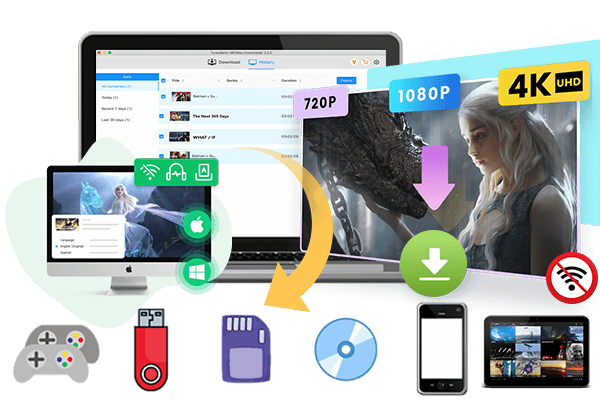
Want to watch HBO Max offline without worrying about Wi-Fi connections, mobile data, or streaming interruptions? This article will show you how to watch HBO Max offline on PC, Mac, iPhone, or Android, smart TV, laptop, game console and any device.
HBO Max offers a huge library of blockbuster movies, hit dramas, and binge-worthy originals. However, streaming requires a stable internet connection and can quickly consume your mobile data. So, many users ask: Can I watch HBO Max with no internet?
The answer is YES! Whether you’re preparing for a long flight, traveling, or staying somewhere with poor Wi-Fi or a weak signal, downloading HBO Max videos in advance is the best solution to ensure a smooth viewing experience. In this post, we’ll introduce three methods to help you watch HBO Max offline on any device, even with a Max With Ads account!
Method 1. Watch HBO Max Offline on iPhone/Android
The easiest way to watch HBO Max offline on your phone is to use its built-in download feature. HBO Max allows its ad-free subscribers to download selected movies and TV episodes directly to their mobile devices for offline viewing. Before you begin, ensure you meet the following requirements:
- An active HBO Max ad-free subscription, including Standard, Premium, and other bundle plans.
- A compatible mobile device, including iPhone, iPad, Android, and Fire table.
- The latest Max app installed on your mobile device.
- Enough space storage on your mobile device.
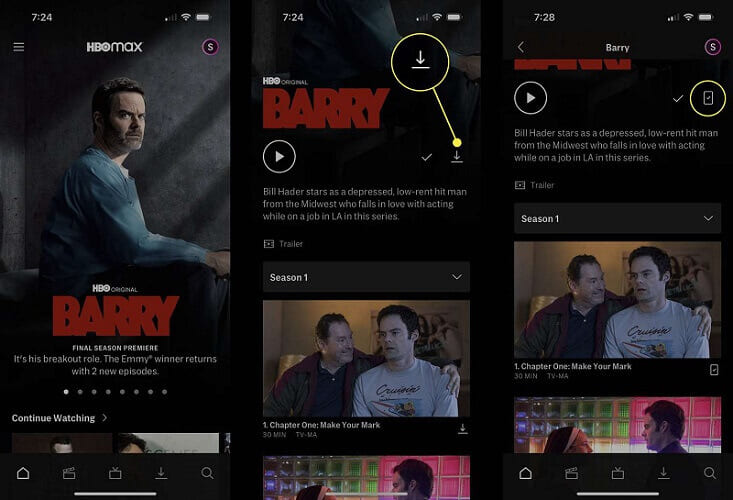
When you are ready, follow below steps learn how to download and watch HBO Max videos on smart phone or tablet:
Step 1. Open the HBO Max app on your iPhone or Android phone and sign in to your Max ad-free account.
Step 2. Search for the movie or TV show you want to watch offline.
Step 3. Open its details page and look for the “Download” button.
Step 4. Tap the “Download” icon and wait for the video to finish downloading.
Step 5. Once completed, go to the “Downloads” section in the app. Select your downloaded movie or episode to watch HBO Max offline without Wi-Fi.
• App-locked Downloads: HBO Max downloads are just cache files. Your downloaded videos are locked inside the HBO Max app, you cannot move them to another device, export them, or play them in a different media player.
• Expiration Date: Unwatched downloads generally expire after 30 days. After you press play, you typically have 48 hours to finish watching. If you cancel your subscription or the content leaves the HBO Max library, your downloads may become unplayable.
Method 2. Watch HBO Max Offline on Mac/PC
HBO Max does not offer an official download function for Mac or Windows computers, and there is no dedicated HBO Max app for desktop operating systems. On Mac and Windows users, you can only stream HBO Max through a web browser with an internet connection. Luckily, there are many helpful HBO Max video downloaders.
TunesBank HBOMax Video Downloader is a desktop tool designed to fill this gap. It supports both Max ad-free and ad-supported accounts, allowing you to download movies and TV shows from HBO Max directly to your Mac or Windows computer without the Max app. It can save HBO Max videos as MP4 or MKV files, while preserving FHD 1080p quality and original audio tracks. After downloading, you can keep HBO Max videos permanently, transfer them to any video to watch offline without relying on the Max app.
Features of TunesBank HBOMax Video Downloader:
- Supports both Max With Ads and Max Ad-free plans.
- Download HBO Max movies/TV shows to MP4 or MKV.
- Keep HBO Max videos with HD 1080P quality, original audio tracks.
- Customize various output parameters for HBO Max videos.
- Built-in Max web browser, no need to install the Max app.
- Download Max movies/TV shows in different subtitles.
- Batch download, with up to 50X faster speed.
- Offline enjoy HBO Max videos on various devices.
How to Download and Watch HBO Max Videos Offline on Computer
Step 1. Open TunesBank HBOMax Video Downloader
Download and install the TunesBank HBOMax Video Downloader on your Windows or Mac computer. Launch the software and sign in with your Max account to access the content library. It supports both Max With Ads and Max Ad-Free account.
Step 2. Find Your Wanted Max Movies or Shows
Search for the HBO Max videos you want to download. You can either type the name or paste the URL to locate it.
Step 3. Define the Output Settings
Click the “Gear” icon to go to the settings window. TunesBank software lets you select the video quality (up to HD 1080p) to enhance your viewing experience. Select MP4 format, as it is compatible with USB drive. And choose your desired audio track, subtitle and more.
Step 4. Begin Downloading Max Videos to MP4
Once you’ve chosen your preferences, hit the “Download” button, and the software will begin downloading HBO Max movie to your local drive.
If you add a Max TV episode, first you need to the episodes and seasons you want to download. You can download individual episodes or full seasons, click the “Download” button.
Step 5. Find Downloaded HBO Max Videos on Computer
After the downloading progress is finished, go to “History” tab and click the “Blue Folder” icon to open the output folder.
Step 6. Watch HBO Max Offline on Your Laptop/Computer
You can play the downloaded MP4 Max video files using any media player, such as VLC, Windows Media Player, QuickTime, iTunes, or the built-in player on your computer. No internet connection is required, and these Max video files will never expire.
Method 3. Watch HBO Max Offline on Smart TV/Game Console
If you want to watch HBO Max movies and TV shows on a bigger screen without an internet connection, you can transfer HBO Max videos to USB drive.
After downloading HBO Max videos to MP4 using TunesBank HBOMax Video Downloader, you can copy and paste these MP4 files to a USB drive. Then plug the USB drive into your TV’s USB port and use the TV’s media player to browse and play the Max video files.
000
FAQs About HBO Max Offline Viewing
How Do You Watch HBO Max Without Wi-Fi?
You must download the HBO Max video content on your device in advance. For Max Ad-Free subscribers, you can use the official Max app on your phone or tablet. Additionly, both Max Ad-Free and Ad-Supported users can use a desktop downloader like TunesBank HBOMax Video Downloader. It can download HBO Max videos as MP4/MKV files on your computer. Once downloaded, you can watch HBOMax offline on all devices.
Can I Watch HBO Max Offline on MacBook?
Currently, HBO Max does not offer offline downloads for Mac. But you can a third-party desktop downloader such as TunesBank HBOMax Video Downloader. This desktop tool is able to download movies and TV shows from HBO Max to your MacBook or Windows laptop directly, which you can then play offline with any media player.
How to Watch HBO Max on a Plane?
You need to download your favorite HBO Max movies or shows before your flight. If using the mobile app, remember the 30-day/48-hour expiration rules. For a more permanent solution, use a desktop downloader like TunesBank to export MP4 files and transfer them to your laptop or tablet for uninterrupted viewing during the flight.
Conclusion
In short, there are several ways to watch HBO Max offline, depending on your device and subscription plans. The official HBO Max app is a convenient choice for downloading videos to iPhone and Android devices, but its expiration rules and app restrictions can be inconvenient. If you want to watch HBO Max offline on a computer, Smart TV, or other compatible devices, TunesBank HBOMax Video Downloader offers a more flexible alternative. It can download HBO Max videos to MP4 or MKV files all at once, so you can enjoy your favorite movies and shows across different screens without network and expiration date!
The Latest Articles
– Download HBO Max Videos to MKV Format
– How to Watch HBO Max Videos on Macbook Offline
– Download HBO Max Videos on Windows PC
– Download HBO Max Movies & Shows to Watch Offline
– How to Keep HBO Max Video Downloads Forever
– How to Get Max Free Trial in 2025
– How to Get HBO Max Student Discount
– How to Download Netflix Video to MKV
– How to Download Netflix Movies on Mac
– How to Download Netflix Movies on Windows Computer
– How to Watch Netflix Movies on CarPlay
– How to Play Netflix Videos Without Netflix App
– Flixgrab Full Review in 2025
– How to Keep Netflix Videos Forever
– Top 8 Solutions to Download Streaming Video
– Top 10 Free Movie Download Sites Recommended
– 3 Ways to Download Movies to Watch Offline
– 2 Verified Methods to Download X/Twitter Videos to MP4
– Download Twitter(X) Videos on PC, Mac and Mobile Phone
– Download Facebook Videos on PC, Mac and Mobile Phone
– 3 Ways to Download Facebook Video to MP4

HBOMax Video Downloader
The best HBO Max Video Downloader to download Max(HBO) movies & TV series to to HD MP4 / MKV with audio track and subtitles kept. Easily get Max(HBO) videos downloads for offline playback on any device, anytime, anywhere!