








 United States (English)
 Japan (日本語)
 Russia (русский)
 Germany (Deutsch)
 France (Français)
 Spain (Español)
 Italy (Italia)
 Portugal (Portugues)
 China (繁体中文)
 Turkish (Türk dili)
 Dutch (Nederlands)
 Korean(한국인)
 Saudi Arabia(عربي)
 Download ad-free movies, episodes and original series from Hulu.

Q: “Can I use Hulu app when traveling? Is it possible to watch Hulu on the airplane?”
A: Of course. Long flights can feel endless, but with the right preparation, you can catch up on your favorite TV shows or movies to kill the time on the fight. Hulu is a popular streaming platform that lets you enjoy your favorite movies and shows wherever you go, including while traveling. This guide will walk you through every method to watch Hulu on a plane, from using onboard Wi-Fi to downloading content for offline viewing on your phone or laptop. Let’s explore!
Method 1. Watch Hulu on a Plane via In-Flight Wi-Fi
Some airlines offer in-flight Wi-Fi, allowing you to watch Hulu on a plane without downloading videos beforehand. However, not all in-flight Wi-Fi packages support video streaming. For example, Singapore Airlines restricts streaming services like Hulu, while Alaska Airlines offers Wi-Fi on equipped aircraft that supports streaming. Check your airline’s Wi-Fi availability, restrictions, and pricing before departure.
Step 1. Once onboard, enable Wi-Fi on your phone, tablet, or laptop.
Step 2. Connect to the airline’s in-flight Wi-Fi network (e.g., “AlaskaWiFi” or “Panasonic”). Select a plan and complete the purchase if required.

Step 3. Launch the Hulu app on your mobile device or visit the Hulu website using a supported browser on your laptop.
Step 4. Sign in to your Hulu account and browse the available movies and TV shows.
Step 5. Select your preferred title and start streaming Hulu content on the plane.
Method 2. Watch Hulu on a Plane on iPhone/Android (Offline)
If you want to watch Hulu offline without in-flight Wi-Fi, you can download your favorite movies and TV shows on Hulu before departure. Hulu allows its Premium (ad-free) subscribers to download supported titles on mobile devices. Once downloaded, you can watch these Hulu videos on airplane mode. For eligible users, please refer to the following steps:
Step 1. Open the Hulu app on your iPhone, iPad, or Android device. Sign in using your Hulu Premium account.
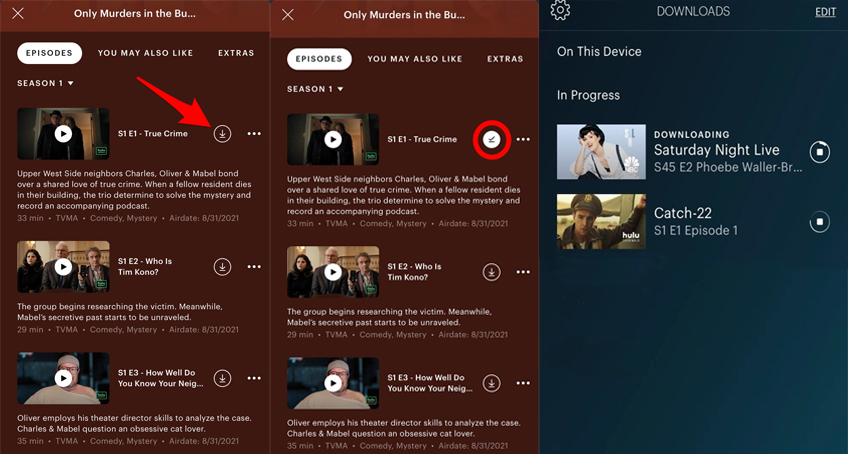
Step 2. Navigate to the Downloads tab or tap See What’s Downloadable from the menu.
Step 3. Browse or search for the movie or TV show you want to save. Look for the “Download” icon.
Step 4. Tap the “Download” icon on the movie page. For TV shows, you may need to download individual episodes separately. Wait until the download is complete before closing the app.
Step 5. Once on the plane, put your phone in Airplane Mode. Open the Hulu app, go to Downloads, and selected your saved content to play it offline.
Method 3. Watch Hulu on a Plane on MacBook/Windows Laptop (Offline)
While the Hulu mobile app works well for Premium subscribers, it has notable limitations. The downloaded Hulu videos are locked inside the app and come with strict expiration dates. You have 30 days to start watching before a download expires, and once you press play, you have just 48 hours to finish. To overcome these restrictions and watch Hulu on a plane on a larger laptop screen, you can rely on a dedicated desktop tool.
Here TunesBank Hulu Video Downloader comes into handy. It supports both Hulu ad-free and ad-supported users, allowing you to download movies and TV shows from Hulu directly to your computer’s hard drive in MP4 or MKV format. The software will preserve multiple audio tracks and subtitles, and save the Hulu videos with up to 1080p quality. In this way, you can build a permanent local library of Hulu videos and keep Hulu videos forever. Better yet, you can play your Hulu videos offline on any device or media player without an internet connection, anytime, anywhere!
Features of TunesBank Hulu Video Downloader:
- Download movies and TV shows with Hulu ad-supported or ad-free plan.
- Download videos from Hulu US, Hulu Store, Hulu JP Store.
- Save Hulu movies and show in widely used MP4 or MKV format.
- Downloads Hulu videos to computer in HD quality up to 1080p.
- Preserves original audio tracks and multilingual subtitles.
- Batch download multiple episodes or entire seasons from Hulu.
- Keep Hulu videos permanently and enjoy offline playback anywhere.
How to Download Hulu Videos on Laptop to Watch on a Plane?
Step 1. Launch TunesBank Hulu Video Downloader
Download and launch TunesBank iMovieTool Video Downloader on your Windows or Mac laptop, computer. On the main interface, select Hulu as your platform. Then choose a country among the Hulu, Hulu JP, and Hulu JP Store.
Sign in to your Hulu account through its built-in browser. Both ad-supported and ad-free accounts are supported.
Step 2. Set the Output Settings
Click the Menu button (usually in the top-right corner) and select Preference. Here, you can choose your desired output format (MP4 is recommended for maximum compatibility with laptops and TVs), set the video quality to High (1080p), and select your preferred audio and subtitle languages.
Step 3. Search for Hulu Videos
You can search by name, paste a video URL, or browse Hulu’s built-in online library. For example, here we type the title of the TV show “Friends Seasons” into the search bar.
Step 4. Start Downloading Hulu Video to Laptop
After finding your desired movie or show, click the “Download” button. If it is a TV series, a window will pop up allowing you to select specific seasons and episodes.
For TV series, select the seasons and episodes you want to save. You can also open “Advanced Settings” to customize video quality, audio tracks, and subtitles.
Step 5. Watch Hulu Videos Offline on Laptop
After the download completes, navigate to the “History” tab within the software. You will see your downloaded content listed. Click the folder icon next to a title to open the output directory on your computer. You can now watch the downloaded Hulu videos on your laptop using other media players.
Enjoy the Hulu videos on a plane without relying on Wi-Fi or worrying about download expiration!
Conclusion
There are three ways to watch Hulu on a plane: stream through in-flight Wi-Fi, download supported titles using the official Hulu app, or use TunesBank Hulu Video Downloader to save Hulu videos on your laptop. TunesBank must be the best choice as it can download Hulu shows and movies on your laptop or computer in HD MP4 or MKV files for permanent offline viewing! Start it right now and enjoy your favorite Hulu entertainment throughout your flight!
The Latest Articles
– Download Hulu Videos to MKV Format
– 3 Methods to Download Hulu Movies on Mac
– Download Hulu Videos on Windows 11/10
– 7 Best Hulu Video Downloaders in 2025
– How to Get Hulu Free Trial in 2025
– Download Hulu Videos with an Ad-Supported Plan
– 3 Ways to Download Movies to Watch Offline
– Download HBO Max Videos to MKV Format
– How to Watch HBO Max Videos on Macbook Offline
– Download HBO Max Videos on Windows PC
– 3 Ways to Rip HBO Max Videos in Best Output Quality
– Download HBO Max Movies & Shows to Watch Offline
– How to Keep HBO Max Video Downloads Forever
– How to Get Max Free Trial in 2025
– How to Get HBO Max Student Discount
– How to Download Netflix Video to MKV
– How to Download Netflix Movies on Mac
– How to Download Netflix Movies on Windows Computer
– How to Watch Netflix Movies on CarPlay
– How to Play Netflix Videos Without Netflix App
– Flixgrab Full Review in 2025
– How to Keep Netflix Videos Forever
– Top 8 Solutions to Download Streaming Video
– Top 10 Free Movie Download Sites Recommended
– 3 Ways to Download Movies to Watch Offline
– 2 Verified Methods to Download X/Twitter Videos to MP4
– Download Twitter(X) Videos on PC, Mac and Mobile Phone
– Download Facebook Videos on PC, Mac and Mobile Phone
– 3 Ways to Download Facebook Video to MP4

Hulu Video Downloader
A powerful Hulu video downloader. Batch download any Hulu shows or movies to MP4/MKV in high quality. You can download Hulu videos with an Hulu free account.