







 United States (English)
 Japan (日本語)
 Russia (русский)
 Germany (Deutsch)
 France (Français)
 Spain (Español)
 Italy (Italia)
 Portugal (Portugues)
 China (繁体中文)
 Turkish (Türk dili)
 Dutch (Nederlands)
 Korean(한국인)
 Saudi Arabia(عربي)
 Download from Netflix, Disney+, Prime Video, YouTube, and more.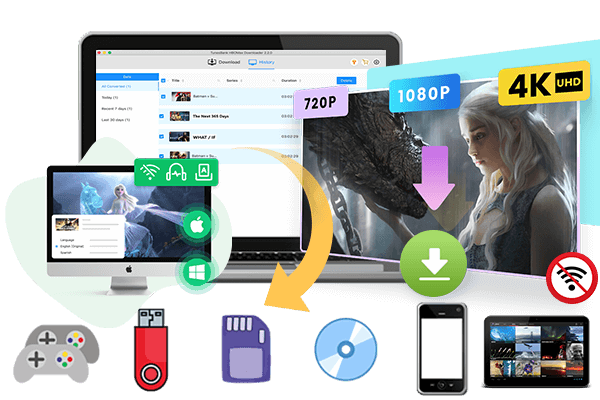
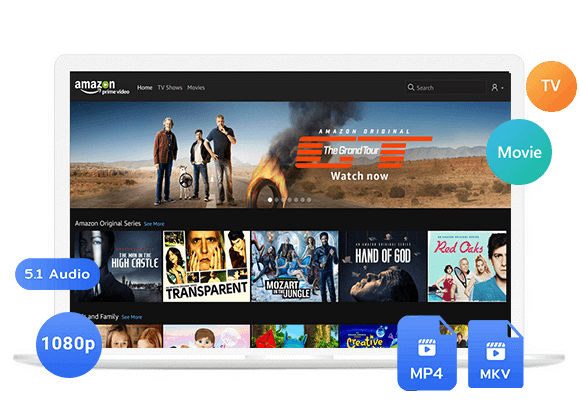
Looking for a way to download movies from Filmyfly? This guide will show you how to download movies from Filmyfly websites step by step. We will also introduce a better video downloader that lets you save movies for free from streaming services in high quality for offline watching on any device.
Looking for a way to download movies from Filmyfly for free? Many users visit Filmyfly websites to watch and save Bollywood movies, Hollywood movies, South Indian movies, and web series for offline viewing. The platform offers a large collection of movies in different resolutions and formats, making it popular among movie lovers. In this guide, we will show you how to download movies from Filmyfly websites step by step. We will also introduce a better and safer alternative All-in-One Video Downloader, which helps you download movies from streaming services in high quality for offline playback on any device.
Part 1. How to Download Movies from Filmfly via Website
Filmyfly is known for providing free movie download links for various genres and languages. There are several mirror sites available online, including:
🌐filmypass.com
This site offers a wide range of Bollywood, Hollywood, South Indian dubbed movies, and web series. It is designed with categories that help users browse movies more easily.
🌐filmyfly.cafe
Filmyfly.cafe is another mirror site that provides movie downloads in various resolutions. Users can find newly released movies and trending web series.
🌐filmyfly.camp
This website also shares free movie download links and includes multiple formats for mobile phones, tablets, and computers.
These websites usually offer movies in different qualities such as 480p, 720p, and 1080p. Users can search for their favorite content and download it directly to their devices. Although these websites are popular, users may encounter pop up ads, redirects, broken links, and unstable download speeds while trying to download Filmyfly movies for free.
Tutorial Guide to Download Movies from Filmyfly Sites
Step 1. Open the Filmyfly Website
Launch your web browser and visit one of the Filmyfly mirror sites such as filmyfly.cafe.
Step 2. Search for a Movie
Use the search bar on the homepage to find the movie you want to download. You can also browse categories like Bollywood, Hollywood, Action, Comedy, or Web Series.
Step 3. Open the Movie Page
Click the movie title to open its download page. Here you will usually see details such as file size, format, and available resolutions.
Step 4. Select Video Quality
Choose your preferred video quality such as 480p, 720p, or 1080p depending on your storage space and internet speed.
Step 5. Click the Download Link
Tap the provided download button and wait for the movie file to start downloading to your device.
Limitations of Filmyfly Websites
While Filmyfly websites allow users to download movies from Filmyfly for free, they also come with several disadvantages:
⚠️Too many pop up ads and redirects
⚠️Unsafe links that may contain malware risks
⚠️Slow and unstable download speed
⚠️Some download links may not work
⚠️Video quality may be compressed
⚠️Limited support for subtitles and audio tracks
⚠️Websites may become unavailable anytime
Because of these limitations, many users prefer safer and more stable solutions to save movies offline.
Part 2. Better Alternative to Download Filmfly Movies for Free – iMovieTool[Hot]
If you want a cleaner and more reliable way to download movies for offline watching, iMovieTool All-in-One Video Downloader is a great alternative. iMovieTool All-in-One Video Downloader is a professional video downloader that supports downloading movies and TV shows from popular streaming services. It supports platforms including Netflix, Amazon Prime Video, Disney Plus, Hulu, HBO Max, Apple TV Plus, and more. Unlike Filmyfly websites, iMovieTool provides high quality downloads without ads, pop ups, or broken links. With this tool, you can download and save videos directly to MP4 or MKV format in HD 1080p qualtiy, so you can watch them offline on any device without restrictions.
👍Main Features of iMovieTool All-in-One Video Downloader
Download Movies in MP4 or MKV
iMovieTool allows users to save movies in widely supported MP4 and MKV formats for playback on phones, tablets, TVs, and computers.
High Quality Video Downloads
The software supports HD 720p and 1080p downloads with original audio quality.
Fast Download Speed
With advanced acceleration technology, iMovieTool can download videos much faster than online movie download websites.
Batch Download Support
Users can download multiple movies or entire seasons at the same time.
Built-in Web Browser
The software comes with a built in streaming browser, so there is no need to copy and paste video URLs manually.
Keep Multilingual Audio and Subtitles
iMovieTool supports saving subtitles and audio tracks in multiple languages.
Watch Offline Without Limits
Downloaded movies can be played on any media player or device without internet connection.
Tutorial: How to Download Filmfly Movies with iMovieTool
Netflix is a good example because it offers a large collection of Bollywood and Hollywood movies that are also popular on Filmyfly websites.
Step 1. Launch iMovieTool and Select Netflix
Install and open iMovieTool All in One Video Downloader on your computer. On the main interface, choose Netflix as the streaming platform.
Step 2. Sign In to Your Netflix Account
Log in with your Netflix account inside the built in browser.
Step 3. Customize Output Settings
Click the settings icon to choose output format(MP4 or MKV), video quality, subtitle language, audio language, and output folder.
Step 4. Search for Netflix Movies
Open the “Browse” section and the built in browser will display the Netflix homepage automatically. From there, you can search for Bollywood movies, Hollywood movies, comedy films, action movies, or popular web series.
After finding the movie you want to save, click the movie title to open its detail page, let’s search The Mother as an example. Then tap the green “+” icon to add the movie for download.
Step 5. Start Downloading the Movies
click the “Download” icon next to the movie title to start downloading. iMovieTool will begin downloading the video immediately. During the process, you can view the progress bar, download status, and estimated remaining time.
Step 6. Watch Movies Offline
After downloading, you can open the output folder and watch the movies offline anytime without buffering.
Comparison Table: Filmyfly Websites vs iMovieTool
| Features | Filmyfly Websites | iMovieTool All-in-One Video Downloader |
|---|---|---|
| Video Quality | Usually compressed | HD 720p and 1080p |
| Download Speed | Unstable | Fast and stable |
| Ads and Pop Ups | Yes | No |
| Safety | Potential security risks | Safe and clean |
| Output Format | Limited | MP4 and MKV |
| Batch Download | No | Yes |
| Subtitle Support | Limited | Multiple subtitles |
| Audio Track Options | Limited | Multilingual audio |
| Offline Playback | Depends on file | Play on any device |
| Ease of Use | May redirect users | Simple built in browser |
Compared with Filmyfly websites, iMovieTool- gives users a safer and easier way to download movies for offline watching. There are no annoying ads, fake download buttons, or broken links. It also provides faster download speed and better video quality.
Another advantage is that downloaded movies are saved in MP4 or MKV format, so you can watch them on phones, tablets, smart TVs, gaming consoles, and other devices anytime. For users who like watching movies offline during travel or keeping a movie collection, iMovieTool is a better and more reliable choice.
Conclusion
Filmyfly websites such as filmypass.com, filmyfly.cafe, and filmyfly.camp are popular among users who want to download movies for free. These sites offer Bollywood, Hollywood, and dubbed movies in different video qualities. However, users may often face problems like pop up ads, redirects, broken links, and unstable download speed.
If you want a safer and smoother way to download movies, iMovieTool All-in-One Video Downloader is a better option. It supports Netflix and many other streaming services, allowing users to download high quality movies quickly in MP4 or MKV format. With fast speed, stable downloads, multilingual subtitles, and offline playback on any device, iMovieTool is a reliable alternative for downloading movies.
The Latest Articles
– Top 8 Solutions to Download Streaming Video
– Top 10 Free Movie Download Sites Recommended
– 3 Ways to Download Movies to Watch Offline
– 2 Verified Methods to Download X/Twitter Videos to MP4
– Download Twitter(X) Videos on PC, Mac and Mobile Phone
– Download Facebook Videos on PC, Mac and Mobile Phone
– 3 Ways to Download Facebook Video to MP4
iMovieTool Movie Downloader
Download movies to MP4/MKV in 1080P, download movies from Netflix, Amazon Prime Video, Disney+, HBO Max, Hulu, Apple TV+, YouTube, and Paramount+. Download videos from Twitter, Instagram, Facebook, and TikTok for free.