








 United States (English)
 Japan (日本語)
 Russia (русский)
 Germany (Deutsch)
 France (Français)
 Spain (Español)
 Italy (Italia)
 Portugal (Portugues)
 China (繁体中文)
 Turkish (Türk dili)
 Dutch (Nederlands)
 Korean(한국인)
 Saudi Arabia(عربي)
 Download from Netflix, Disney+, Prime Video, YouTube, and more.

Want to download Stranger Things to watch offline? In this guide, we’ll show you the easiest and most reliable way to download all episodes of Stranger Things Season 1-5 to MP4 in 1080P, so that you can watch Stranger Things episodes anytime, anywhere. No need to worry about Netflix’s download limits.
Question: “Where can I download all seasons of Stranger Things in high quality? New fans here.” – from Reddit
Netflix hosts the complete Stranger Things series, offering all 5 seasons for streaming and downloading. To download Stranger Things Season 1 to 5, you can:
👉 Method 1. Subscribe to Netflix Premium, and download Stranger Things episodes on the mobile devices.
👉 Method 2. Use iMovieTool Netflix Video Downloader. A permanent solution to download Stranger Things as MP4 for offline viewing anywhere.
Stranger Things Season 5 has officially begun its long-awaited rollout on Netflix. The first four episodes premiered on November 26, 2025, followed by the next three episodes on December 25, 2025. The epic series finale is scheduled to arrive on December 31, 2025, marking the end of one of Netflix’s most iconic shows. With its gripping storyline, nostalgic 1980s setting, and unforgettable characters, it’s no wonder fans always seek a reliable Stranger Things download method to enjoy the full series offline.
In this guide, you’ll learn an easy way to download Stranger Things (Season 1-5) to MP4 in 1080P/4k resolution. Keep reading to discover the easiest way to download Stranger Things and relive every mystery, scare, and adventure from Hawkins, Indiana.
Quick Overview of Stranger Things:
Stranger Things takes place in 1980s Indiana and follows a group of kids who discover strange creatures, secret experiments, and dangerous government plots. With the help of Eleven, a girl with special powers, they fight the dark world called the Upside Down while also facing the ups and downs of growing up. The show mixes mystery, horror, and touching moments of friendship and love across its 5 seasons.
Stranger Things seasons vary in length, and the final Season 5 also having 8 episodes, released in three parts through December 2025, the Stranger Things final Season 5 released in three parts on Nov 26, Dec 25, Dec 31, 2025. You can watch Full Stranger Things (Seasons 1-5) on Netflix or IMDB.
If you want to download Full Stranger Things (Seasons 1-5) to watch offline, you can use iMovieTool All-in-One Video Downloader to download Stranger Things (Full Seasons 1-5) from Netflix on your computer.
1. Where to Watch Stranger Things Online
As a thrilling sci-fi adventure series, Stranger Things series is available exclusively on Netflix. On Netflix, accessing Stranger Things requires a subscription. While some free online websites may offer the series, these websites come with intrusive ads and even potential security risks. For a safe and legal way to watch Stranger Things, the Netflix app or web player is a good option.

- Season 1 (Total 8 episodes, released on July 15, 2016)
- Season 2 (Total 9 episodes, released on October 27, 2017)
- Season 3 (Total 8 episodes, released on July 4, 2019)
- Season 4 (Total 9 episodes, released on July 1, 2022)
- Season 5 (Total 8 episodes, the first four released on November 26, 2025, three on December 25, and the final episode premieres on December 31, 2025.)
Click here, get Stranger Things (2016) Season 1 series MP4 download!
2. How to Download Stranger Things in Netflix App?
As the king of streaming OTT platform, Netflix is equipped with a download function for its paid subscribers. Currently, Netflix offers three paid plans, including Standard with ads, Standard, and Premium. With an active Netflix subscription, you are able to stream the Stranger Things episodes in Netflix app or web player, or download Netflix Stranger Things series for offline viewing. Below we will show you how to download Stranger Things season 1-5 in the Netflix app:
Step 1. Open the Netflix app on your iPhone, iPad, Android, or Amazon fire tablet.
Step 2. Sign in with your Netflix subscription account.
Step 3. Directly search for Stranger Things in the search bat, and open the season or episode you want to download.
Step 4. Hit on the “Download” button under the title to save it offline.
Step 5. After which, go to “Downloads” to access your offline library and watch Stranger Things episodes offline.
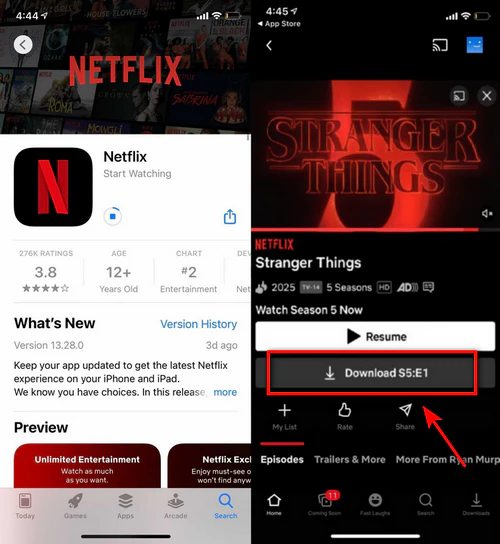
Usually, Netflix lets you download movies and TV shows, including Stranger Things, through its app if you’re subscribed to an ad-free plan. This is handy for watching offline, but there are a lot of limits.
- Due to licensing agreements, some titles may not be available to download at all.
- Netflix stoped downloaded in the Windows App, currently, you can only download Stranger Things series on mobile devices.
- Downloads can expire after a certain time (7/30 days). When you start watching, the downloaded Stranger Things will be deleted after 48 hours. Once you cancel your subscription, all your saved videos disappear.
- Netflix also limits the number of movies that can be downloaded. The ad-supported users can download up to 15 episodes of Stranger Things from Netflix, while ad-free users have a maximum of 100 episodes in total.
In short, Netflix doesn’t allow you to keep the downloaded Stranger Things episodes forever.
3. How to Download Stranger Things to MP4/MKV Files?
To get rid of download restrictions from Netflix, it’s a good idea to download and save Stranger Things on your local computer folder. Fortunately, there’s an easy solution, you can download and convert Netflix to MP4 with some third-party tool, such as iMovieTool Video Downloader.
Unlike the official download method, our iMovieTool helps you to bypass all the constraints. iMovieTool Netflix Video Downloader enables you to download Stranger Things (Season 1-5) to MP4/MKV in 1080P and even 4k quality. By applied hardware acceleration inside the software, the download speed is up to 50 times faster than the Netflix app! After saving Netflix videos to MP4, you can save them permanently and watch them anytime you want, on any device. Best of all, iMovieTool works with every Netflix plan, so you can even batch download Stranger Things if you’re using the ad-supported plan. With lossless video resolution and original sound effects retained, you will surely have the same great streaming experience offline!
Free download iMovieTool and start to download Download Full Stranger Things (Seasons 1-5) from Netflix on your computer.
👍 Highlighted Features of iMovieTool Netflix Video Downloader
- Download all content form Netflix to Mac/PC without Netflix App.
- Download Netflix movies, TV shows to MP4/MKV in 1080P.
- Download multiple Stranger Things episodes at 50X speed.
- Batch download all seasons and episodes of Stranger Things.
- Keep Stranger Things episodes forever, no expiration.
- Keep audio tracks and subtitles in multiple languages.
- Available on Windows and Mac.
With iMovieTool, you can quickly download all episodes of Stranger Things for offline watching. The downloads never expire, and you’re free to transfer them to any device or play them with any media player you like. Keep reading for a step-by-step guide on how to download Stranger Things with iMovieTool.
How to Download Stranger Things 1-5 Full Season to MP4 with iMovieTool?
You can watch Stranger Things 1-5 Full Season in Netflix, and you can use iMovieTool to download Full Stranger Things (Seasons 1-5) to Windows/Mac computer for viewing offline. Let’s teach you how to download Netflix episodes to MP4 or MKV:
Step 1. Launch iMovieTool and Sign in to Netflix Account
First, download and install iMovieTool Netflix Video Downloader on your PC or Mac. Open the program, select Netflix as the download source, and log in with your Netflix account.
Step 2. Search Stranger Things
Use the built-in search bar to look for Stranger Things. The program will display all available episodes for you to choose from.
Or, you can copy the video URL from Netflix app/browser and then paste the video link into the searching bar to seach Stranger Things directly.
Step 3. Adjust Output Settings
Click the gear icon in the top right corner to open the settings. Here, you can set MP4 or MKV as the output format, select audio and subtitle languages, choose the video codec, and pick an output folder.
Step 4. Start Downloading Stranger Things Episodes
Hit the “Download” button, the software will pop up a new windows, you can select all episodes or desired episodes you wish to download.
iMovieTool will download the episodes from Netflix and save them to your computer in MP4 or MKV format. You can also add more episodes to the download list for batch downloading.
Step 5. Check Your Downloads
When the process finishes, go to the History tab to view all downloaded videos. Click the Open output folder option to find your saved Stranger Things episodes.
Now you’ll have permanent access to all the episodes — no more worrying about Netflix’s download expiration limits.
Comparison Table: Netflix App VS iMovieTool Netflix Video Downloader
| Feature | Netflix App | iMovieTool |
|---|---|---|
| Format | Protected and limited | MP4/MKV |
| Playback | Netflix app only | Any media player |
| Expiration | Expire after a certain period | Permanent storage |
| Download Options | One track with limited quality | Batch download in 1080p HD |
4. FAQs about Downloading Stranger Things
Q1. How can I watch Stranger Things without Netflix?
Stranger Things is only available for streaming on Netflix. But if you want to skip Netflix’s download restrictions, you can use third-party Netflix video downloaders to save episodes as MP4 files. This allows you to download Stranger Things in 1080P and watch it offline anytime, without limits.
Q2. Can I download Stranger Things for free?
Unfortunately, no. Netflix no longer provides a free trial, so a subscription is required to download Stranger Things. However, there are ways to enjoy Netflix at little or no cost, such as certain T-Mobile plans or free Netflix gift codes from websites like Zouton.
Q3. Are there movies similar to Stranger Things?
Yes! While waiting for Season 5, you might enjoy these films, which share a mix of mystery, suspense, and small-town adventures:
The Vast of Night
A suspenseful sci-fi thriller set in the 1950s, following a switchboard operator and radio DJ as they investigate a mysterious audio frequency that hints at something otherworldly.
My Friend Dahmer
A biographical drama that explores the teenage years of Jeffrey Dahmer, showing the early signs of the notorious serial killer while focusing on his struggles with isolation and social challenges.
Close Encounters of the Third Kind
A classic sci-fi adventure about ordinary people who experience mysterious encounters with UFOs and the efforts of scientists to understand the extraterrestrial phenomenon.
The Lost Boys
A cult horror-comedy that follows two brothers who move to a California town plagued by vampires, mixing teen drama, action, and supernatural thrills.
Silver Bullet
A horror film based on a Stephen King story, featuring a small town terrorized by a mysterious werewolf and a young boy determined to uncover the truth and stop the creature.
Conclusion
Stranger Things is one of Netflix’s most popular sci-fi thriller series. If you’re a Stranger Things fan, now is the perfect time to download all episodes of Stranger Things (Season 1-5) in 1080P and enjoy them offline anytime, anywhere. iMovieTool Netflix Video Downloader makes this easy by supporting high-quality, batch downloads. You can even transfer the episodes to any device you like. Don’t wait, start using it now and easily download Stranger Things, you’ll love the convenience and quality!
The Latest Articles
– Top 8 Solutions to Download Streaming Video
– Top 10 Free Movie Download Sites Recommended
– 3 Ways to Download Movies to Watch Offline
– 2 Verified Methods to Download X/Twitter Videos to MP4
– Download Twitter(X) Videos on PC, Mac and Mobile Phone
– Download Facebook Videos on PC, Mac and Mobile Phone
– 3 Ways to Download Facebook Video to MP4

Netflix Video Downloader
Download Netflix movies/TV shows to MP4 with multi-language audio track and subtitle kept. Up to 50X downloading speed. Easily to save your favorite Netflix movies/TV shows to your computer for viewing offline.







