








 United States (English)
 Japan (日本語)
 Russia (русский)
 Germany (Deutsch)
 France (Français)
 Spain (Español)
 Italy (Italia)
 Portugal (Portugues)
 China (繁体中文)
 Turkish (Türk dili)
 Dutch (Nederlands)
 Korean(한국인)
 Saudi Arabia(عربي)
 Download Netflix Movies and TV shows to watch offline.
Look for ways to watch The Witcher all seasons in 1080p offline? This ultimate guide explains how to download The Witcher Season 1-4, covering official Netflix method, professional MP4 download solution, torrent-based option, and recommendations for similar shows/movies.
The popular fantasy TV series, The Witcher Season 4, was officially released on Netflix on October 30, 2025, continuing the epic storyline that captivated global audiences throughout Seasons 1–3. Another good news is the final season – The Witcher Season 5 will premiere on Netflix in October, 2026. As one of Netflix’s most successful original shows, The Witcher has built a massive fan base thanks to its dark storytelling, epic battles, and unforgettable characters.
With over two years since the season 3 aired, now, it’s the perfect time to revisit earlier seasons to refresh your memory. As The Witcher series are Netflix Originals and exclusive to Netflix, you can access all seasons of The Witcher and enjoy exciting story plots with a Netflix subscription. However, some viewers wanna a smooth playback. So, in this ultimate guide, we’ll walk you through all workable solutions to download The Witcher all seasons safely, efficiently, and permanently for offline viewing.

Way 1. Download The Witcher with Netflix App
Since all seasons of The Witcher are now available on Netflix. The most straightforward way to download The Witcher series is by using the official Netflix app. Netflix allows subscribers to download movies and TV shows to watch offline.
Therefore, you are able to download The Witcher series for offline viewing on supported mobile devices, including iPhone, iPad, Android phone or tablet, or Amazon Fire tablet. This method is ideal for casual viewers who want to watch episodes temporarily without relying on a stable internet connection.
How to Download The Witcher via Netflix App
Step 1. Launch the Netflix app on your mobile device.
Step 2. Log in with your active Netflix account.
Step 3. Search for The Witcher and select the desired season.

Step 4. Tap the download icon next to each episode or choose “Download Season”.
Step 5. Once completed, access downloaded episodes from the “Downloads” tab. You can then watch The Witcher all seasons in 1080p within the Netflix app.
However, Netflix downloads come with several drawbacks. For instance:
- All downloaded episodes are protected by DRM copyright, meaning you can only play downloaded The Witcher episodes inside the Netflix app.
- You cannot transfer any downloaded episodes to other devices or media players.
- The Netflix downloads also have an expiration date (7 or 30 days). When you begin watching, it only last for 48 hours. After which you must reconnect to the internet to renew them.
- Once your subscription ends, all downloaded The Witcher episodes or other content become inaccessible.
- Additionally, Netflix does not allow downloading episodes directly to computers, smart TVs, or external drives.
To download Netflix The Witcher Season 4, 3, 2, 1 for permanently watching, you need to download The Witcher episodes to MP4 or other regular formats. Keep reading to the Way 2 & 3.
Way 2. Download The Witcher Season 1-4 in MP4 1080P via iMovieTool (Best)
To get rid of restrictions from Netflix and save The Witcher episodes permanently, the best solution is to download Netflix to MP4 by using a third-party Netflix downloader. This is where iMovieTool Netflix Video Downloader excels.
iMovieTool Netflix Video Downloader is a powerful desktop software designed to help users download any TV show and move from Netflix to local computer. It is equipped with a browser and smart search function. This way, you can search The Witcher series directly, paste Netflix URLs, or browse content freely. The software supports batch downloads and speeds up to 50 times, enabling users to download all seasons of The Witcher at once with just a few clicks.
With its help, you can easily download all episodes of The Witcher to your computer in 1080p MP4 or MKV format. This means you can keep the episodes permanently and enjoy them offline on all media players, smart TVs, tablets, and gaming consoles. Even better, iMovieTool also preserve original audio tracks, and subtitles. You can choose to download subtitles as embedded tracks or separate SRT files, making it ideal for multilingual viewers.
Features of iMovieTool Netflix Video Downloader:
- Download Netflix TV shows and movies in MP4 or MKV.
- Support 50X faster download speed than the Netflix app.
- Download full episodes of The Witcher from Netflix to PC/Mac.
- Save The Witcher full episodes in HD 1080p, or 720p.
- Preserve original audio tracks (like 5.1 surround sound) and subtitles.
- Batch download an entire season of The Witcher with one click.
How to Download Netflix The Witcher Episodes in MP4 1080P?
Step 1. Run iMovieTool and Sign in Netflix Account
After installing and launching TunesBank iMovieTool your computer, you will see the streaming services it supports, as shown in the image below. Here we select Netflix service to enter the iMovieTool Netflix Video Downloader.
Next, securely log in to your Netflix account to access The Witcher series and all available seasons.
Step 2. Define Download Settings
Access the settings window by click on the “Menu” > “Preference”. Choose MP4 format, 1080p high resolution, preferred audio languages, subtitle type, and output folder before downloading The Witcher episodes.
Step 3. Search and Add The Witcher in 3 Ways
Thanks to the built-in web browser, iMovieTool offers multiple content-locating options so you can find the series quickly and accurately.
Way 1: Search by Name. Under “Search” section, type “The Witcher” directly into the search bar to load all seasons and episodes instantly. Alternatively, you can enter “The Witcher season 4” or other keywords to locate it.
Way 2: Search by URL. Copy any URL of The Witcher season 1/2/3/4 from Netflix, and paste it into iMovieTool’s search bar to access the series page immediately.
Way 3: Browse Online Turn to “Browse” section, navigate categories in the built-in browser, and find The Witcher manually.
Step 4. Start Downloading The Witcher Episodes to MP4
Click the “Download” button, select the desired seasons or episodes of The Witcher in the pop-up window. You may also customize advanced settings before downloading.
Then click the “Download” button button to start saving The Witcher Season 1–4 in 1080p MP4 files locally.
Step 5. Access Your Downloaded Episodes
After completion, find your downloaded episodes in the “History” section. Click the blue folder icon to open the output folder and watch downloaded The Witcher episodes offline on any device without restrictions.
Way 3. Download The Witcher Episodes Using Torrents
While the iMovieTool Netflix Video Downloader remains the best TV Series downloader for saving The Witcher series in MP4 with HD quality, there are situations where you don’t want to install any third-pary software or app and just find a free TV show download site.
Another option to download The Witcher series is through torrent-based platforms. Some free websites, such as the Internet Archive, offer limited episodes of The Witcher for streaming or downloading. However, these sources usually do not provide full seasons. Currently, only around 13 episodes of The Witcher are available for streaming and downloading on this website. But the download process is often complicated.
Step 1. (Preparation) Install a torrent client such as uTorrent on your computer.
Step 2. Go to Internet Archive in your browser, search for “The Witcher”.
Step 3. From result, click on the title to open the page.
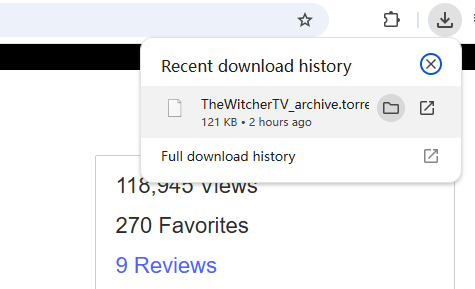
Step 4. Scroll download to find “TORRENT” and click on it.
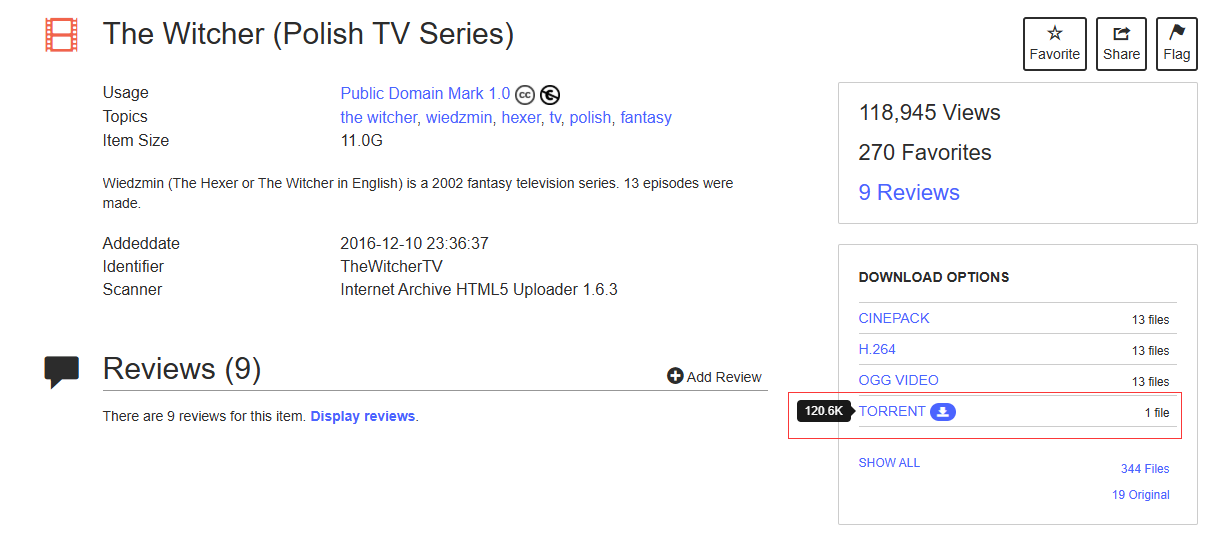
Step 5. Open The Witcher torrent on uTorrent, it will display all available download options in the torrent file.
Step 6. In the pop-up window, customize the save path and select the video file you want to download. Then, click “OK” to start downloading The Witcher episodes from the torrent file.
Top Movies & TV Shows Recommendations like The Witcher
If you enjoy epic fantasy, dark storytelling, and immersive world-building like The Witcher, there are many similar shows and movies worth watching.
Here is a list of top shows similar to The Witcher:
- Wheel of Time
- Game of Thrones
- House of the Dragon
- The Rings of Power
- The Wheel of Time
- Merlin
- Arcane
- Carnival Row
- The Sandman
- The Shannara Chronicles
Recommended Movies Like The Witcher:
- The Hobbit Trilogy
- The Lord of the Rings Trilogy
- Seventh Son
- The Witcher: Nightmare of the Wolf
- Gretel and Hansel
Verdict: Where to Download The Witcher
Ready to binge-watch The Witcher offline? Want to download The Witcher all seasons? How to download all episodes of The Witcher on PC or Mac? This articles shows you 3 easy ways to download The Witcher season 1-4 for offline viewing. If you only need short-term offline playback, the official Netflix app is a convenient option. However, for users who want to watch and download all seasons of The Witcher permanently, iMovieTool Netflix Video Downloader is the most reliable solution.
Using it, users can quickly get MP4/MKV copied files of The Witcher downloads on local computer folder, avoid expiration limits, and enjoy permanent offline playback. This method offers the best balance of quality, flexibility, and stability. So if you are a big fan of The Witcher, give iMovieTool a try. Download your favorite episodes of The Witcher 1 & 2 & 3 & 4, and build your own monster-hunting archive!
The Latest Articles
– Top 8 Solutions to Download Streaming Video
– Top 10 Free Movie Download Sites Recommended
– 3 Ways to Download Movies to Watch Offline
– 2 Verified Methods to Download X/Twitter Videos to MP4
– Download Twitter(X) Videos on PC, Mac and Mobile Phone
– Download Facebook Videos on PC, Mac and Mobile Phone
– 3 Ways to Download Facebook Video to MP4

Netflix Video Downloader
Download Netflix video to MP4 or MKV with multi-language audio track and subtitle kept. Up to 50X downloading speed. Easily to download your favorite movies/TV shows from Netflix to your computer for offline viewing.







