








 United States (English)
 Japan (日本語)
 Russia (русский)
 Germany (Deutsch)
 France (Français)
 Spain (Español)
 Italy (Italia)
 Portugal (Portugues)
 China (繁体中文)
 Turkish (Türk dili)
 Dutch (Nederlands)
 Korean(한국인)
 Saudi Arabia(عربي)
 Download Netflix Movies and TV shows to watch offline.
If you are a fan of Stranger Things, you’re in the right place to get the Stranger Things season 1 download solutions. This guide will walk you through two easy methods to download all episodes of Stranger Things season 1 on mobile and computer with high quality.
Stranger Things has captivated global audiences with its thrilling blend of 80s nostalgia, supernatural mystery, and compelling characters after its 2016 release. It’s no wonder fans always seeking an easy Stranger Things season 1 free download method to enjoy the series offline without any risks. Let’s revisit the classic first season of Stranger Thing and enjoy the suspenseful journey of Hawkins, Indiana.
This guide will show you how to download all episodes of Stranger Things Season 1 for offline viewing or save the Stranger Things series to HD MP4 using iMovieTool Netflix Video Downloader. Read on to discover how to enjoy Stranger Things series with maximum flexibility!
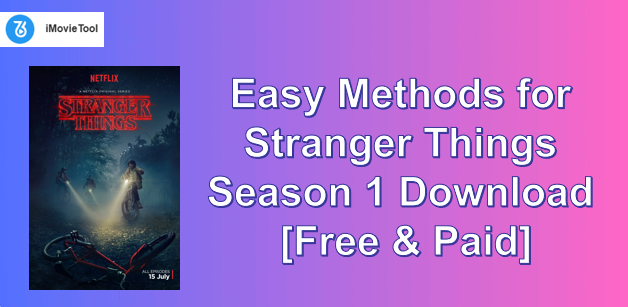
Brief Introduction to Stranger Things Season 1
Release Date: July 15, 2016.
Directors: The Duffer Brothers (Matt & Ross Duffer), Shawn Levy.
Stars: Winona Ryder, David Harbour, Finn Wolfhard, Millie Bobby Brown, Gaten Matarazzo, Caleb McLaughlin, Natalia Dyer, and others.
Episodes: 8
Episode Lengths: About 50 mins
Where to Stream: Netflix App or Website
Stranger Things Season 1 first premiered on Netflix in 2016. Set in the small town of Hawkins, Indiana, it follows a group of kids in the 1980s as they uncover supernatural events. The season blends nostalgia, mystery, and suspense, quickly becoming a global hit.
Where to Watch & Download Stranger Things Season 1?
As mentioned above, Netflix is the exclusive streaming platform for all seasons of Stranger Things (1-5), including Season 1. With an active Netflix subscription, you can access the Stranger Things seasons (1-5) and full episodes with great quality.
One of the simplest ways to get Stranger Things season 1 free download is through the official download function offered by Netflix. Whether you are subscribing to Netflix Standard, Standard With Ads, or Netflix Premium, you can use its built-in download feature to download Stranger Things episodes to watch offline.
Steps to Download Stranger Things Season 1 on Netflix (App)
Step 1. First, download and install the Netflix app on your device (iPhone, iPad, Android phone, tablet, or Amazon Fire tablet).
Step 2. Launch the Netflix app, and sign in to your Netflix account using your credentials.
Step 3. Search for “Stranger Things” in the search bar and navigate to Season 1.
Step 4. Select the episodes you want to download, and click the “Download” icon next to each episode.
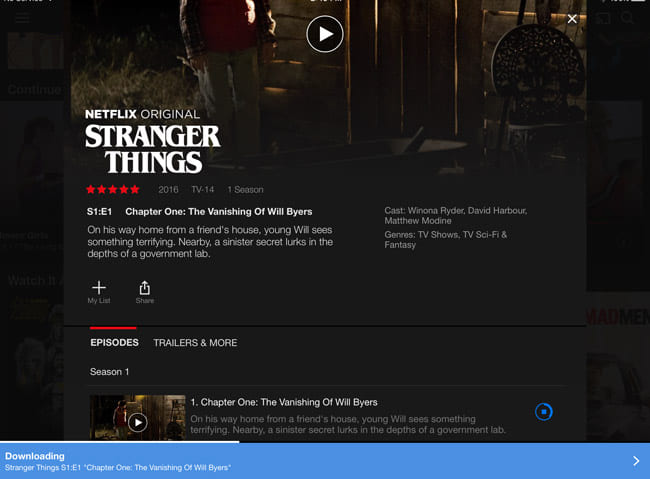
Step 5. Wait for the download to complete, and access it in the Downloads section of the app.
How to Download All Episodes of Stranger Things Season 1 to HD MP4?
If you are a Netflix subscriber, you can use the mobile app to download all episodes of Stranger Things season 1 for offline viewing. However, these downloads are only playable within the Netflix app on your mobile devices. And these Netflix downloads will be removed from your devices after 7 or 30 days. When you start watching, you only have 48 hours to finish it. So, is it possible to keep Stranger Things TV series permanently? Is there any way to download and watch Stranger Things offline in a big screen such as desktop or smart TV?
Of course, despite the Netflix app, another powerful solution to save Stranger Things all seasons for offline playback can be using a third-party Netflix downloader to extract the episodes to regular MP4 files.
That’s where the iMovieTool Netflix Video Downloader comes in handy. With it, you can easily go beyond Netflix app download limitations enjoy your favorite content anytime, anywhere. With the embedded Netflix web browser, this intelligent tool enables you to directly access the Netflix library, search and download Stranger Things directly to your computer without the Netflix app.
In just a few clicks, you can download and save your Stranger Things series to MP4 and MKV videos. In addition, iMovieTool keeps the original sound quality with up to HD 1080P quality for Netflix downloads, ensuring the best streaming offline experience. After that, you can transfer your downloaded Stranger Things episodes to any device or player to watch offline forever, even after your subscription ends.
More Features of iMovieTool Netflix Video Downloader:
- Download any movies, TV shows from Netflix without the Netflix App.
- Download Netflix movies, TV shows, and documentaries to Windows, Mac.
- Download all episodes from Stranger Things 1-5 in HD MP4, MKV format.
- Download Netflix videos in 720p or 1080p to enjoy high-quality visuals.
- 50X speed to quickly download Netflix episodes without losing quality.
- Batch download all episodes of a Stranger Things season at once.
- Download subtitles and select preferred audio tracks for each episode.
- Easy to use, search content by name, URL, or browse Netflix online.
With the help of iMovieTool Netflix Video Downloader, all users of Netflix are allowed to download episodes of Stranger Things 1-5 from Netflix in HD MP4 or MKV format, and enjoy a flexible offline playback. Once downloaded, the content is yours forever. You won’t have to worry about expiration dates or device restrictions. Watch this video guide to learn more!
How to Download Stranger Things Season 1 in HD 1080P MP4?
Step 1. Log in to iMovieTool Netflix Video Downloader
Download and install TunesBank iMovieTool on your PC or Mac. Launch the program and choose Netflix service. Then log in with your Netflix account to active the iMovieTool Netflix Video Downloader.
Step 2. Adjust Output Settings
Access the settings window by clicking the Menu bar > Preference. You can choose the output format (MP4), video quality (high 1080p), and audio language. This tool also allows you to select subtitle language and output folder.
Step 3. Search for Stranger Things
Thanks to the built-in web browser in the iMovieTool, you can search Stranger Things Season 1 in three ways:
1# Using the Name: Go to “Search” section. Type “Stranger Things” or “Stranger Things Season 1” in the search bar and select the season and episode.
2# Using the URL: Copy and the URL of the show or episode of Stranger Things Season 1 directly from Netflix’s website, and paste it in the search bar, click “Search” icon to locate it.
3# Browse Online: Turn to “Browse” section. You can browse Netflix through the iMovieTool interface and directly select the season and episodes of “Stranger Things”. Then click the “+” icon, and hit on “Download” icon to save it locally.
Step 4. Download Episodes of Stranger Things Season 1 to MP4
Click the “Download” icon, then a pop-up window will appear to let you select season & episodes. Before downloading, you may also click the “Gear” icon yo customize the downloading settings in your preferences.
After selecting the episodes of Stranger Things Season 1 you want to download, click on “Download” button. iMovieTool will start the downloading process. Wait for the download to complete, which will be stored in the folder you selected earlier.
Step 5. Access Downloaded Episodes
Once the download process is complete, go to “Season” section, or navigate to the folder you designated in the output settings to check the downloaded episodes.
All episodes of Stranger Things Season 1 will be available as MP4 or MKV files, ready to be watched offline on any device or player!
The Bottom Line
This article teaches two easy ways to get the Stranger Things season 1 download for offline watching. If you already have a subscription to Netflix, downloading Stranger Things season 1 has never been easier, simply process it in the Netflix app. But if you want true flexibility, third-party tools like iMovieTool Netflix Video Downloader could be the best solution. It helps you bypass these restrictions and download Stranger Things all seasons and episodes to your Mac or Windows computer as local HD MP4 or MKV files. With the ability to save your favorite episodes forever, you can revisit Hawkins, Indiana, anytime you like.
The Latest Articles
– Top 8 Solutions to Download Streaming Video
– Top 10 Free Movie Download Sites Recommended
– 3 Ways to Download Movies to Watch Offline
– 2 Verified Methods to Download X/Twitter Videos to MP4
– Download Twitter(X) Videos on PC, Mac and Mobile Phone
– Download Facebook Videos on PC, Mac and Mobile Phone
– 3 Ways to Download Facebook Video to MP4

Netflix Video Downloader
Download Netflix video to MP4 or MKV with multi-language audio track and subtitle kept. Up to 50X downloading speed. Easily to download your favorite movies/TV shows from Netflix to your computer for offline viewing.







