








 United States (English)
 Japan (日本語)
 Russia (русский)
 Germany (Deutsch)
 France (Français)
 Spain (Español)
 Italy (Italia)
 Portugal (Portugues)
 China (繁体中文)
 Turkish (Türk dili)
 Dutch (Nederlands)
 Korean(한국인)
 Saudi Arabia(عربي)
 Download from Netflix, Disney+, Prime Video, YouTube, and more.

Ready to binge-watch Supernatural offline? This article shows you two effective ways to download Supernatural Season 1-15 in 1080P for offline viewing. You can save Supernatural downloads from Amazon Prime or platforms on mobile devices, or permanently obtain HD MP4/MKV Supernatural downloads on Windows and Mac.
“I am a new fan of TV show Supernatural. Can someone tell me how to download Supernatural all seasons? Thanks.”
Supernatural, one of the longest-running fantasy series worldwide, continues to captivate audiences with its brotherly bond and supernatural storytelling. Even years after the final episode aired, many fans of the show are still eager to revisit the emotionally engaging plot. It’s no surprise that fans always seek a reliable Supernatural series download method to enjoy the full series offline, anytime and anywhere.
Are you one of them? You’re in the right place to get the Supernatural complete series download solutions. This article will walk you through two simple methods step by step. Keep reading to discover the best way to download all episodes of Supernatural (Season 1-15) in 1080P for offline viewing!

Where to Download All Supernatural Episodes?
As a globally popular TV show, Supernatural seasons 1 to 15 are available on multiple official streaming and digital platforms. You can subscribe to Amazon Prime Video or Peacock to watch and stream all Supernatural episodes with excellent video quality. Alternatively, you may also purchase Supernatural seasons or individual episodes from some digital platforms like YouTube, Google Play, Apple TV, Fandango at Home, and Amazon Prime, then download the Supernatural episodes to watch offline.
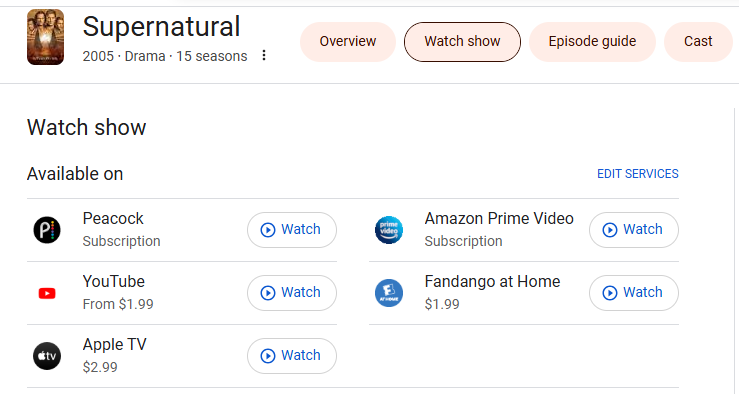
How to Download Supernatural Episodes in 1080P on OTT Services?
Can you download episodes of TV show Supernatural? Of course! Most OTT platforms support offline downloads through their official apps, allowing subscribers to watch content without an internet connection. With an active subscription on Amazon Prime Video or Peacock, you can watch and download all Supernatural episodes. Or, if you have purchased Supernatural seasons or episodes, you are also allowed to download Supernatural series on your PC, Mac, Android, or iPhone to watch offline.
Here we take the Amazon Prime as example, to show you how to download Supernatural episodes in 1080p.
Step 1. Open the Amazon Prime Video app on your Android phone, iPhone, iPad, or compatible tablet.
Step 2. Sign in with your active Amazon Prime subscription account. If you purchased the Supernatural episodes on Amazon Prime, you don’t an subscription account.
Tips: If you are new to Amazon Prime, you are able to get a 30-day free frial, and then download Supernatural episodes for free!
Step 3. Search for Supernatural in the search bar, open the info page of the season you want to download.
Step 4. Tap the “Download” button and select your wanted episodes or download the entire season of Supernatural.
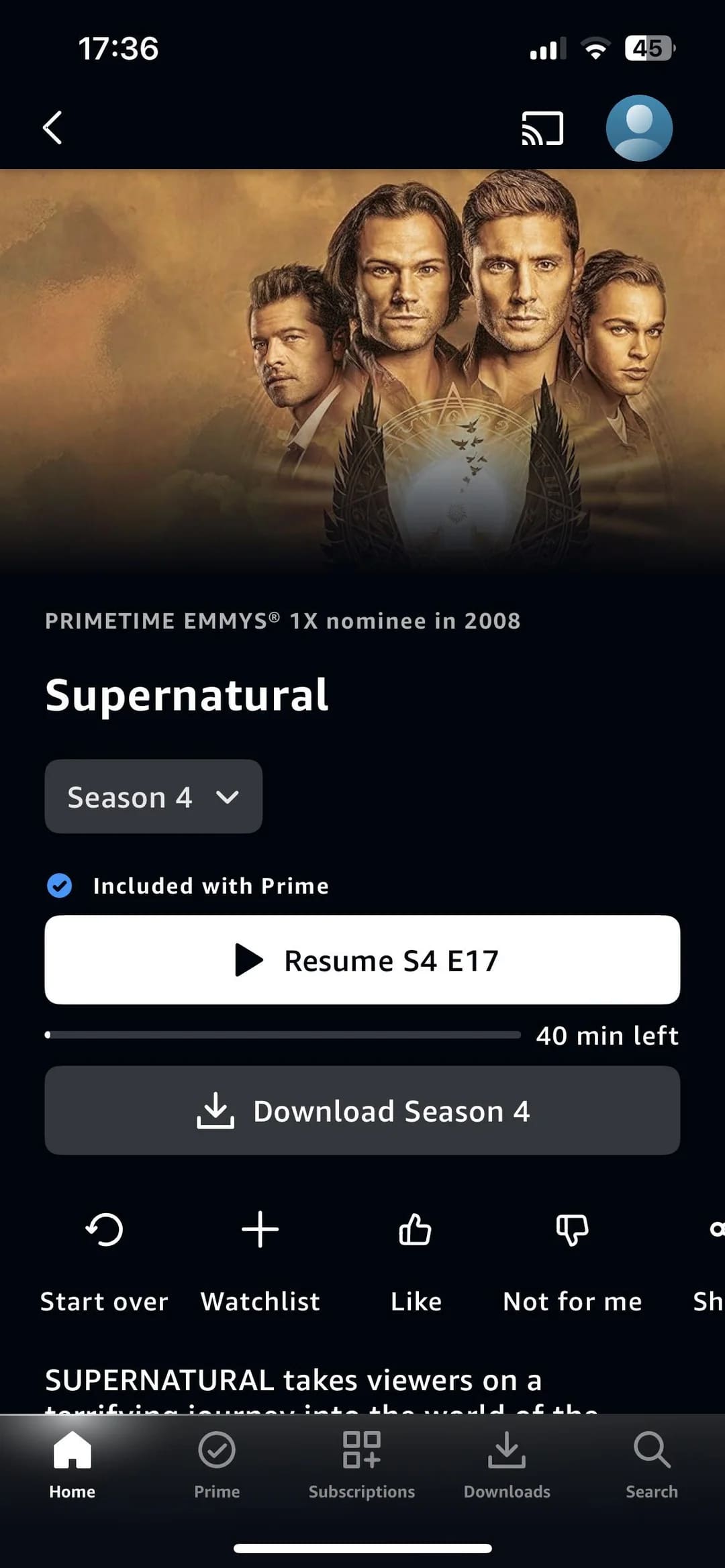
Step 5. Afterwards, you can access the downloaded Supernatural episodes from the “Downloads” section within the Prime Video app.
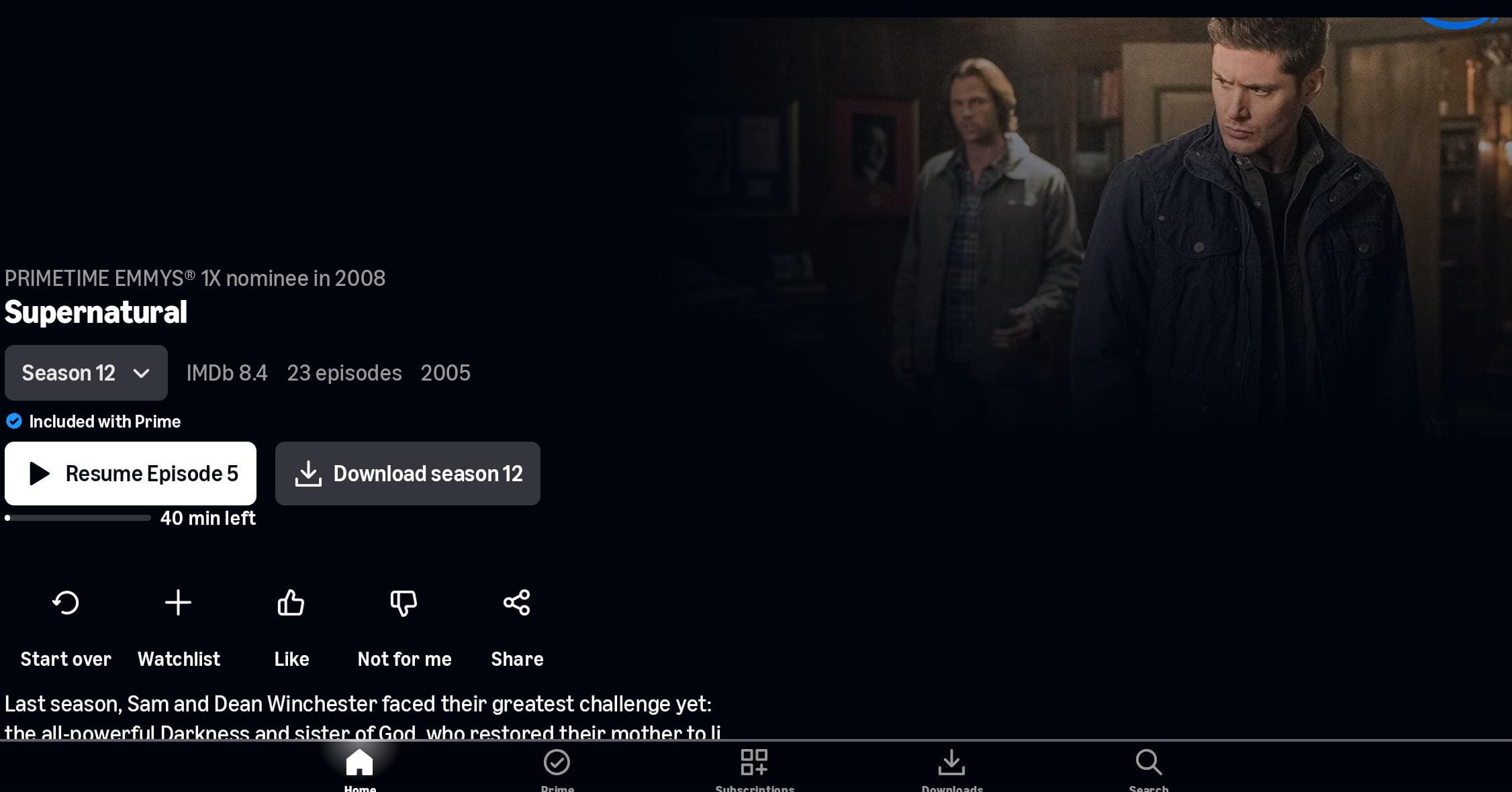
Meanwhile, you may also download Amazon Prime Supernatural series to PC or Mac, open the Prime Video app on desktop, find the Supernatural, select the season, and tap “Download season” to save all episodes of the Supernatural season at once.
While this Supernatural series download method is useful, there are certain limitations you can’t ignore. For example:
Device Limits: You can only download videos from Amazon Prime or other streaming platforms in a few limited authorized devices.
Expiration: All Supernatural series downloads expire after a set period. Once begin watching, it will be removed from your device after 48 hours.
Quantity Limits: For Prime Video subscribers, you can download 15-25 episodes of Supernatural at a time within the app. If you purchased the Supernatural series, the downloads are limited to no more than four devices simultaneously.
Playback Restrictions: You can only watch the downloaded Supernatural episodes within the streaming app.
How to Download All Episodes of Supernatural (Season 1-15) in 1080P Permanently
To overcome download restrictions from streaming platforms, it is a good idea to download all Supernatural episodes to HD MP4 using a professional streaming video downloader.
This is where TunesBank iMovieTool All-in-One Video Downloader comes into play! It is a powerful tool designed to help users download movies and TV shows from streaming platforms like Amazon Prime, Netflix, YouTube, Apple TV+, Hulu, Disney+, Max, Paramount+, etc. This tool outputs 1080P MP4 and MKV files so you can keep your downloads forever. If you have subscribed to these platforms (any plan, even the ad tiers), you can utilize it to download all the episodes of Supernatural Season 1-15 in 1080p resolution. What’s more, you can choose your preferred audio tracks and subtitle languages, subtitle formats to save Supernatural downloads.
For Amazon users, turn to the TunesBank Amazon Video Downloader. It can download TV shows and movies from Amazon Prime Video, as well as purchases and rentals from Amazon’s entire catalog. This way, you can easily download Amazon Prime Supernatural to HD MP4 and keep them permanently even after your subscription ends.
More Features of TunesBank iMovieTool:
- Supports Netflix, Prime Video, YouTube, Disney+, Hulu, Apple TV+, Paramount+, etc.
- Download TV shows and movies in 1080p resolution with high resolution and EAC3 5.1 or AAC 2.0 audio quality.
- Up to 50X faster to download Supernatural season 1–15 in 1080P to computer without streaming app.
- Download all Supernatural episodes to MP4 or MKV format for flexible playback.
- Save multiple languages for subtitles and audio tracks and original video metadata.
- Batch add entire seasons or the complete series of Supernatural to the queue.
Detailed Steps: Download Supernatural (Season 1–15) in 1080P MP4
Amazon Prime Video hosts the complete Supernatural series, offering all 15 seasons for streaming. Below we will show you the detailed steps on how to download Supernatural series to MP4 from Amazon Prime using the TunesBank iMovieTool Video Downloader.
Step 1. Install TunesBank iMovieTool and Choose Amazon Prime
After downloading and installing the TunesBank iMovieTool on your Mac or PC, open the software. As you can see below, it supports up to 12 streaming platforms.
For example, here we select the Amazon Prime service, select a country to go on.
Step 2. Sign In with Amazon Account
You will then enter the TunesBank Amazon Video Downloader. Next, sign in to your Amazon Prime account using the built-in browser. This grants secure access to Supernatural episodes for downloading.
Step 3. Modify Download Settings
Go to the Menu bar and choose Preferences. In the pop-up settings panel, select MP4 as the output format, choose high 1080P video quality, preferred audio language, subtitle type, and output folder before downloading Supernatural.
Step 4. Search and Add Supernatural Series
TunesBank iMovieTool offers three flexible ways to locate Supernatural episodes for downloading.
Browse Online: Tap “Browse” tab to navigate the platform normally. Find “Supernatural”, open its series page, click the green “+” icon to let the downloader recognize them automatically.
Then, it will pop up a small window, from where you can hit on the “Download” icon to save the Supernatural episodes directly.
Using the Name: Tap “Search” tab, enter “Supernatural” into the search bar. TunesBank will display all available seasons, allowing you to select and download Supernatural seasons 1 to 15 easily.
Using the Amazon URL: Or, copy the Amazon Prime URL of Supernatural and paste it into TunesBank. The program will instantly detect the series and prepare it for download.
Step 5. Start Downloading All Supernatural Episodes in 1080p
Once added, click “Download” icon, and you’ll see a list of all 15 seasons of Supernatural. You can select individual episodes, entire seasons, or use “Select All” to queue the complete 327-episode series for download.
Hit on “Download” button to start downloading all Supernatural episodes in 1080P quickly and efficiently.
Step 6. Get Downloaded Supernatural Episodes
Once completed, access your downloaded Supernatural episodes from the “History” section or go to the output folder you specified. The Supernatural episodes are stored in MP4 format with 1080p high quality. You can now watch Supernatural offline anytime without Amazon Prime or internet access.
Verdict: Which Way Is Best for Downloading Supernatural Episodes
With 15 seasons and over 300 episodes, Supernatural is a series worth watching and preserving. While streaming platforms offer convenient access, their offline download features come with limitations that prevent long-term flexibility. If you are looking to watch Supernatural episodes offline on any device or player without any restrictions, then TunesBank iMovieTool All-in-One Video Downloader will be the perfect choice for you.
With this great tool, you can easily download all episodes of Supernatural (Season 1–15) in 1080P, save them as MP4 or MKV files locally, and enjoy permanent offline viewing. So you don’t worry about streaming platforms remove the Supernatural series, download limits, expiration dates, or device limits, subscriptions or internet availability. Try TunesBank iMovieTool right now and make your Supernatural viewing experience more hassle-free and flexible!
The Latest Articles
– Top 8 Solutions to Download Streaming Video
– Top 10 Free Movie Download Sites Recommended
– 3 Ways to Download Movies to Watch Offline
– 2 Verified Methods to Download X/Twitter Videos to MP4
– Download Twitter(X) Videos on PC, Mac and Mobile Phone
– Download Facebook Videos on PC, Mac and Mobile Phone
– 3 Ways to Download Facebook Video to MP4

iMovieTool Movie Downloader
Download movies to MP4/MKV in 1080P, download movies from Netflix, Amazon Prime Video, Disney+, HBO Max, Hulu, Apple TV+, YouTube, and Paramount+. Download videos from Twitter, Instagram, Facebook, and TikTok for free.







