








 United States (English)
 Japan (日本語)
 Russia (русский)
 Germany (Deutsch)
 France (Français)
 Spain (Español)
 Italy (Italia)
 Portugal (Portugues)
 China (繁体中文)
 Turkish (Türk dili)
 Dutch (Nederlands)
 Korean(한국인)
 Saudi Arabia(عربي)
 Download HD movies & TV shows from Prime Video fastly and losslessly.
Is Amazon Prime better than Netflix? In this Amazon Prime VS Netflix review, we’ll compare every important aspect, including content library, pricing, user interface, video quality, device support, and offline downloads. Plus, we’ll share a powerful bonus tool to help you download HD videos from both platforms as permanent MP4/MKV files.
Today, as online video streaming becomes more popular than ever, a growing number of platforms are competing to deliver better content and more personalized viewing experiences. Among them, Amazon Prime Video and Netflix, as two thriving streaming video platforms, have attracted millions of subscribers and built massive libraries of movies, TV shows, and original content.
However, if you’re new to these platforms, you may feel confused about which one is best to buy. So, in this Amazon Prime vs. Netflix comparison, we’ll break down everything you need to know about both platforms, including their features, user interfaces, benefits, pricing, and performance, to help you decide which streaming service suits you best. Now, let’s dive in.
Amazon Prime vs. Netflix: Price Plans
When get start with a new streaming video service, you will wonder if you can access its video content for free. Both Amazon Prime and Netflix provide multiple pricing options. Amazon also allows users to rent or purchase movies and TV shows directly without a subscription, and these can be downloaded within the Prime Video app. Additionally, Amazon offers a 30-day free trial for both Prime Video and full Prime membership, while Netflix stopped offering free trials in October 2020. Check the table below to see its pricing plans in details.
| Amazon Prime Video | Netflix | |
| Free Trial | Yes, 30-day | No |
| Price | ● Amazon Prime membership: $14.99 / month or $139 / year, including free shipping, Prime Video (with ads), Amazon Music, and pharmacy/grocery discounts ● Standalone Prime Video Subscription: $8.99 / month |
● Standard with ads: $8.99 / month ● Standard: $19.99 / month ● Premium: $26.99 / month |
Winner: Amazon Prime
Amazon Prime vs. Netflix: Content Library
The video library is the heart of a streaming video platform. Though both platforms invest heavily in original productions and licensed content, they differ in focus and variety.
Amazon Prime Video offers a vast library of movies, TV shows, sports content, and even live TV options in some regions. Popular Prime exclusives include The Boys, Reacher, The Marvelous Mrs. Maisel, and blockbuster movies available for rent or purchase. Additionally, Amazon integrates third-party channels, expanding its catalog beyond standard subscriptions.
Netflix, on the other hand, has built a reputation for its extensive library of feature films, documentaries, TV shows, anime, and award-winning Netflix Originals. You can access popular TV series like Stranger Things, Squid Game, Wednesday, The Witcher and more on Netflix. Compared with Amazon Prime Video, Netflix consistently delivers high-quality original content across genres.
Winner: Netflix
Amazon Prime vs. Netflix: User Interface and User Experience
The user interface is another important factor when comparing Amazon Prime vs. Netflix. A smooth and intuitive interface can significantly enhance the streaming experience.
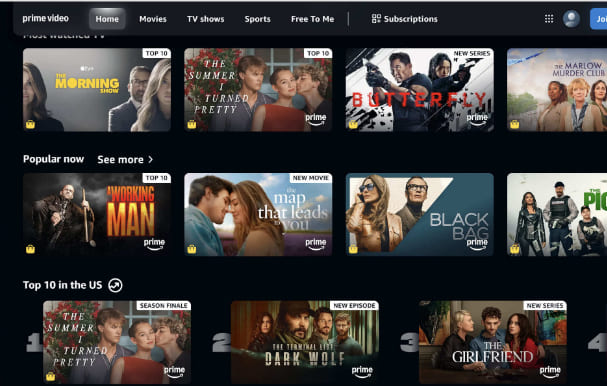
Amazon Prime Video has often been criticized for a cluttered and confusing interface. The home screen mixes free content with rentals and purchases, making it hard to tell what’s included. Recently, though, it has improved with clearer categories, “Top 10” lists, and the X-Ray feature that shows actors, music, and trivia during playback.
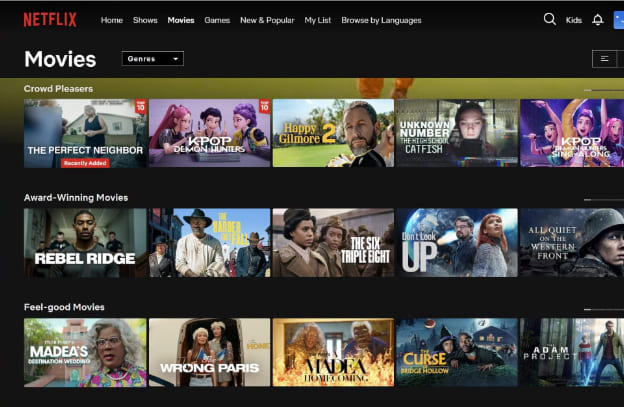
Netflix is widely praised for its clean, user-friendly interface. It features personalized recommendations, seamless navigation, and an efficient content discovery system. Users can easily browse categories, continue watching content, and receive tailored suggestions based on viewing history. The interface is consistent across all devices, making it easy to pick up where you left off.
Winner: Netflix
Amazon Prime vs. Netflix: Video Quality
Video quality is essential when evaluating Netflix VS Amazon Prime. Both platforms support 4K and HDR, delivering a great streaming experience on a 4K TV or a high-end sound system. But there are subtle differences.
Netflix delivers exceptional video quality. The Premium plan offers 4K, HDR10, Dolby Vision, and Dolby Atmos audio on compatible devices. However, the Standard tiers can only watch videos in FHD 1080p resolution.
Amazon Prime Video also supports HD, 4K Ultra HD, and HDR formats, including Dolby Atmos audio for select titles. Unlike Netflix, some 4K content is included without requiring a premium tier. But not all originals are available in high quality.
Winner: Draw
Amazon Prime vs. Netflix: Platform Availability and Device Support
You can access Amazon Prime Video or Netflix content through its official app or web player on some supported devices. But Netflix doesn’t launch a dedicated Netflix app for Mac. Now, let’s compare Amazon Prime vs Netflix in terms of platform availability and device support.
| Amazon Prime Video | Netflix | |
| Country Availability | Over 240 countries and territories | Over 190 countries/regions |
| Device Support | iOS, Android, Amazon Fire tablet, Fire TV devices, game consoles (PlayStation/Xbox), web browsers, set-top boxes | iOS, Android, Amazon Fire tablet, Smart TVs, Apple TV, Chromecast, game consoles, web browsers, streaming sticks |
| Offline Downloads | Windows PCs, Macs, laptops, smartphones, and tablets | iOS, Android, Google Chromebooks, and Amazon Fire tablets. |
Winner: Draw
Amazon Prime vs. Netflix: Offline Downloads
Offline downloads can an important factor many of you will need to watch your favorite videos without internet connection. Both platforms allow users to download content for offline viewing. However, not all titles are downloadable. And, the download function only works on a few supported devices. Furthermore, downloaded content expires after 30 days or 48 hours after starting playback.
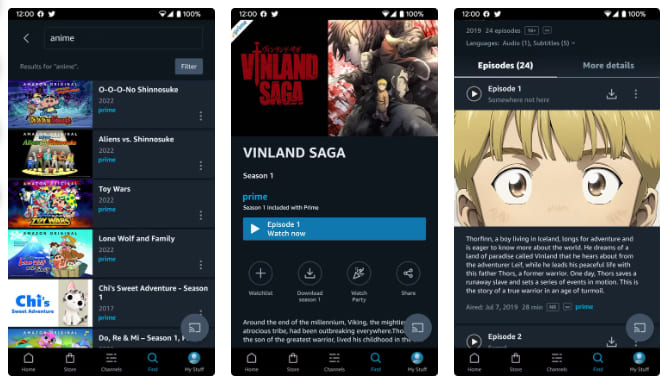
Amazon Prime Video lets users download videos on Windows PCs, Macs, laptops, smartphones, and tablets through its Prime Video app. It also supports downloading rented or purchased content for offline viewing, even without a subscription.
Netflix allows downloads on iPhone, iPad, Android, Google Chromebooks, and Amazon Fire tablets via the Netflix app.
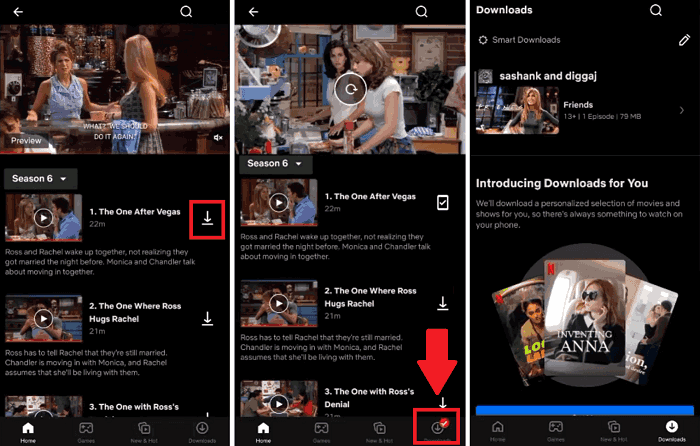
Winner: Amazon Prime
Round-up: Which One Is Better, Amazon Prime or Netflix?
After comparing Amazon Prime vs. Netflix, it’s clear that both platforms excel in different areas. The “better” service depends entirely on your viewing habits. To simply conclude, Netflix stands out for its original content and user-friendly interface, while Amazon Prime offers better pricing flexibility, additional perks, and more versatile download options.
If you prioritize exclusive shows and a polished viewing experience, Netflix is the better choice. However, if you want more value for money and broader functionality, Amazon Prime Video may be the ideal option.
Bonus: Download HD Videos from Netflix and Amazon Prime as MP4 Files
Typically, streaming platforms often come with limitations such as app-only playback, expiration dates, and regional restrictions, etc. To overcome these issues and keep the video offline permanently, using a professional MP4 video downloader is the best solution.
TunesBank iMovieTool Video Downloader is a simple yet powerful tool designed to help users download streaming videos from platforms like Netflix and Amazon Prime, Hulu, Max, Disney+, Apple TV+, YouTube, Paramount+, and more. It provides high-quality MP4/MKV downloads while maintaining original audio tracks and subtitles.
With its intuitive interface and built-in web browser, users don’t need to install separate streaming apps. Simply browse content online, add video title, define output parameters, and download it instantly. The software offers up to 50X faster download speeds using GPU hardware acceleration and batch processing. You can download entire TV series seasons with just one click. After downloading, you can easily watch videos offline or transfer them to other devices without restrictions.
Explore More Features of iMovieTool Video Downloader:
● Supports 12+ platforms, including Amazon Prime, Netflix, Hulu, Max, etc.
● Download movies, TV series, shows, dramas, videos to PC/Mac without streaming app
● Download streaming videos in MP4 or MKV formats for wide device compatibility
● Preserve HD and or even 4K video quality with original audio tracks and subtitles
● Support batch downloading to save multiple movies or episodes simultaneously
● Maintain multilingual subtitles and audio tracks for flexible viewing preferences
● Offer 50X fast download speeds for efficient and time-saving offline video access
● Built-in browser for searching and downloading content directly within the software
● Retain metadata information for better organization and media library management
Easy Guide to Download Amazon Prime Video as HD MP4
Step 1. Select a Platform and Log In Account
Download and install the TunesBank iMovieTool Video Downloader on your Mac or Windows PC. Launch the software and On the main interface, choose a video platform. For example, here we click on Amazon Prime Video.
Then, log in to your account through the built-in browser to access your streaming library securely.
Step 2. Define Output Settings
Move to the Menu icon at the upper right corner, and choose Preference option. Adjust the output settings by selecting MP4 format, preferred resolution, audio language, and subtitle options. This ensures your downloaded videos match your playback preferences and device compatibility.
Step 3. Search for Amazon Videos
You can search for content in three ways within the software.
# Browse Online: Tap “Browse” tab, use the built-in browser to explore categories, and select content just like you would on the official website.
Open the video page, and click “+” icon to add it to the download queue. In the pop-up window, you can directly hit on the “Download” icon to save it instantly.
# Using Name: Tap “Search” tab, enter the movie or show title directly into the search bar. The software will quickly display relevant results from the platform.
# Using URL: Copy and paste the video URL from Netflix or Amazon Prime Video into the search field to locate the exact content instantly.
Step 4. Start to Download Amazon Video
After selecting your desired content, click the “Download” icon next to the title. The software will start processing and downloading the Amazon video in your chosen format and quality.
Once the download is complete, you can move to the “History” section and access your Amazon videos from the local folder. These Amazon videos can be played offline or transferred to other devices without restrictions.
Final Words
In the debate of Amazon Prime vs. Netflix, there is no a dedicated answer. Both platforms deliver excellent streaming experiences, but they cater to different needs. Netflix leads in original content, interface, and video quality. Amazon Prime offers better value, flexibility, and the unique option to rent/buy new releases. Choosing between Amazon Prime Video and Netflix ultimately comes down to your viewing habits and preferences. If your budget allows, you can subscribe to both platforms at the same time!
If you want to download videos from Amazon Prime or Netflix for offline viewing, try iMovieTool Video Downloader. It integrates 12+ popular streaming platforms into one place. You can directly download movies, TV shows, and original videos from both, without installing streaming apps on your desktop! Download it to experience its super-fast 50X downloading speed and lossless output today!
The Latest Articles
– Top 8 Solutions to Download Streaming Video
– Top 10 Free Movie Download Sites Recommended
– 3 Ways to Download Movies to Watch Offline
– 2 Verified Methods to Download X/Twitter Videos to MP4
– Download Twitter(X) Videos on PC, Mac and Mobile Phone
– Download Facebook Videos on PC, Mac and Mobile Phone
– 3 Ways to Download Facebook Video to MP4

Amazon Video Downloader
Download movies and TV shows from Amazon Prime Video in MP4 or MKV format with audio track and subtitles kept. Up to 50X downloading speed. Save your favorite Amazon Prime videos to your computer for viewing offline.







