








 United States (English)
 Japan (日本語)
 Russia (русский)
 Germany (Deutsch)
 France (Français)
 Spain (Español)
 Italy (Italia)
 Portugal (Portugues)
 China (繁体中文)
 Turkish (Türk dili)
 Dutch (Nederlands)
 Korean(한국인)
 Saudi Arabia(عربي)
 Download HD movies & TV shows from Disney Plus.

This article covers 2 effective ways to download Marvel movies to watch offline.
👉 WAY 1. Download Marvel movies in the official Disney+ app.
👉 WAY 2. A permanent solution using a professional third-party tool, TunesBank DisneyPlus Video Downloader, download Marvel movies and also all its TV series to local computer in MP4 or MKV format with original audio quality (AAC 5.1, EAC3 5.1) and HD resolution.
For Marvel fans, 2026 is a crucial year, with multiple new Marvel movies and TV series will be officially released on Disney+ for streaming and offline watching. From epic Avengers blockbusters to must-watch superhero originals, are you ready to enjoy these superhero content? With a Disney Plus subscription, it is quite easy and convenient to watch Marvel movies in your home theatre!
If you want more flexibility, downloading Marvel movies to watch offline is the best solution. In this guide, we’ll walk you through two effective ways to download Marvel movies, including how to get Marvel movies MP4 downloads with English audio and subtitles. This way, you can enjoy your favorite Marvel films anytime, anywhere – without restrictions. Let’s get started.
Upcoming New Marvel Movies and Shows for 2026
Before diving into how to download Marvel films, let’s take a quick look at the list of upcoming Marvel movies and shows in 2026.
Upcoming Marvel Movies in 2026
The most anticipated Marvel series movies scheduled for 2026 include:
- Spider-Man: Brand New Day
- Avengers: Doomsday
Upcoming Marvel TV Shows in 2026
Disney Plus continues to be the home of exclusive Marvel series. Here’s what’s coming in 2026:
- Spidey and His Amazing Friends – Season 4
- Your Friendly Neighborhood Spider-Man – Season 2
- Wonder Man
- Daredevil: Born Again – Season 2
- VisionQuest
- X-Men’97 – Season 2
WAY 1. Download Marvel Movies in Disney+ App
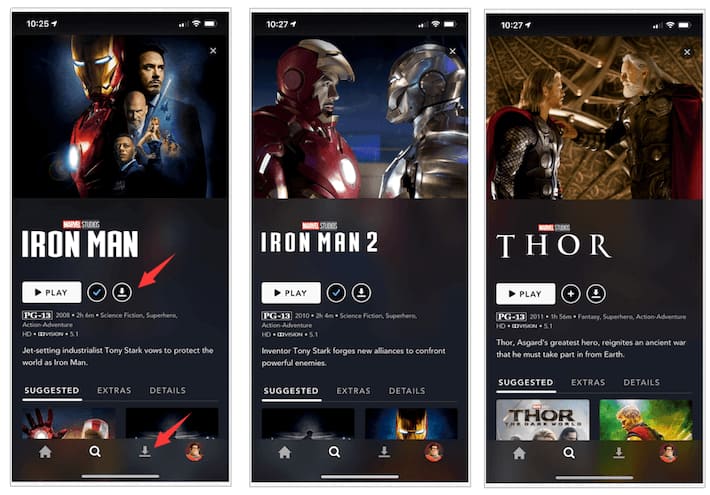
Currently, Marvel movies and also all its TV series are available on Disney Plus. If you have subscribed to Disney+ Premium, you can directly download Marvel movies from Disney Plus to your iPhone or Android. Just install the Disney+ app, find your Marvel movies, and hit the download button.
However, there are limitations. The downloaded Marvel movies can only be watched inside the Disney+ app and expire after a certain period. Once you cancel the Disney+ subscription, all downloads become inaccessible. Don’t worry, to bypass Disney Plus download limit, the WAY 2. can help.
-
Preparation for Downloading Marvel Movies:
A Disney+ Premium (No Ads) subscription
A stable internet connection for downloading
A compatible mobile device (Android phone/tablet, iPhone, or iPad)
The latest version of the Disney+ app installed on mobile device
Here’s how to download Marvel movies and enjoy the offline viewing within the Disney+ app:
Step 1. Download the Disney+ app from Google Play Store or Apple App Store and sign in with your Premium account.
Step 2. Search for the Marvel movie or Marvel series you want to download.
Step 3. Open the movie or episode page and tap the “Download” icon.
Step 4. Once downloaded, go to the Downloads section to watch Marvel movies offline without internet.
WAY 2. Download Marvel Movies in HD MP4 via TunesBank
As shown in Way 1, the official DisneyPlus downloads are restricted by DRM protection, making them temporary and device-locked. Good news, you can rely on a third-party tool to save Marvel movies downloads from DisneyPlus forever. Here, TunesBank DisneyPlus Video Downloader is recommended.
The software helps you download any DisneyPlus video to MP4/MKV in HD resolution, and for sure, including all the Marvel movies and shows. Better yet! You can use TunesBank to download Marvel movies with any Disney+ plan, even the Basic ads tiers. Plus, all Marvel movies downloads preserve the original sound effects, multilingual audio tracks, and subtitles. With the 50X lightning speed and batch mode, you can add multiple Marvel movies or entire series at once and download them efficiently.
Great Features of TunesBank Disney+ Video Downloader:
- Download Marvel movies from Disney Plus in MP4 or MKV for flexible playback.
- Download Marvel movies to computer to watch offline permanently.
- Download all Disney+ movies and series with the best HD quality.
- Built-in Disney+ browser to browse and download Marvel movies online.
- Batch download Disney+ movies and TV shows at up to 50X faster speed.
- Preserves all available audio languages (English dub, original, etc.) and subtitle tracks (SRT/ASS).
With TunesBank, it is possible to download all Marvel movies and TV series from DisneyPlus for offline viewing. You can keep the DisneyPlus downloads forever, transfer them to any device, and watch them with local media player like iTunes, WMP, VLC, QuickTime, etc. Scroll down to get the detailed tutorial for how to download Marvel movies in HD MP4 with TunesBank DisneyPlus Video Downloader.
How to Download Marvel Movies on Computers in MP4 Permanently
Downloading the Marvel movies is very simple if you have TunesBank DisneyPlus Video Downloader on your computer. With a few clicks, it can export Marvel movie downloads, with the multi-lingual audio tracks and subtitles kept. Follow below steps:
Step 1. Open TunesBank DisneyPlus Video Downloader
Download and install TunesBank iMovieTool on your Windows or Mac computer. Launch the program, select Disney service from the main interface.
Enter the TunesBank DisneyPlus Video Downloader.
Step 2. Sign In Disney+ Account
Then, you need to log into your Disney+ account, either Basic or Premium. This grants the software access to the whole video library.
Step 3. Three Modes to Search for Disney Marvel Movies
Within TunesBank, you’ll see an integrated browser. First, tap “Browse” tab, find the Marvel movie you want. Open the movie directly, and click the green “+” icon in the right side to add it into download queue.
Second, you can turn to the “Search” tab, type the keyword or name of the Marvel movie or series you want to download. For example, you can enter Spider-Man: Brand New Day in the search field, TunesBank will automatically detect it and display a download dialog box.
Third, if you’ve already copied a URL of Marvel movie from Disney Plus, simply paste the URL in to TunesBank for precise search.
Step 4. Define Download Settings
Next, click on the Menu bar and choose “Preference”. In the pop-up window, choose MP4 as your output format. Select your preferred video quality (high), audio language (English or others), and subtitle track if needed.
Step 5. Start Downloading Disney Marvel Movies
Click the “Download” button to begin downloading Marvel movie from Disney+ web browser. During the process, you can add more Marvel movies to the download queue for batch downloading.
Step 6. Get Downloaded Disney Marvel Movies
Once finished, access the “History” section to find the downloaded Marvel movies. You can now watch Marvel movies offline on any device without restrictions.
FAQs about Downloading Marvel Movies
Where can I download all Marvel movies?
Currently, Disney Plus is the primary official platform that offers the full Marvel Cinematic Universe (MCU) library for download. With a valid Disney+ Premium subscription, you can download Marvel movies and series on supported devices such as iPhone, iPad, Android phones, and tablets for offline viewing. However, these downloads come with limitations, including device restrictions and expiration dates. To get around it, TunesBank DisneyPlus Video Downloader is the best choice.
Where can I watch Marvel movies besides Disney Plus?
Besides Disney Plus, some Marvel movies may be available on digital rental or purchase platforms like Netflix, Amazon Prime Video, Hulu, YouTube, Apple TV+, etc., depending on your region and licensing agreements. To download Marvel movies from these platforms, you can consider using the TunesBank iMovieTool (All-in-One Video Downloader).
What are good websites to download marvel movies or series for free?
First, Marvel movies are copyright-protected and primarily exclusive to Disney. While some free movie websites offer a few Marvel movies resources, they usually feature poor quality, intrusive ads, pop-ups, and security risks. To watch Marvel movies safely and legally, it is best to choose the Disney Plus platform.
Final Words
By now, you know how to download Marvel movies to watch offline. While the Disney+ app offers a basic offline option, its limitations make it impossible for long-term or flexible viewing. With the help of TunesBank DisneyPlus Video Downloader, you can easily and quickly download Disney Marvel movies, save them to MP4 files, and enjoy Marvel films anytime, anywhere, without internet or expiration worries!
The Latest Articles
– Top 8 Solutions to Download Streaming Video
– Top 10 Free Movie Download Sites Recommended
– 3 Ways to Download Movies to Watch Offline
– 2 Verified Methods to Download X/Twitter Videos to MP4
– Download Twitter(X) Videos on PC, Mac and Mobile Phone
– Download Facebook Videos on PC, Mac and Mobile Phone
– 3 Ways to Download Facebook Video to MP4

Disney+ Video Downloader
Download any Disney+ movies/series/originals to MP4/MKV in high quality on your computer.







