








 United States (English)
 Japan (日本語)
 Russia (русский)
 Germany (Deutsch)
 France (Français)
 Spain (Español)
 Italy (Italia)
 Portugal (Portugues)
 China (繁体中文)
 Turkish (Türk dili)
 Dutch (Nederlands)
 Korean(한국인)
 Saudi Arabia(عربي)
 Download from Netflix, Disney+, Prime Video, YouTube, and more.

Learn how to download long YouTube videos on PC, Mac, Android, iPhone, and online in 4 ways. Discover the best long YouTube video downloader here to save YouTube videos longer than 2 hours in MP4 format with high quality.
Quick Review: Long YouTube Video Downloaders in This Guide
- Best for Offline Save + Subtitle Playback: iMovieTool YouTube Video Downloader (100% Success)
- Best Official Method: YouTube Premium
- Best for Occasional Online Downloads: Online YouTube Downloader
- Best Free Browser Solution: Video Downloader Professional
YouTube is a good place to access millions of long-form videos, including full-length movies, podcasts, online courses, documentaries, concerts, gameplay recordings, multi-hour live streams, and even 10-hour music loops. If you’re trying to download long YouTube videos for offline viewing during a flight or at your leisure, you come to the right post. We’re going to look at some of the most popular long YouTube video downloaders including step-by-step guides for downloading long YouTube videos on PC, Mac, Android, iPhone, and online.
Way 1. Download Long YouTube Videos on PC/Mac (Best)
If you’re looking for the most reliable and efficient way to download YouTube videos longer than 2 hours, using a professional desktop application is your best bet. the easiest and most reliable solution.
Among the reliable YouTube video downloaders in the market, iMovieTool YouTube Video Downloader stands out with its stable performance, high quality, fast speed and strong compability.
This tool enables you to download YouTube long videos, short video clips, full-length movies, TV shows, K-dramas, music videos, documentaries, podcasts, and more directly to your Mac or PC without the YouTube app. It can download long YouTube videos in MP4 or MKV format with original video quality (up to 8K), multilingual audio tracks, and subtitles preserved. Combined with batch downloading and speeds of up to 50X, you are allowed to add multiple YouTube long videos to the download queue at once!
Thanks to its built-in official YouTube web player, you can browse, search, play, and download videos without copying and pasting URLs.
• Download YouTube videos longer than 2 hours without limitations.
• Download long YouTube videos in MP4/MKV format.
• Save long YouTube videos with up to 1080P, 4K, or 8K quality.
• Built-in web browser for seamless browsing and downloading.
• Save audio tracks and subtitles in multiple languages.
• Batch download multiple YouTube videos at 50X speed simultaneously.
Ready to download a long video from YouTube? iMovieTool makes the process simple with its built-in YouTube browser and user-friendly interface. No ads, no pop-ups, 100% safe! Just follow the steps below to download long YouTube videos on Mac or PC.
How to Download Long YouTube Videos on PC in MP4?
Step 1. Download iMovieTool and Select YouTube
First, download and install iMovieTool All-in-One Video Downloader on your computer, and choose YouTube from the supported platforms.
Sign in to your YouTube free or premium account to access the official library.
Step 2. Customize Download Settings
Move to the Menu icon and click it. Then select the Preferences option. From the pop-up window, you can customize your download preferences. Select MP4 or MKV as the output format, then configure the output folder, video quality, subtitle type, audio language, and other settings before downloading.
Step 3. Search and Add Long YouTube Videos
Go to the “Search” section. Type the name of the YouTube video into the built-in search bar. The software will display matching results, allowing you to select the correct video instantly.
Copy the YouTube video link from your browser and paste it into iMovieTool’s search box. The software will analyze the URL and prepare the video for download within seconds.
Alternatively, you may browse any long YouTube video in the built-in web browser directly, and click the green “+” icon to add it to the download queue.
Step 4. Start Downloading the Long YouTube Video
Click “Download” button to begin saving the long video from YouTube to your computer folder. The original resolution, subtitles, and audio tracks are preserved for the best viewing experience. During the download, you can continue adding more long YouTube videos to the download queue.
Step 5. Access Your Downloaded YouTube Videos
After the download finishes, open the “History” section and click “Output Folder” icon to locate your videos.
Your long YouTube videos are now saved as DRM-free MP4 files, and you can transfer them to any device for offline viewing, forever.
Way 2. Download Long YouTube Videos on Android/iPhone
If you mainly watch YouTube on your mobile devices, YouTube offers an official method. By subscribing to YouTube Premium ($15.99/month), you can download YouTube long videos for offline viewing on your phone or tablet. If you’re new to the service, you can get a 1-month free trial of YouTube Premium, and access all Premium features for free!
How’s how to save long YouTube videos in just a few steps with YouTube Premium.
Step 1. Launch the YouTube app on your Android phone, tablet, iPhone, or iPad. Sign in with your Premium account.
Step 2. Search for the long video you want to save, and play it.
Step 3. Tap the “Download” icon (downward arrow) below the video player.
Step 4. Select your preferred download quality, such as 720P, 1080P, or Smart Downloads, depending on the available resolution and your device’s storage space.
Step 5. Once the download finishes, go to “Library”, tap “Downloads” to watch the video without an internet connection.
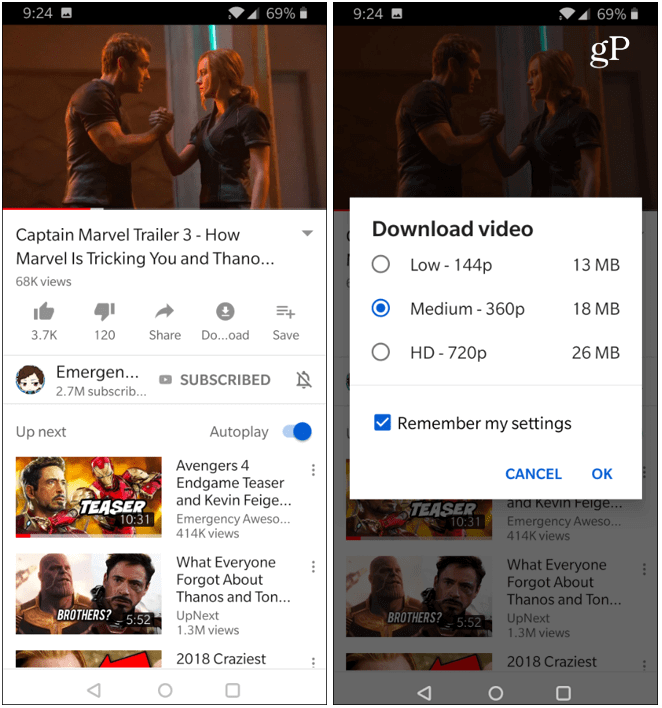
● YouTube Premium downloads expire after 29 days and must be re-downloaded, even if unwatched.
● Downloads are only available during your subscription period.
● Downloaded videos remain encrypted inside the YouTube app, meaning that you can’t transfer them to a USB drive, smart TV, or other media players.
● Purchased movies and YouTube Shorts are streaming-only and cannot be saved offline.
✅ Solution: Use iMovieTool YouTube Video Downloader to download 1080P long videos from YouTube to MP4 or MKV format on your computer, then move the videos to your phone! No restrictions!
Way 3. Download Long YouTube Videos Online
If you prefer not to install any software, there are several online tools like y2mate that let you download long YouTube videos online for free. This web-based online service works directly in your browser, requires no installation. Simply paste a YouTube URL and download the long YouTube videos in MP4 format with resolutions up to 1080p. Check the step-by-step guide below:
Step 1. Open YouTube in your browser, locate the long video you want to save, and copy its URL from the address bar or the Share menu.
Step 2. Open your preferred online YouTube downloader website like y2mate in a new browser.
Step 3. Paste the copied YouTube URL into the input field on the website, click “Start” button.
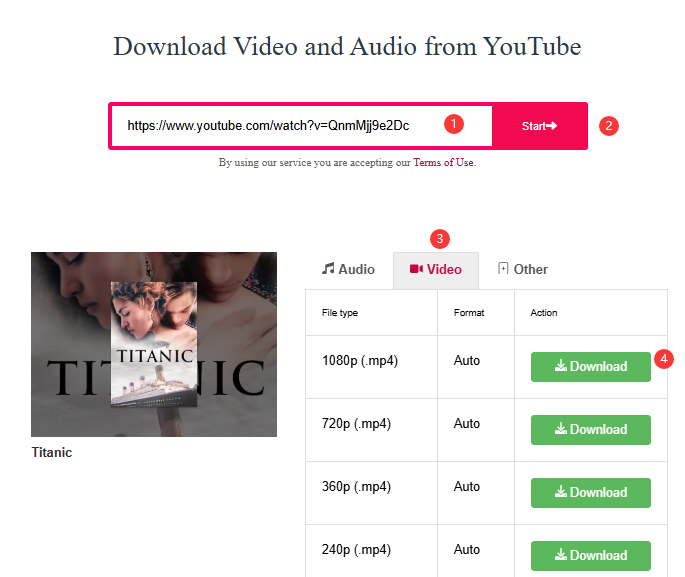
Step 4. Select MP4 as the output format and choose your preferred resolution.
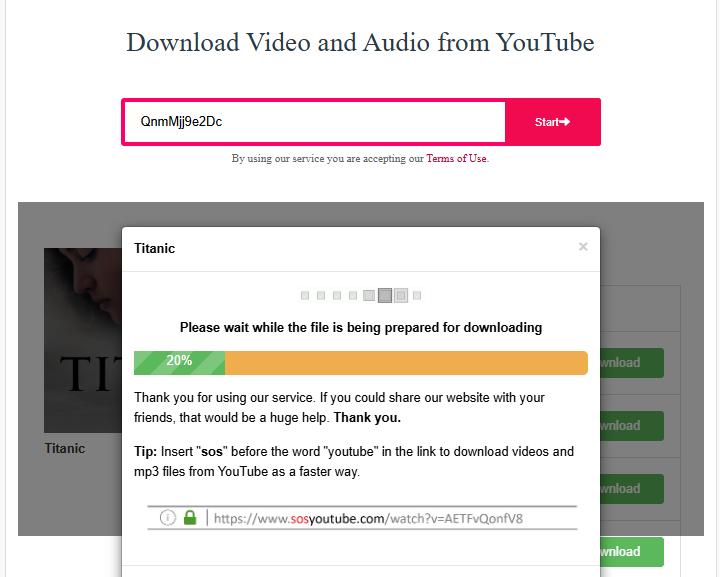
Step 5. Click the “Download” button and wait for the processing to complete.
Way 4. Download Long YouTube Videos for Free
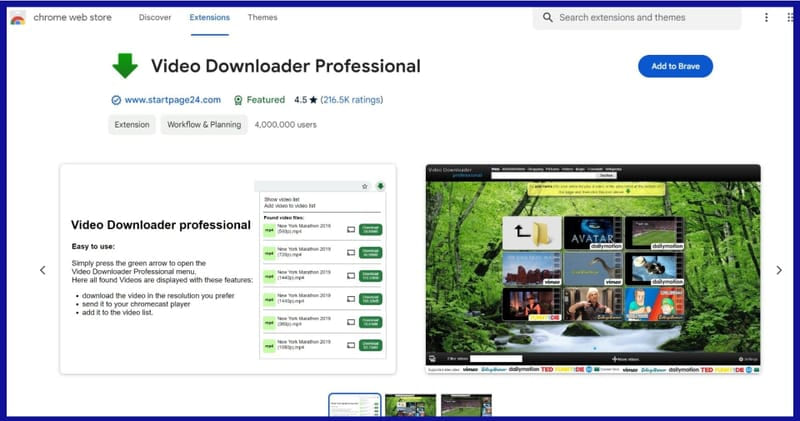
Video Downloader Professional is a popular YouTube downloader Chrome extension, which can bring assistance to help download 1080P long YouTube videos for free. By adding the extension to your Chrome or Edge browser, it can detect downloadable videos while you browse YouTube and provide a download button directly within your browser. Let’s see how it works.
Step 1. Open the Chrome Web Store and search for “Video Downloader Professional”.
Step 2. Click “Add to Chrome” to install the extension.
Step 3. Open YouTube and play the video you want to download.
Step 4. Click the extension icon in your browser toolbar.
Step 5. The extension will automatically detect downloadable content and display the available video formats.
Step 6. Select your preferred format and quality and click “Download” to save the video to your computer.
FAQs About Downloading Long YouTube Videos
How Do I Download a 10-Hour Long YouTube Video?
To download a 10-hour YouTube video, you need a reliable long YouTube video downloader that can handle large file sizes and long-duration content. iMovieTool YouTube Video Downloader is an excellent choice. It supports batch downloads, 50X faster speed, and can handle videos of any length without issues. Simply paste the URL or search for the video within the built-in YouTube web player, select MP4 format, and start download.
How Do I Download the Audio of a Long YouTube Video?
To extract audio from a long YouTube video, you can use iMovieTool YouTube Video Downloader to download the long YouTube video as MP4, and then extract the audio using a dedicated audio converter or free online converter service.
How to Download a Long YouTube Video on PC?
To download a long YouTube video on PC, you can utilize a professional desktop downloader like iMovieTool YouTube Video Downloader, online YouTube download site, or free browser extension. For a good offline playback experience, iMovieTool is more recommended. It can save YouTube long videos in up to 8K.
How Do I Convert a 4-Hour YouTube Video to MP3?
To convert a 4-hour YouTube video to MP3, you can use iMovieTool YouTube Video Downloader to download the YouTube video in MP4 format first, then use a dedicated audio converter tool to convert it from MP4 to MP3 audio. Alternatively, you can use a free online YouTube downloader to convert the long video to MP3 audio. But most online YouTube downloaders can’t handle large file sizes and long durations.
Conclusion
Above, we’ve explore several ways to download long YouTube videos, whether you are using a computer, laptop, iPhone, or Android. From third-party tool like iMovieTool YouTube Video Downloader to mobile apps and online services, and browser extension, each method has its own advantages and limitations. If you’re looking for the most reliable and feature-packed solution, we strongle recommend iMovieTool YouTube Video Downloader. It supports batch downloads, 50X faster speed, HD 1080P and 4K output, plus multilingual audio tracks and subtitles, making it easy to download all videos from YouTube! Start downloading today!
The Latest Articles
– Top 8 Solutions to Download Streaming Video
– Top 10 Free Movie Download Sites Recommended
– 3 Ways to Download Movies to Watch Offline
– 2 Verified Methods to Download X/Twitter Videos to MP4
– Download Twitter(X) Videos on PC, Mac and Mobile Phone
– Download Facebook Videos on PC, Mac and Mobile Phone
– 3 Ways to Download Facebook Video to MP4

iMovieTool Movie Downloader
Download movies to MP4/MKV in 1080P, download movies from Netflix, Amazon Prime Video, Disney+, HBO Max, Hulu, Apple TV+, YouTube, and Paramount+. Download videos from Twitter, Instagram, Facebook, and TikTok for free.