








 United States (English)
 Japan (日本語)
 Russia (русский)
 Germany (Deutsch)
 France (Français)
 Spain (Español)
 Italy (Italia)
 Portugal (Portugues)
 China (繁体中文)
 Turkish (Türk dili)
 Dutch (Nederlands)
 Korean(한국인)
 Saudi Arabia(عربي)
 Download from Netflix, Disney+, Prime Video, YouTube, and more.

In this guide, we will show you exactly how to get Rick and Morty downloads from official streaming platforms like Netflix, Amazon Prime, Hulu, etc. Plus, we will guide you a reliable method to download Rick and Morty series to HD MP4 on your PC or Mac so you can keep the episodes forever.
Have you watched the hit adult animated sci-fi comedy Rick and Morty? The series follows reckless genius Rick Sanchez and his grandson Morty Smith on chaotic interdimensional adventures. Spanning seasons 1–8, Rick and Morty is known for its dark humor, inventive sci-fi, sharp satire, and unexpected emotional depth.
The series is available on popular streaming platforms like HBO Max and Netflix, Amazon Prime, etc., you can also download Rick and Morty episodes with an ad-free subscription. This post covers multiple methods of that, including a powerful video downloader tool – TunesBank iMovieTool All-in-One Video Downloader, to help you get Rick and Morty full series download to enjoy a smooth playback experience.

Way 1. Watch and Download Rick and Morty in Streaming Apps
As one of the popular animated shows, the Rick and Morty is available across several popular streaming platforms, including Netflix, Hulu, Amazon Prime Video, Disney+, HBO Max, YouTube, YouTube TV, Sling TV, Apple TV, Vudu, The Roku Channel, etc.
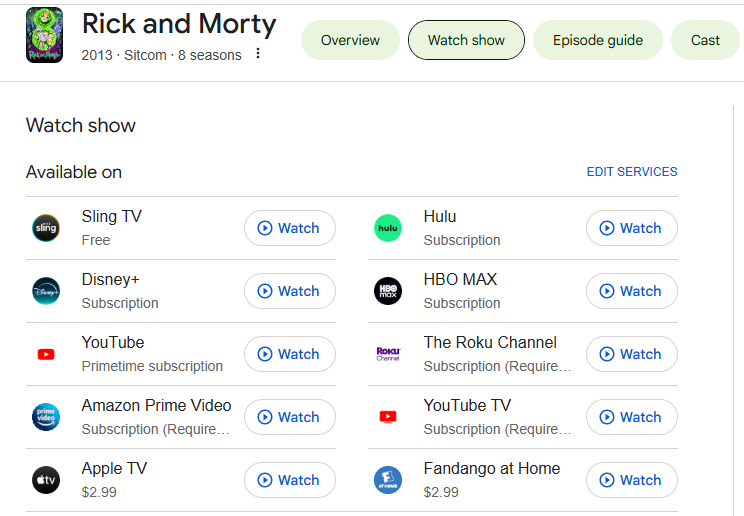
One of the easiest ways to download Rick and Morty season 1-8 is through the Ad-free subscription on these streaming platforms. Once subscribed, you can enjoy the built-in download feature on supported mobile devices, or even desktop computers. Additionally, you may also purchase or rent the episodes of Rick and Morty on some platforms and download them offline.
Here we use the Netflix as an example to show you how to get Rick and Morty downloads in the Netflix app:
Step 1. Open the Netflix app on your smartphone or tablet.
Step 2. Sign in to your Netflix account ((Standard, Premium, or Standard with Ads).
Step 3. Search for “Rick and Morty” in the search bar.
Step 4. Select the season or episode you want. Tap the “Download” button.
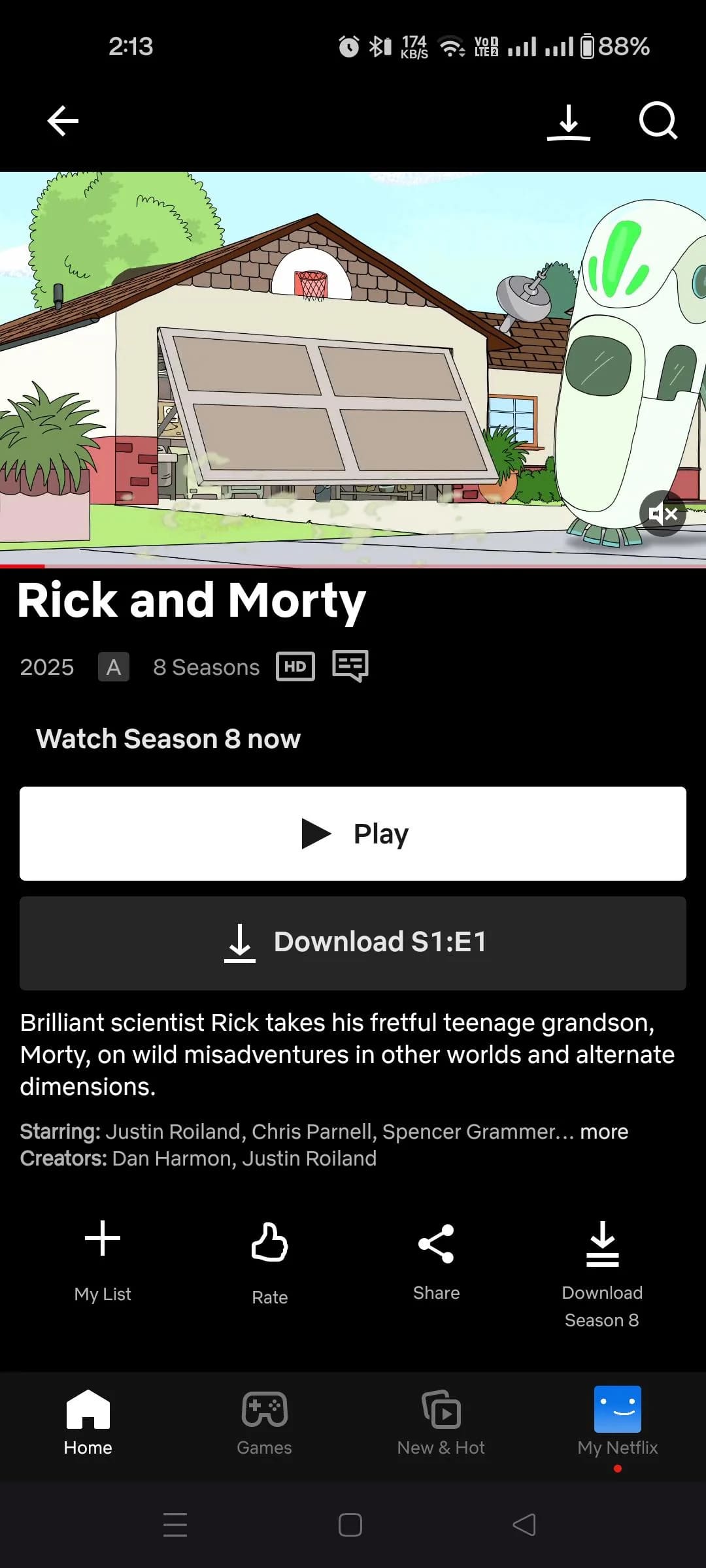
Step 5. Then, go to the “My Downloads” or “Downloads” section within the Netflix app. You can watch Rick and Morty offline without an internet connection.
Way 2. Download Rick and Morty Series to HD MP4 on PC/Mac
To bypass streaming app limits and get the ultimate offline viewing experience, the best solution is to download Rick and Morty episodes as MP4 files. Here a professional tool named TunesBank iMovieTool All-in-One Video Downloader is highly recommended.
With a built-in web browser, the software enables you to directly download Rick and Morty series to HD MP4 or MKV from any streaming platform, including HBO Max, Netflix, Hulu, Amazon Prime, Disney+, YouTube+, Apple TV+, Paramount+, and more. What’s more, it preserves 1080p full HD resolution, EAC3 5.1 surround sound, and multi-language subtitles. You can even batch download entire seasons of Rick and Morty at 50X faster speed, with just one click!
Unlike traditional streaming app downloads, TunesBank iMovieTool allows you to save the Rick and Morty episodes permanently on your computer without expiration dates or playback restrictions. Thus, you can watch Rick and Morty offline using other media players like VLC, WMP, iTunes, etc., or transfer them to your USB drive, MP4 player, phone, tablet and more devices.
Imagine this: You have a 7-hour flight from New York to London. To kill your time, you can load your iPad with all 8 seasons of Rick and Morty without geographical restrictions. The MP4/MKV files are saved in the native Photos app or VLC. No Wi-Fi needed. No “license expired” messages. No buffering. Just pure, high-definition animated playback. Enjoy it!
• Multi-Platform Support: Works with Netflix, Max (HBO Max), Amazon Prime, Hulu, Disney+, YouTube, Apple TV+, and more.
• Built-in Web Browser: No need to copy URLs manually – search, browse, and download directly.
• Permanent Offline Access: Download any show and movie to MP4 or MKV with no expiration. Watch forever.
• High-Quality Output: Save videos in up to 1080p Full HD (supports 4K where available) with 5.1 audio tracks.
• Preserve Subtitles: Keep subtitles as separate SRT files or burn them directly into the video.
• Multiple Languages: The video downloads will be maintained with original multilingual subtitles and audio tracks.
• Batch Download: Download all episodes of a season or an entire series with one click. Perfect to download all season of Rick and Morty.
• Fast Speed: Up to 50x faster than real-time streaming. Download a full season of Rick and Morty in under 30 minutes.
• Universal Device Compatibility: Play streaming videos on VLC, Windows Media Player, iTunes, Plex, or any media player. Transfer downloads to iPhone, Android, USB drive, or external HDD.
Now, let’s see how to download Rick and Morty series to MP4 using TunesBank iMovieTool All-in-One Video Downloader. We’ll take Netflix as an example.
Step 1. Select a Platform and Login
Download and install TunesBank iMovieTool Video Downloader on your Windows PC or Mac. Launch the software. On the home screen, you will see icons for Netflix, Max, Amazon, Disney+, Hulu, YouTube, Paramount+, Apple TV+, TikTok, Facebook, Instagram, and Twitter. For example, click the Netflix icon.
Log in to your Netflix account through the built-in browser.
Step 2. Customize Output Settings
Click the “Menu” icon (usually top-right), choose “Preference” option. Then select MP4 as the output format (MKV is also available). Select video codec H.264 for maximum compatibility. Set resolution to high 1080p for the best viewing experience. And choose your preferred audio track and subtitle language.
Step 3. Search and Add Rick and Morty
Thanks to the built-in web browser, you have three easy ways to find the series.
Browse Online: Tap “Browse” tab, navigate the video library and manually find the episodes, or search it in the search field. Then open the TV series and click “+” icon to add it to the download queue.
Using Name: Tap “Search” tab, type “Rick and Morty” into the search bar inside the built-in browser. Press Enter. All seasons and episodes will appear.
Using URL: Navigate to the Rick and Morty series page on Netflix. Copy the URL from the address bar. Paste it into iMovieTool’s analyzer. The software will automatically load all episodes.
Step 4. Start Downloading Rick and Morty to MP4 in 1080p
Once located the series, click the “Download” icon next to the title.
In the pop-up window, you will see a list of seasons. Expand Season 1, Season 2, etc. Check the boxes next to the episodes you want to download. And hit on “Download” button. The software will download Rick and Morty episodes as MP4 files quickly and efficiently.
Step 5. Find Downloaded Rick and Morty Episodes
After the downloads complete, go to the “History” tab. Click the Blue Folder icon next to any episode and to locate the output folder location. You can now watch the Rick and Morty series offline!
The Bottom Line
With the right tools, watching Rick and Morty offline on any device has never been easier. Above, we’ve introduced two methods on how to download Rick and Morty (1-8 series) to watch offline. Compared to the official streaming apps, TunesBank iMovieTool offers a powerful, user-friendly, and flexible solution to download all seasons of Rick and Morty from major platforms and save them as local HD MP4 or MKV files. Now you can enjoy Rick and Morty without interruptions, buffering, or restrictions.
The Latest Articles
– Top 8 Solutions to Download Streaming Video
– Top 10 Free Movie Download Sites Recommended
– 3 Ways to Download Movies to Watch Offline
– 2 Verified Methods to Download X/Twitter Videos to MP4
– Download Twitter(X) Videos on PC, Mac and Mobile Phone
– Download Facebook Videos on PC, Mac and Mobile Phone
– 3 Ways to Download Facebook Video to MP4

iMovieTool Movie Downloader
Download movies to MP4/MKV in 1080P, download movies from Netflix, Amazon Prime Video, Disney+, HBO Max, Hulu, Apple TV+, YouTube, and Paramount+. Download videos from Twitter, Instagram, Facebook, and TikTok for free.







