








 United States (English)
 Japan (日本語)
 Russia (русский)
 Germany (Deutsch)
 France (Français)
 Spain (Español)
 Italy (Italia)
 Portugal (Portugues)
 China (繁体中文)
 Turkish (Türk dili)
 Dutch (Nederlands)
 Korean(한국인)
 Saudi Arabia(عربي)
 Download full HD 1080P movies & TV shows from HBO Max & Max.

Do you want to download House of the Dragon episodes for offline viewing? This article will guide you on how to download all episodes of House of the Dragon Season 1–2 in 1080p, by using the Max app, or professional HBO Max video downloader. Check it out!
House of the Dragon is available exclusively on HBO Max. Set nearly 200 years before the events of Game of Thrones, this epic fantasy series chronicles the rise and fall of House Targaryen. If you are a big fan of House of the Dragon because of Seasons 1 and 2’s fantastic plots, you must have waited to enjoy the new season for a while! Good news! Actor Matt Smith confirms House of the Dragon season 3 will be released in 2026 on HBO Max.
Now is the perfect time to revisit House of the Dragon Seasons to refresh your memory. To avoid buffering, ads, or unstable streaming connections, this article will show you how to download House of the Dragon Season 1/2 locally and provide you with a professional HBO Max video downloader. This way, you can watch House of the Dragon offline anytime, anywhere.

Released on August 21, 2022, House of the Dragon is an HBO original series adapted from George R. R. Martin’s Fire & Blood. The TV series doesn’t just tell a story, it ignites a war. It focuses on the Targaryen civil war known as the Dance of the Dragons. With stunning visuals, complex characters, and cinematic storytelling, the show quickly became one of HBO’s most successful franchises, attracting millions of viewers worldwide across its first two seasons.
House of the Dragon Season 3 & 4 Release Dates (Latest Updates)
As mentioned earlier, one of the show’s prominent actors, Matt Smith, has confirmed that House of the Dragon Season 3 is expected to arrive in the summer of 2026. Based on HBO’s production timeline, a premiere in August 2026 is a strong possibility.
Additionally, House of the Dragon Season 4 has been officially renewed by HBO. While the exact release date is not set, industry speculation points towards a 2028 release. According to insider reports, Season 4 will likely serve as the final chapter, concluding the Dance of the Dragons storyline from Fire & Blood and bringing the epic Targaryen saga to a dramatic end. Let’s look forward to it together!
Here is the House of the Dragon release schedule:
| Season | Release Year | Status | Episodes | |
|---|---|---|---|---|
Season 1 |
August 21, 2022 | Released (Available on Max/Blu-ray) | 10 | |
Season 2 |
June 16, 2024 | Released (Available on Max/Blu-ray) | 8 | |
Season 3 |
2026 (Summer) | Confirmed & In Production | TBD | |
Season 4 |
2028 (Expected) | Confirmed (Final Season) | TBD |
Where to Watch House of the Dragon Online?
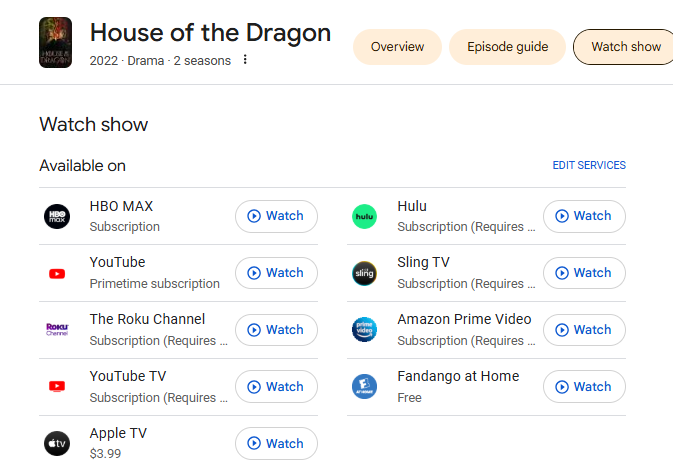
As a popular TV show, House of the Dragon series is not only available on HBO Max, but also on lots popular streaming video platforms. You can watch House of the Dragon season 1, 2 in HD through the following streaming websites or their apps, using a subscription account or purchased episodes.
- HBO Max
- Hulu
- Amazon Prime
- YouTube
- YouTube TV
- Sling TV
- The Roku Channel
- Fandango at Home
- Apple TV
Where to Download House of the Dragon Episodes in Full HD?
If you want to download House of the Dragon episodes for offline viewing, there are two main options: using the streaming app or relying on a third-party HBO Max video downloader. Both methods enable you to get House of the Dragon downloaded in 1080p. Scroll down and continue to see how.
Method 1. Download House of the Dragon Episodes with Max App on iOS/Android
HBO Max (now branded as Max) allows subscribers to download movies, TV shows (including House of the Dragon) to watch offline. This feature is available on iOS and Android devices for users with an ad-free subscription plan. If you’re using the Max With Ads plan, you can only watch House of the Dragon online with Internet connection across your streaming devices. To download House of the Dragon with Max Ad-supported plan, you can turn to Method 2.
Here’s how to download House of the Dragon series in Max app:
Step 1. Open the Max app on your mobile device. Sign in with a Max Ad-Free, or Ultimate Ad-Free account.
Step 2. Search for House of the Dragon in the search bar.
Step 3. On the series page, click “Download” button to download them one by one, or save all episodes at once.
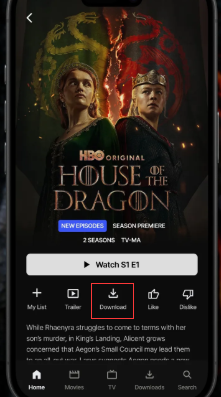
Step 4. Go to the “Downloads” to find all your downloaded episodes and enjoy offline playback.
Method 2. Download House of the Dragon Season 1-2 with HBO Max Video Downloader 🔥
While the Max app (or other streaming apps) is convenient, it comes with strict download limitations such as expiration dates, device restrictions, and DRM protection. This makes it impossible for you to keep your HBO Max downloads forever. But don’t worry, there does exist a useful method to save House of the Dragon all episodes forever – downloading House of the Dragon episodes to common MP4 files.
TunesBank iMovieTool All-in-One Video Downloader covers all you need. The software features integration with several popular streaming platforms, such as HBO Max, Netflix, Amazon Prime Video, YouTube, Disney+, Hulu, Apple TV+, and so on. You can search for House of the Dragon series inside the software and download them as MP4 or MKV files to your computer folder directly. TunesBank also preserves all audio tracks and subtitles for all downloaded content.
For HBO Max users, you can use its powerful TunesBank HBOMax Video Downloader. It supports all types of HBO Max accounts. Whether you are using Max ad-free or ad-supported account, you can use it to download all the episodes of House of the Dragon Season 1-2 from HBO Max to MP4 files. What’s more, the downloads come with up to HD 1080p resolution, ensuring a great streaming offline experience.
More Features of TunesBank iMovieTool:
- Download House of the Dragon from HBO Max, Prime Video, YouTube, Hulu, and more.
- Download House of the Dragon episodes with Max Ad-supported plan.
- Save House of the Dragon series in MP4 or MKV formats.
- Download House of the Dragon episodes in 1080p quality.
- Batch download full episodes of House of the Dragon season 1/2 in one click.
- Apply a hardware acceleration to deliver 50X faster download speed.
- Retain original audio and subtitles for each TV episode, movie.
How to Download “House of the Dragon” to MP4 with Max Ad-Supported Plan?
TunesBank iMovieTool Video Downloader supports downloading TV shows and movies from multiple OTT services, including HBO Max, Netflix, Prime Video, Apple TV+, YouTube, etc. Here we will take HBO Max as an example, and show you the detailed steps to download “House of the Dragon” episodes from Max to computer using an ad-supported account.
Step 1. Download and Install iMovieTool
First of all, download and install the TunesBank iMovieTool on your Windows PC or Mac computer, and launch the software.
Step 2. Choose HBO Max Service
Select HBO Max service to activate TunesBank HBOMax Video Downloader. Then log in to your HBO Max account to access House of the Dragon through the built-in browser.
Step 3. Configure Output Settings
Before downloading, navigate to the settings or preferences menu. Here, you can select your preferred video quality (high 1080p), audio language (e.g., Korean, English, Hindi), and subtitle options. Setting this up first ensures all your downloads meet your standards.
Step 4. Search for House of the Dragon
You can find the House of the Dragon TV show in three ways within TunesBank software.
First. Type in “House of the Dragon” in the search bar. The tool will display all available titles in the screen.
1# Using the Search Bar: Go to “Search” tab, type “House of the Dragon” or “House of the Dragon Season 1”, or “House of the Dragon Season 1” directly into the built-in search field.
2# Using the URL: Copy and paste the direct URL of the House of the Dragon page from your web browser into TunesBank HBOMax Video Downloader.
3# Browsing Online: Go to “Browse” tab, navigate HBO Max content directly within TunesBank’s interface to locate House of the Dragon manually. Once located, open the video and click “+”, then click “Download” icon to save it immediately.
Step 5. Download “House of the Dragon” Episodes in 1080P for Free
If everything is ready, click the “Download” button. It will pop up a new window.
Select Season 1 or Season 2, choose individual episodes or the entire season, and click the “Download” button to start.
Step 6. Access Your Downloaded Episodes
Once finished, move to “History” section, open the output folder to watch downloaded House of the Dragon episodes offline in full HD anytime.
FAQs about Downloading House of the Dragons
How to watch House of the Dragons without HBO?
House of the Dragon is an HBO exclusive series, you can watch and download the series on Max app. If you don’t want to rely on the Max app or face streaming limitations, the most reliable solution is using a third-party HBO Max Video Downloader. With TunesBank HBOMax Video Downloader, you can download House of the Dragon episodes to your computer in 1080p MP4 format and watch them offline using other media players like VLC, WMP, iTunes, QuickTime, etc. Plus, you may also transfer the episodes to USB drive, external hard drive, mobile device and more devices for offline watching.
Can I Download House of the Dragons for Free?
No. There is no legal way to download House of the Dragon episodes for free in full HD. Free websites often offer incomplete episodes, low-quality videos, or pose security and copyright risks. To download all episodes safely and permanently, a paid HBO Max subscription and a professional downloader like TunesBank HBOMax Video Downloader are required for stable, high-quality offline viewing.
Final Words
With the right tools, downloading House of the Dragon offline has never been easier. The streaming apps like official Max app providing a straightforward solution, but it set series limitations. With TunesBank HBOMax Video Downloader, you can effortless download all seasons of House of the Dragon from HBO Max, Amazon Prime, YouTube, Hulu and other platforms. This downloader ensures you can download and watch House of the Dragon in 1080p, save them as MP4 or MKV files to enjoy permanent offline playback. Have a try right now!
The Latest Articles
– Download HBO Max Videos to MKV Format
– How to Watch HBO Max Videos on Macbook Offline
– Download HBO Max Videos on Windows PC
– Download HBO Max Movies & Shows to Watch Offline
– How to Keep HBO Max Video Downloads Forever
– How to Get Max Free Trial in 2025
– How to Get HBO Max Student Discount
– How to Download Netflix Video to MKV
– How to Download Netflix Movies on Mac
– How to Download Netflix Movies on Windows Computer
– How to Watch Netflix Movies on CarPlay
– How to Play Netflix Videos Without Netflix App
– Flixgrab Full Review in 2025
– How to Keep Netflix Videos Forever
– Top 8 Solutions to Download Streaming Video
– Top 10 Free Movie Download Sites Recommended
– 3 Ways to Download Movies to Watch Offline
– 2 Verified Methods to Download X/Twitter Videos to MP4
– Download Twitter(X) Videos on PC, Mac and Mobile Phone
– Download Facebook Videos on PC, Mac and Mobile Phone
– 3 Ways to Download Facebook Video to MP4

HBOMax Video Downloader
The best HBO Max Video Downloader to download Max(HBO) movies & TV series to to HD MP4 / MKV with audio track and subtitles kept. Easily get Max(HBO) videos downloads for offline playback on any device, anytime, anywhere!







