








 United States (English)
 Japan (日本語)
 Russia (русский)
 Germany (Deutsch)
 France (Français)
 Spain (Español)
 Italy (Italia)
 Portugal (Portugues)
 China (繁体中文)
 Turkish (Türk dili)
 Dutch (Nederlands)
 Korean(한국인)
 Saudi Arabia(عربي)
 Download from Netflix, Disney+, Prime Video, YouTube, and more.

This guide shows how to watch or download Naruto Shippuden episodes with English dub or subtitles. Come here and save the Naruto Shippuden 1-22 seasons and all episodes to MP4 in 1080p permanently.
For anime fans, Naruto Shippuden remains one of the most iconic and emotionally powerful series ever created in Japan on February 15, 2007. Spanning 22 seasons and 500 episodes, the story follows Naruto’s journey to rescue Sasuke and protect the ninja world from powerful enemies. It continues to captivate audiences worldwide. A good news! Four Naruto episodes will be released in the end of 2026! Now it’s the perfect to re-watch this classic television series!
In this guide, you’ll discover where to watch Naruto Shippuden dubbed in English or other languages. In addition, we’ll walk you through three simple methods to download Naruto Shippuden all seasons for offline viewing, even in MP4 format!

Where to Watch Naruto Shippuden Dubbed in English?
If you’re looking for a safe way to watch Naruto Shippuden dubbed in English, you can turn to the officially licensed streaming platforms – Hulu. Currently, the Naruto series is available on major platforms, but only Hulu provides access to Naruto Shippuden English dubbed episodes. To stream videos on Hulu, you need an active Hulu subscription or bundle plan.
- Hulu with Ads (ad-supported plan) costs $11.99 per month, allowing you to watch Naruto episodes in English online.
- Hulu’s No Ads (premium plan) costs $18.99 per month, allowing you to watch and download Naruto Shippuden dubbed in English.
Watch Naruto Shippuden English Dubbed on Hulu
For Hulu subscribers, you can follow below steps to stream Naruto Shippuden in high quality with English dubs/subs online:
Step 1. Visit Hulu.com or open the Hulu app on your device.
Step 2. Sign in with an active Hulu subscription.
Tips: If you are new to Hulu, you can get Hulu free for 1 month and enjoy this Japanese anime in English online.
Step 3. Search for “Naruto Shippuden”.
Step 4. Select any season and open the episode.
Step 5. Select the English dubbed version and start streaming in HD quality.

Other Streaming Platforms to Watch Naruto Shippuden Dubbed in High Quality
Some content on Hulu is only available in certain regions. For those who can’t access Hulu, there are several other platforms that offer high-quality Naruto Shippuden series. Check below list:
Netflix: Netflix offers some seasons of Naruto Shippuden in selected regions with a paid subscription, providing HD streaming and multilingual options.
Disney Plus: Disney Plus may provide anime content in certain regions under subscription-based plans.
Prime Video: Amazon Prime Video allows users to purchase episodes, or stream Naruto Shippuden series with an active Prime subscription.
Crunchyroll: On Crunchyroll, you can watch and download Naruto Shippuden episodes in the app with a subscription.
Fandango at Home: The Naruto Shippuden Episodes may be available for purchase starting at US$1.99.
YouTube: You can purchase Naruto Shippuden episode at US$1.99.
Apple TV: Offers Naruto Shippuden episodes for purchase starting at US$1.99.
The Roku Channel: May provide Naruto Shippuden through subscription-based partner services.

1. Download Naruto Shippuden English Dubbed Episodes with Hulu App
Having to be online every time streaming to Naruto Shippuden episodes can be very inconvenient, especially when you’re in areas with unstable or slow internet connections. Hence, you may want to download Naruto Shippuden for offline viewing and enjoy uninterrupted playback anytime.
If you subscribe to the premium plans of the streaming platforms mentioned above, you can download Naruto Shippuden episodes on your mobile devices. When you need to download Naruto Shippuden episodes with English dubbed, a Hulu No Ads plan is required. Follow the detailed guide below.
Step 1. Install and open the Hulu app on your mobile device. Sign in with a Hulu (No Ads) plan.
Step 2. Search for “Naruto Shippuden” and navigate to the episode or season you wish to download.
Step 3. Verify that the English dubbed audio track is selected in your preferences.
Step 4. Tap the “Download” icon located next to the episode title or on the series details page.

Step 5. After which, open the “Downloads” tab and watch the episodes offline.
2. Download Naruto Shippuden to MP4 in 1080P (ENG DUB/SUB)
Either Hulu or other streaming apps all restrict downloads with device limits, expiration dates, app-only playback, and quantity caps. For those who want permanent, local copies of Naruto Shippuden series without restrictions, a professional MP4 downloader is the perfect choice.
As one of the best TV show downloaders, TunesBank iMovieTool All-in-One Video Downloader empowers you to download TV shows and movies from multiple streaming platforms, including Hulu, Amazon Prime, Netflix, Disney+, YouTube, Apple TV+, Max, and Paramount+, etc., even without an ad-free subscription plan.
With its help, users can easily download Naruto Shippuden series in MP4 format with high quality up to 1080P losslessly. It also provides multilingual options, allowing users to choose their preferred audio tracks and subtitles, including English dubbing or subtitles. Another standout features is batch download capability. You can select multiple episodes or entire seasons of Naruto Shippuden at once. After downloading, you can get complete control, enjoy unlimited offline playback, and compatibility across devices, no expiration!
More Features of TunesBank iMovieTool Video Downloader:
- Supports multiple platforms: Netflix, Hulu, Prime Video, Apple TV+, YouTube, Max, Disney+, etc.
- Download movies, TV shows from streaming platforms to PC/Mac directly.
- Download Naruto Shippuden all seasons to MP4 in MP4 or MKV format.
- Download Naruto Shippuden English dubbed episodes in 1080P.
- Batch download entire seasons and all episodes of Naruto Shippuden at once.
- Select your preferred audio tracks and subtitle languages, including English.
How to Download All Naruto Shippuden Episodes in MP4 1080P with English Dub/Sub
Follow below guide to download Naruto Shippuden episodes dubbed in English, and save all epsiodes in MP4 1080p files.
Step 1. Launch iMovieTool and Select Netflix
First of all, download the TunesBank iMovieTool Video Downloader on your iMac, MacBook, Windows PC or laptop. Install and launch the program. Then select a service to go on. For example, here we select Netflix.
Next, log in to your Netflix account on iMovieTool to access Naruto Shippuden directly, as well as the whole video library.
Step 2. Change Download Settings
Before downloading Naruto Shippuden episodes, you can set the output parameters in advance. Go to “Menu” and choose “Preference” to open the settings window. choose MP4 format, select 1080P resolution, and select English or original Japanese audio with subtitles.
Step 3. Add The Naruto Shippuden Series in 3 Ways
iMovieTool Video Downloader provides three easy ways to find Naruto Shippuden within the software, by using name, URL, or browsing online.
Use Name or URL: Tap “Search” tab, type “Naruto Shippuden” directly into the search bar to instantly locate available seasons and episodes. Or, copy the episode or season URL from Netflix browser/app and paste it into iMovieTool for direct loading.
Browse Online: Tap “Browse” tab, manually browse Naruto Shippuden content like a regular browser. Open the series and click the “+” icon to add it to the download queue.
Step 4. Begin Downloading Naruto Shippude Episodes to MP4 with English Dubbed
Once located the Naruto Shippuden series, click the “Download” icon next to the title.
In the pop-up window, select your target season and episodes, hit on “Download” button to start saving Naruto Shippuden English dubbed episodes in 1080P MP4 format with selected audio and subtitle settings.
Step 5. Get Downloaded Naruto Episodes in English Dubbed
Once completed, move to the “History” section, open the output folder to access your Naruto Shippuden series in MP4 format. Ready for permanent offline playback of Naruto episodes on any device without the streaming app!
3. Download Naruto Shippuden Episodes via Torrent
The Internet Archive is one of the best sites to download TV series, web series, or movies online. Using it, you can download Naruto Shippuden nglish dubbed episodes for free. However, this online websites only hosts limited Naruto Shippuden episodes and the video quality is often low. Morevire, it requires you to download and open the episodes through torrent clients. If you want a smooth and great experience, we recommend that you choose the professional desktop tool – TunesBank iMovieTool.
Here’s how to free download the English dubbed Naruto Shippuden online:
Step 1. Visit the Internet Archive website in your browser.
Step 2. Search for Naruto Shippuden episodes.
Step 3. Locate available torrent files. Click the “Download” icon next to “Torrent”.
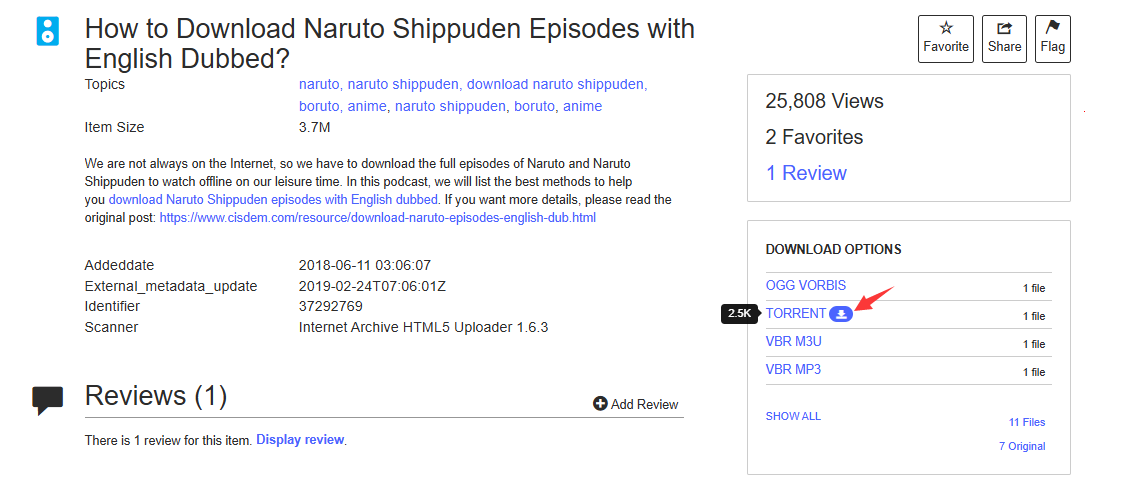
Step 4. Check your browser download history, find the downloaded torrent file.
Step 5. Next, download a torrent client (such as qBittorrent, uTorrent, or BitTorrent).
Step 6. Open the downloaded torrent file through torrent client.
Step 7. Then, it will begin downloading the actual content – Naruto Shippuden.
The Bottom Line
Naruto: Shippuden is a completed anime series that aired from 2007 to 2017, concluding the story of Naruto Uzumaki’s journey to become a true ninja hero. If you want to watch Naruto Shippuden dubbed in English conveniently, Hulu and other streaming platforms provide official access. You can even download Naruto Shippuden episodes with a Premium plan.
For those want to download Naruto Shippuden to watch offline permanently without restrictions, TunesBank iMovieTool All-in-One Video Downloader offers the most flexible and reliable solution. With the ability to download Naruto Shippuden English dubbed episodes, preserve 1080P quality, and save the Naruto Shippuden all seasons in MP4/MKV format, iMovieTool ensures true offline freedom. Get its free trial version right now! Downloading Naruto Shippuden for offline viewing has never been easier.
The Latest Articles
– Top 8 Solutions to Download Streaming Video
– Top 10 Free Movie Download Sites Recommended
– 3 Ways to Download Movies to Watch Offline
– 2 Verified Methods to Download X/Twitter Videos to MP4
– Download Twitter(X) Videos on PC, Mac and Mobile Phone
– Download Facebook Videos on PC, Mac and Mobile Phone
– 3 Ways to Download Facebook Video to MP4

iMovieTool Movie Downloader
Download movies to MP4/MKV in 1080P, download movies from Netflix, Amazon Prime Video, Disney+, HBO Max, Hulu, Apple TV+, YouTube, and Paramount+. Download videos from Twitter, Instagram, Facebook, and TikTok for free.







