








 United States (English)
 Japan (日本語)
 Russia (русский)
 Germany (Deutsch)
 France (Français)
 Spain (Español)
 Italy (Italia)
 Portugal (Portugues)
 China (繁体中文)
 Turkish (Türk dili)
 Dutch (Nederlands)
 Korean(한국인)
 Saudi Arabia(عربي)
 Download from Netflix, Disney+, Prime Video, YouTube, and more.

Turbo Downloader for Instagram is a browser-based Instagram video downloader extension. Is Turbo Downloader for Instagram safe? Is Turbo Downloader for Instagram worth using in 2026? Read on this honest review of Turbo Downloader for Instagram and explore its alternatives to save your favorite Instagram video clips as local MP4 files offline.
Instagram is a popular social media platforms for watching reels, stories, live streams, short videos, and photo content. When you’re streaming a funny video or inspiring tutorial, you may wish to save it to your device. However, Instagram still does not provide a built-in download option for most videos. For that, you’re going to need an Instagram video downloader.
Turbo Downloader for Instagram is a popular option, which allows you to download videos from Instagram directly through your browser. However, is Turbo Downloader for Instagram still the best option in 2026? Does it work reliably for downloading Instagram videos? In this Turbo Downloader for Instagram review, we will explore its key features, potential downsides, and even the best alternative.
Part 1. Turbo Downloader for Instagram (Tested & Review)
Turbo Downloader for Instagram is a browser-based Instagram video downloader extension designed to help users download videos from Instagram directly through Chrome or Firefox browsers, and convert Instagram videos to MP4 for offline viewing or collection. The extension simplifies the downloading process by adding download buttons to Instagram pages, allowing users to save Instagram videos, Reels, Stories, and photos with just a few clicks.
During testing in 2026, Turbo Downloader for Instagram showed decent performance for basic Instagram video downloads, especially when downloading public videos, Reels, and standard media posts directly from the browser.
👍 What I Like: It is free and convenient to to use, with a lightweight setup, easy browser integration, and quick downloading functionality. The extension is beginner-friendly and allows users to download Instagram videos directly while browsing without complicated setup steps.
👎 What I Don’t Like: This extension relies heavily on browser updates, which can temporarily break its functionality and cause occasional download failures. It also lacks stable batch downloading support, advanced output settings, and consistent compatibility with private Instagram content.
Main Features of Turbo Downloader for Instagram:
- Easy installation process, no login required.
- Supports Instagram videos, reels, stories, photos.
- Lightweight browser extension, no complicated settings required
- Download Instagram videos directly from Chrome or Firefox browser.
- Saves Instagram videos as MP4 and images as high-quality JPG.
How to Use Turbo Downloader for Instagram?
Step 1. Install Turbo Downloader Extension
For Chrome: Visit the Chrome Web Store, search “Turbo Downloader for Instagram”, and click “Add to Chrome.”
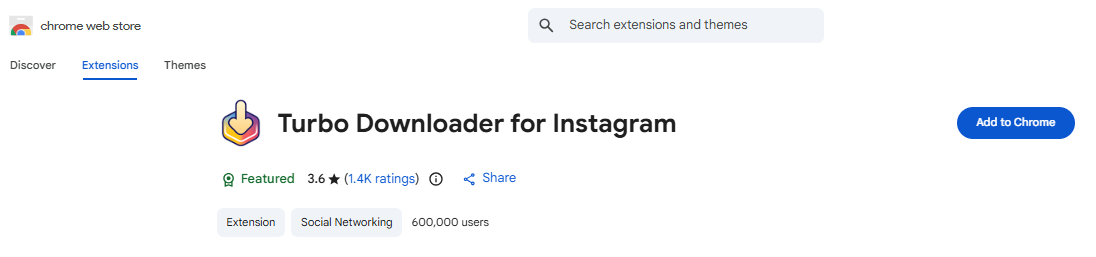
For Firefox: Navigate to the Firefox Add-ons store and search for Turbo Downloader for Instagram Firefox. Click “Add to Firefox.”
Step 2. Open Instagram
Go to Instagram’s official website and sign into your account.
Step 3. Play a Video on Instagram
Open any reel, story, or video post you want to save.
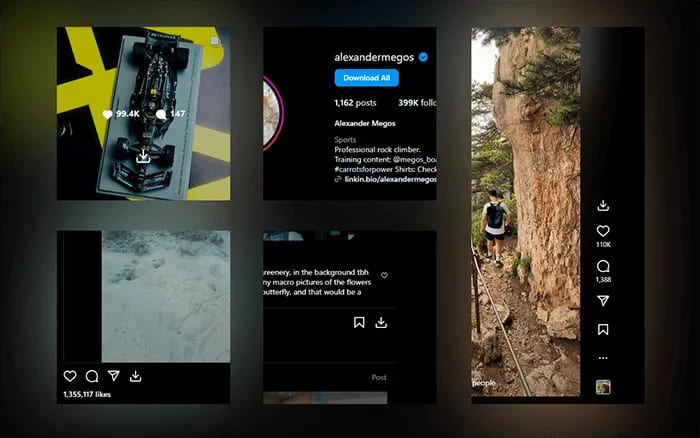
Step 4. Click the Download Button
You will see a new button labeled “Download Video” or a turbo icon, click the button to begin downloading.
Part 2. Best Alternatives to Turbo Downloader for Instagram
While the Turbo downloader for instagram extension is convenient, it has significant limitations: no batch download, no support for private accounts , and frequent breakage. For a more stable, faster, and feature-rich method, you can turn to a professional third-party Instagram downloader. In this part, we will introduce 4 best alternatives to Turbo Downloader for Instagram.
2.1 iMovieTool Video Downloader
The best-ranking Instagram video downloader oriented for Windows and Mac refers to iMovieTool Video Downloader. It acts as an Instagram Video Downloader that also supports other popular social media platforms, including Facebook, X/Twitter, and TikTok. With it, you can easily download Instagram videos, reels, and stories for free, no account login required! Even better, it can detect and download private Instagram videos in common MP4 or MKV format with HD quality.
Another great advantage of iMovieTool Video Downloader is its multilingual audio tracks, and subtitles options. You can freely choose your preferred language to export Instagram video downloads! Thus, you will get a perfect offline viewing experience after collecting Instagram videos from the platform!
Benefits: also iMovieTool Video Downloader also supports 8 major OTT platforms, including Netflix, Amazon Prime, Disney+, Apple TV+, HBO Max, YouTube TV, Hulu, and Paramount+. You can definitely download unlimited movies and TV shows as MP4/MKV local files to keep permanently.
Main Features of iMovieTool Video Downloader:
- Free download videos from Instagram, Facebook, Twitter, and TikTok.
- Download streaming videos from 8 supported OTT services.
- Save Instagram videos in MP4/MKV with1080p resolution.
- Download multiple Instagram videos in batches simultaneously.
- User-friendly interface, simple copy-and-paste URL downloading.
- Utilizes hardware acceleration, works at 50X faster speed.
- Keep multilingual audio tracks and subtitles for downloads.
How to Download Instagram Video to MP4 in HD with iMovieTool?
Step 1. Install and Launch iMovieTool
Download and install iMovieTool Video Downloader on your Windows or Mac computer. Open the software, and select INSTAGRAM platform.
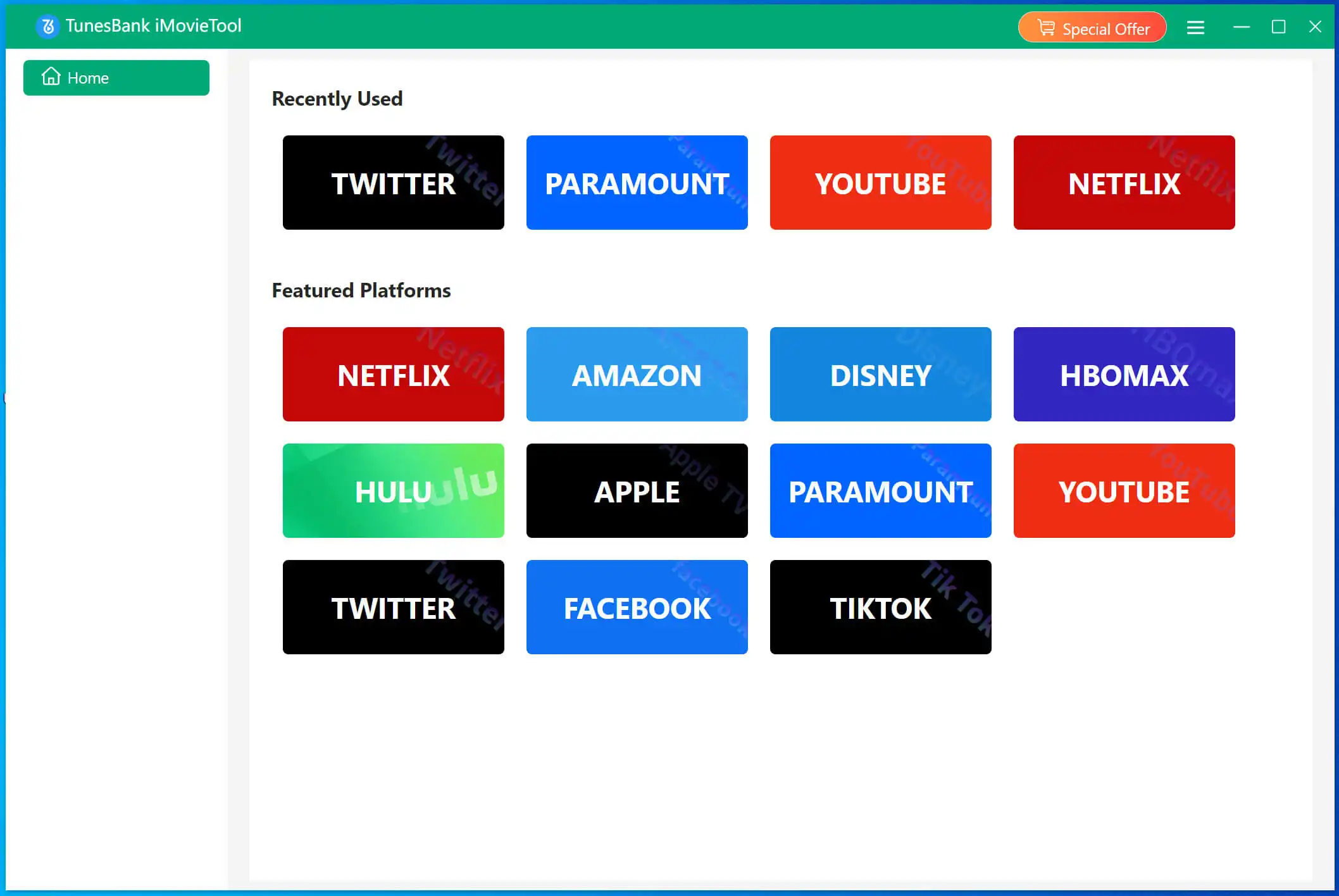
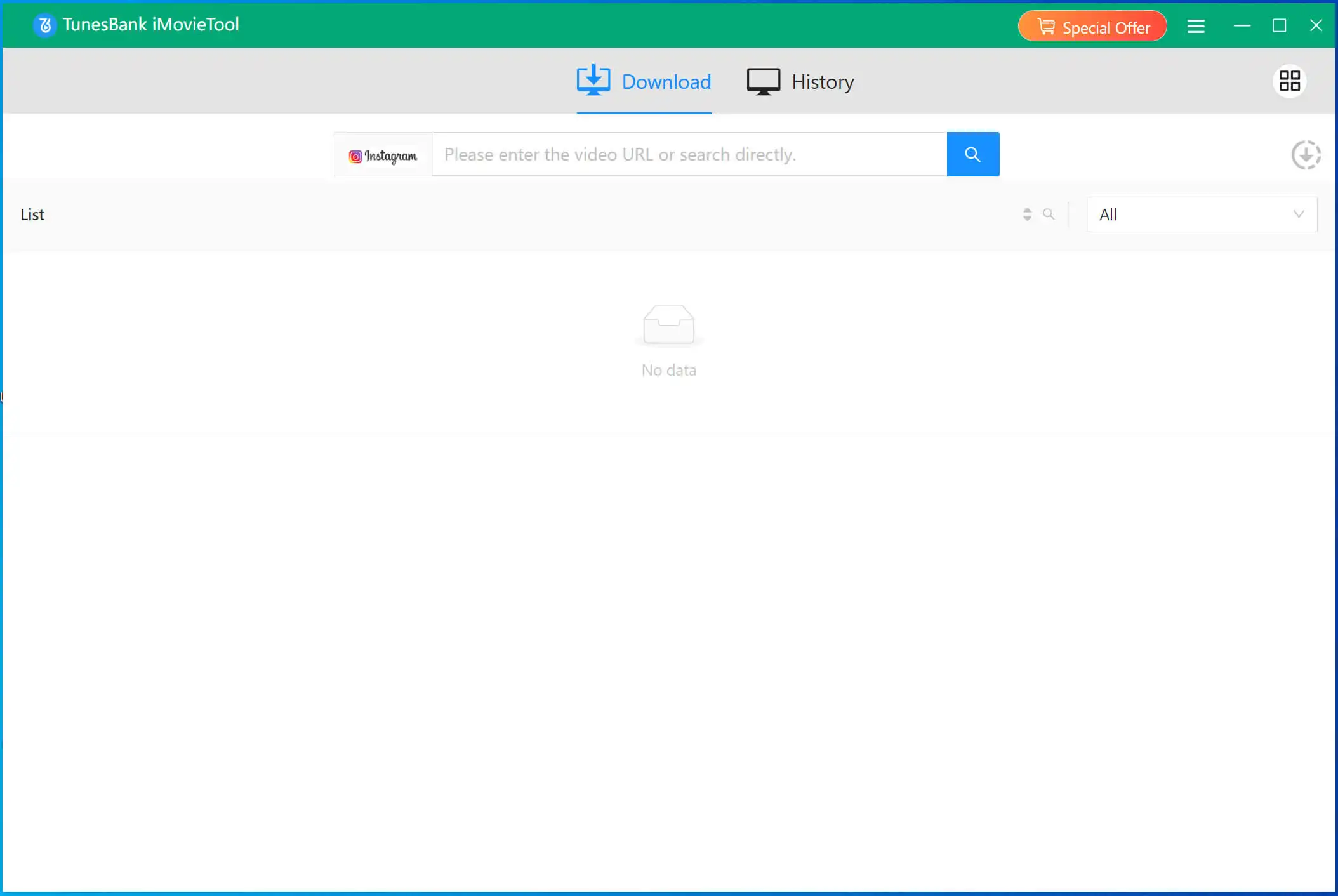
Next, you will enter the free Instagram Video Downloader. As you can see, it features a simple and neat interface.
Step 2. Define Output Parameters
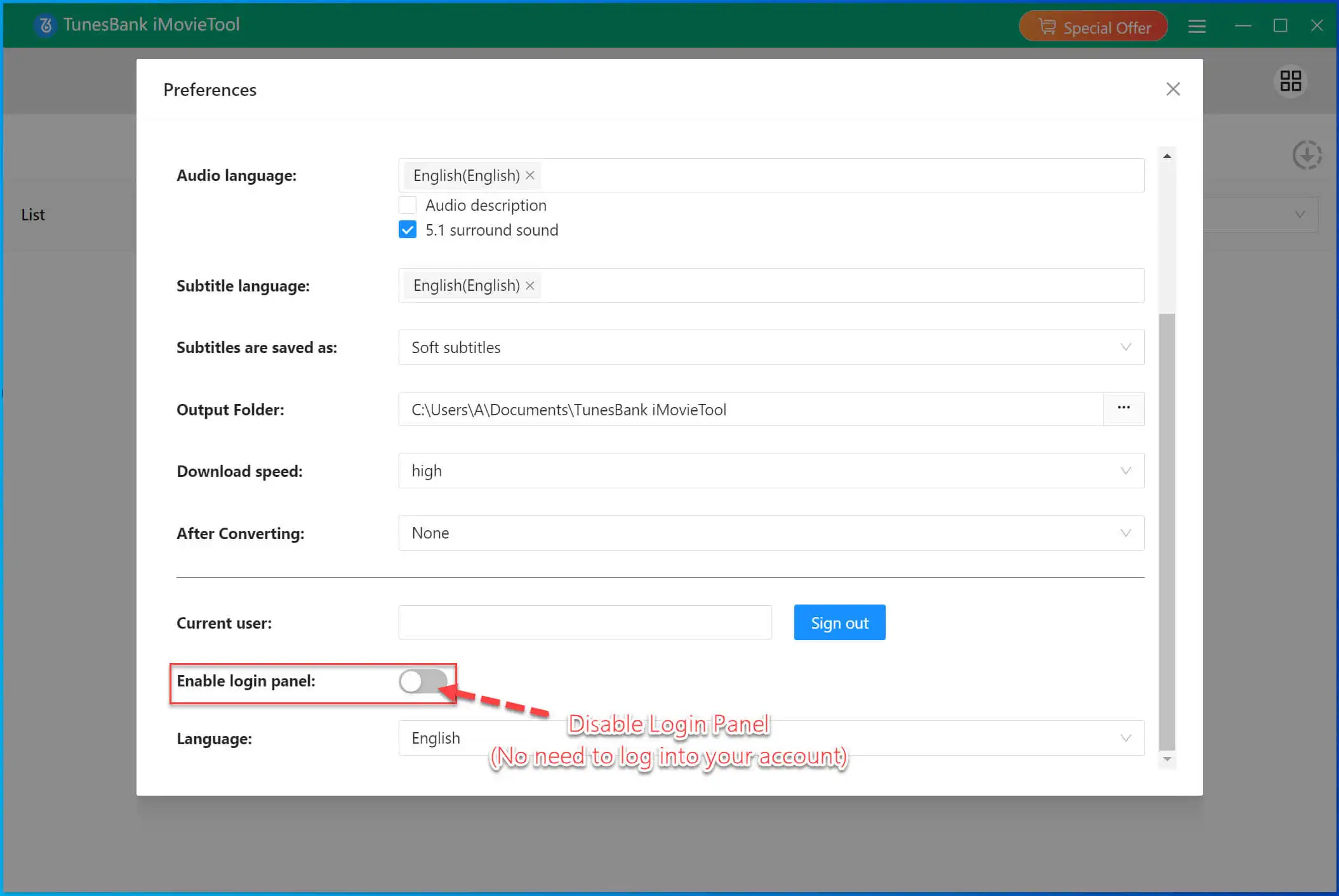
Click on the Menu bar and select “Preferences” option. Select your desired video format, audio language and subtitle language. Meanwhile, you need to disable “Enable login panel”.
Step 3. Copy & Paste Instagram Video URL
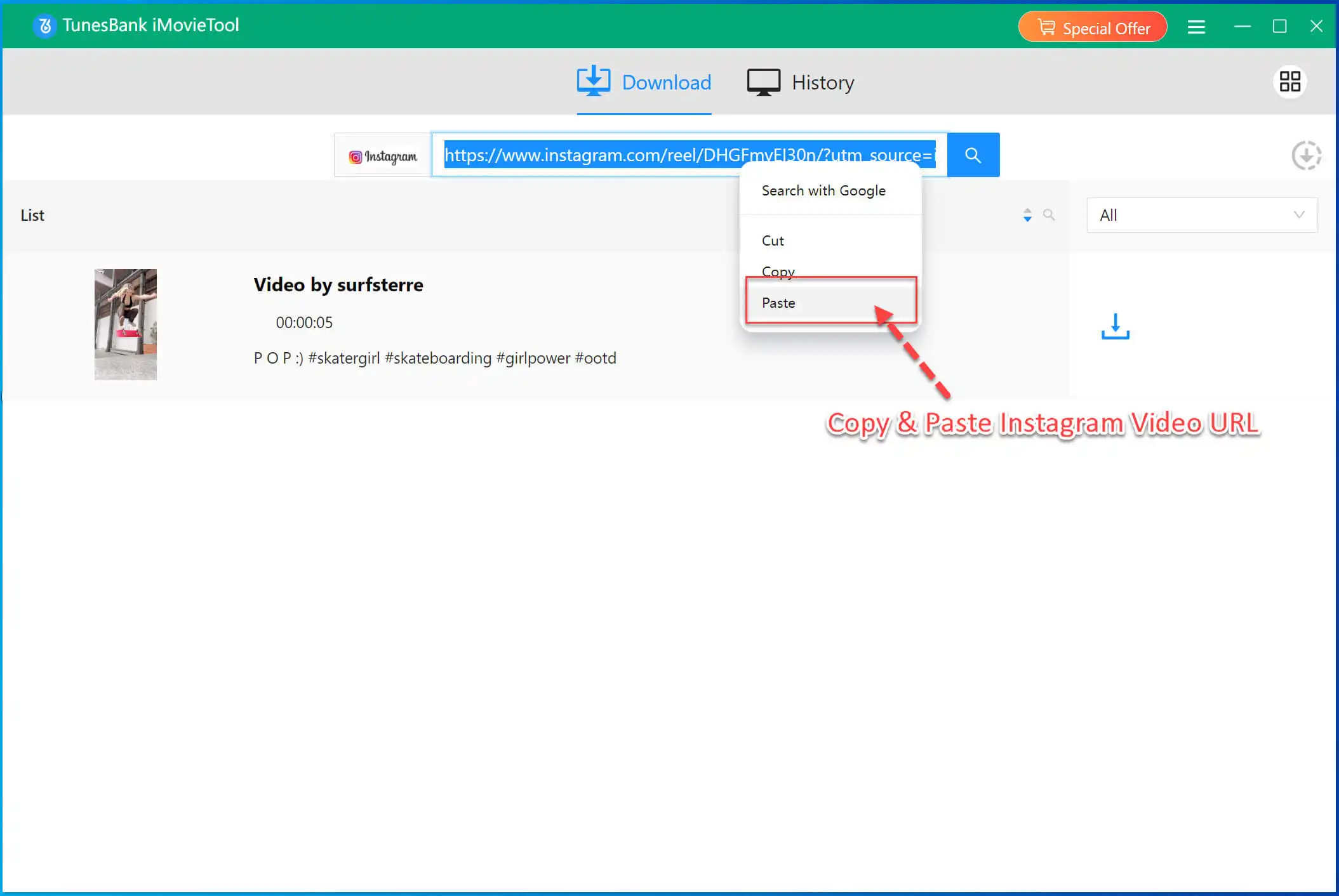
Open Instagram in your browser and copy the URL of the reel, story, or video post you want to download.
Paste the copied Instagram link into iMovieTool’s search bar. The software automatically analyzes the video.
Step 4. Download Instagram Video in HD
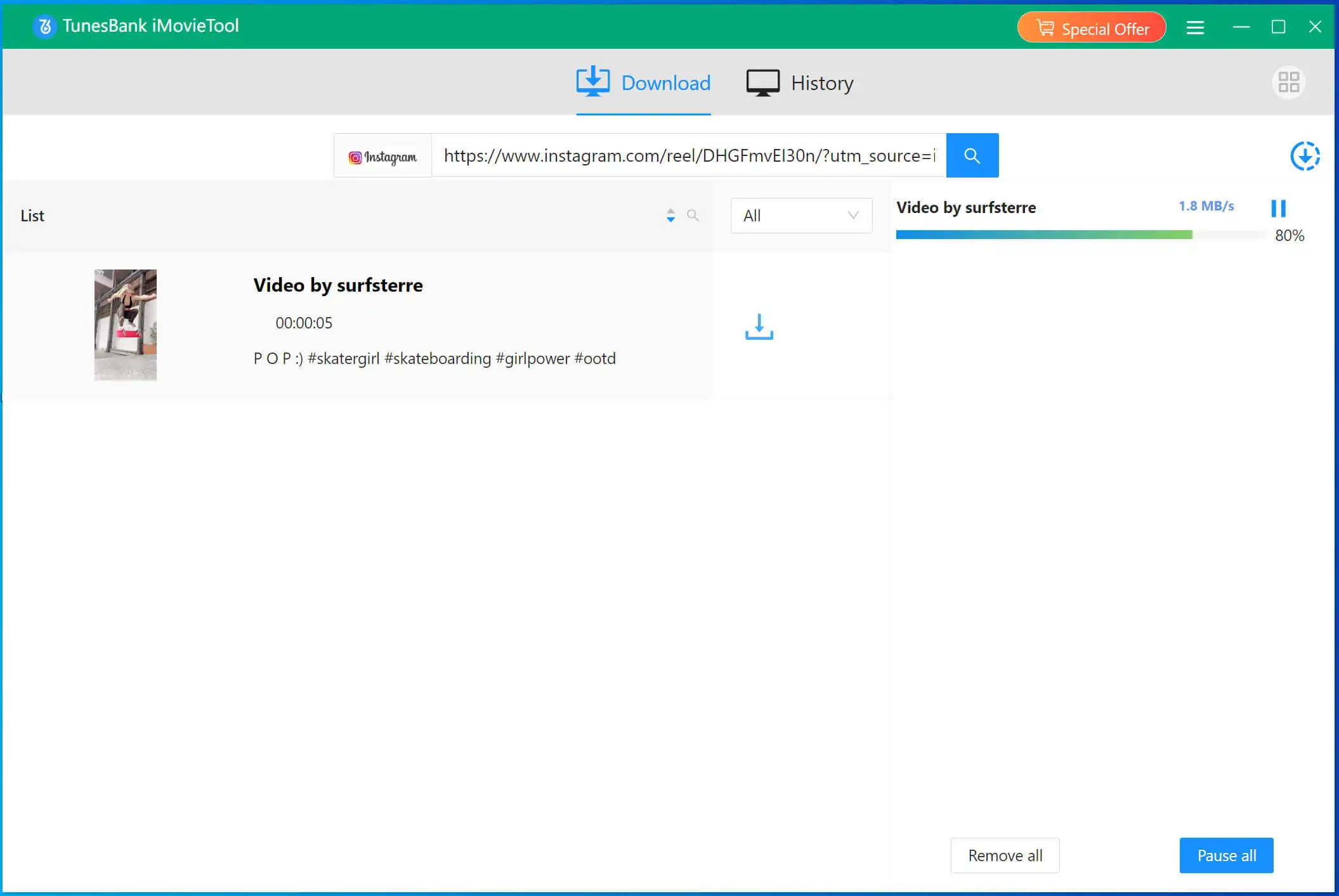
Click the “Download” button. iMovieTool will save the Instagram videos directly to your computer for offline playback.
Step 5. Get Downloaded Instagram Videos
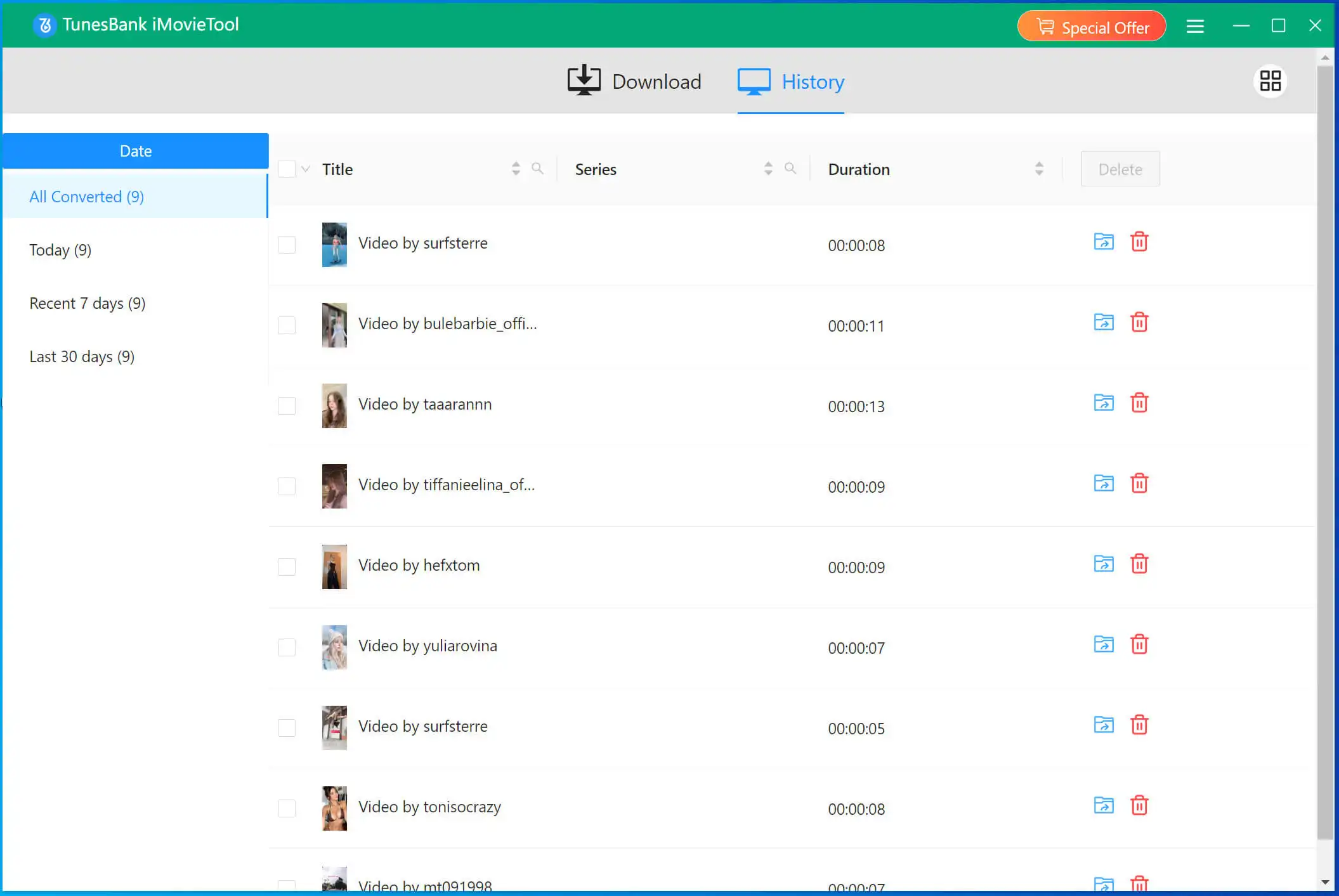
Afterwards, go to “History” section, check the well downloaded Instagram videos.
Pros:
- No login required, anonymous downloading.
- Batch download multiple videos even entire profiles.
- 50X faster than browser-based tools.
- Supports 4 free social platforms + 8 OTT – truly all-in-one.
- Outputs 1080p MP4/MKV with original audio.
- Offers multilingual audio tracks and subtitles.
- 100% success rate, and stable performance.
Cons:
- Desktop software, requires an installation.
- No browser extension or mobile app.
2.2 4kFinder Video Downloader
4kFinder Video Downloader is another good alternative to Turbo Downloader for Instagram. The software focuses on simplicity and high-speed downloads while supporting more than 1,000 streaming websites. You can use it to download videos from Instagram, Facebook, TikTok, OnlyFans, Twitter, YouTube, Vevo, Veoh, Dailymotion, Niconico, Bilibili, Tube8, and more.
Unlike browser-based Instagram video downloader Chrome extensions, 4kFinder is a dedicated desktop application, providing more stable performance and better download management. With its clean interface and fast processing capabilities, 4kFinder is suitable for both beginners and advanced users. What’s more, the software supports batch downloading, 6X faster downloading speeds, allowing you download multiple Instagram videos at once!
Main Features of 4kFinder:
- Download videos from 1000+ streaming websites.
- Offers MP4, MOV, WEBM, MP3 output formats.
- Copy-and-paste URL workflow, no login required.
- Up to 6X faster speed, batch video downloads.
- Support HD 1080p, 2K, 4K and 8K downloads.
- Download Instagram videos to MP4 or MP3.
How to Download Instagram Videos in HD with 4kFinder
Step 1. Download 4kFinder from the official website or below link. Install it on your PC or Mac.
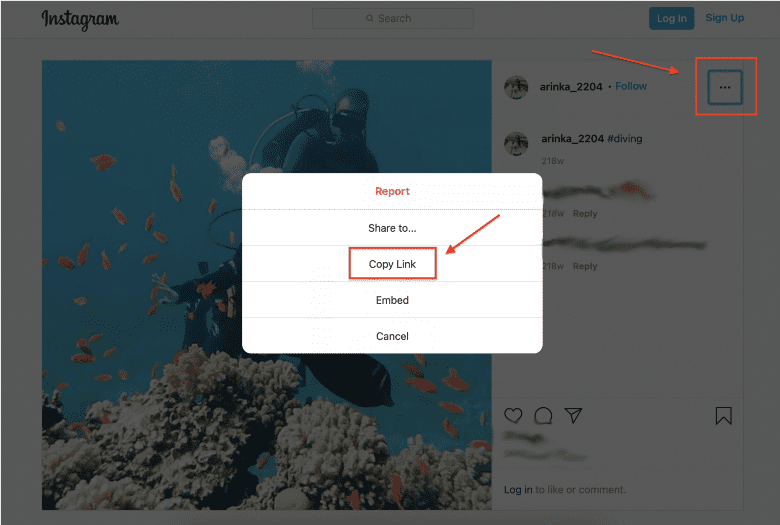
Step 2. Navigate to the Instagram Reel or video post. Play the video and copy the link.
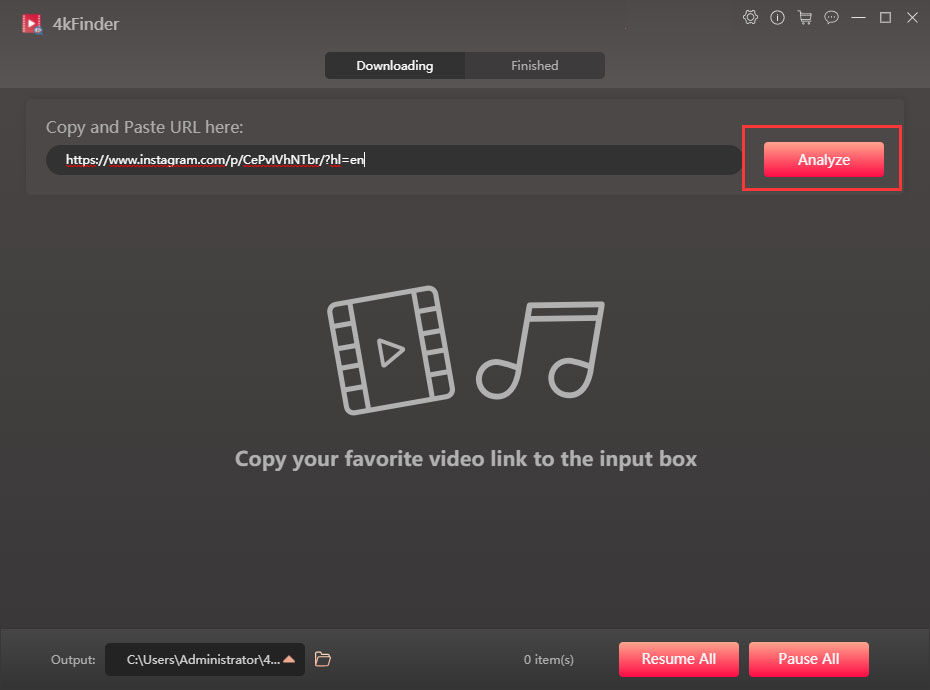
Step 3. Launch 4kFinder, paste the URL into the search box, hit on “Analyze” button.
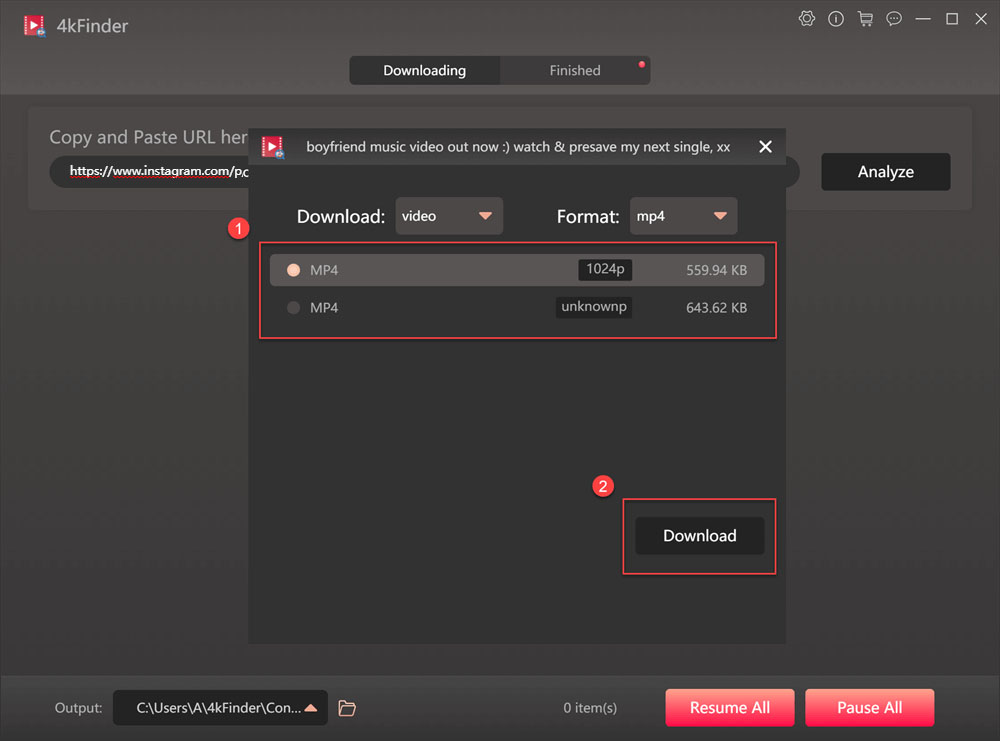
Step 4. The software will analyze the content. A small window will appear, select “video” option, then select “MP4 1080p” option. Press on “Download” button.
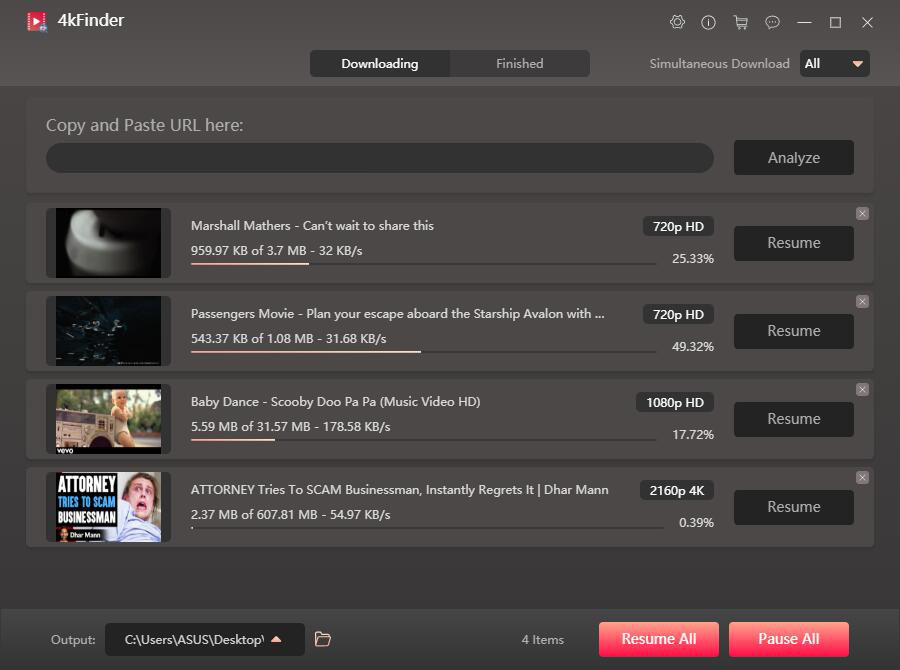
Step 5. The software will process the video. You can continue add more URLs to the search field for batch downloads.
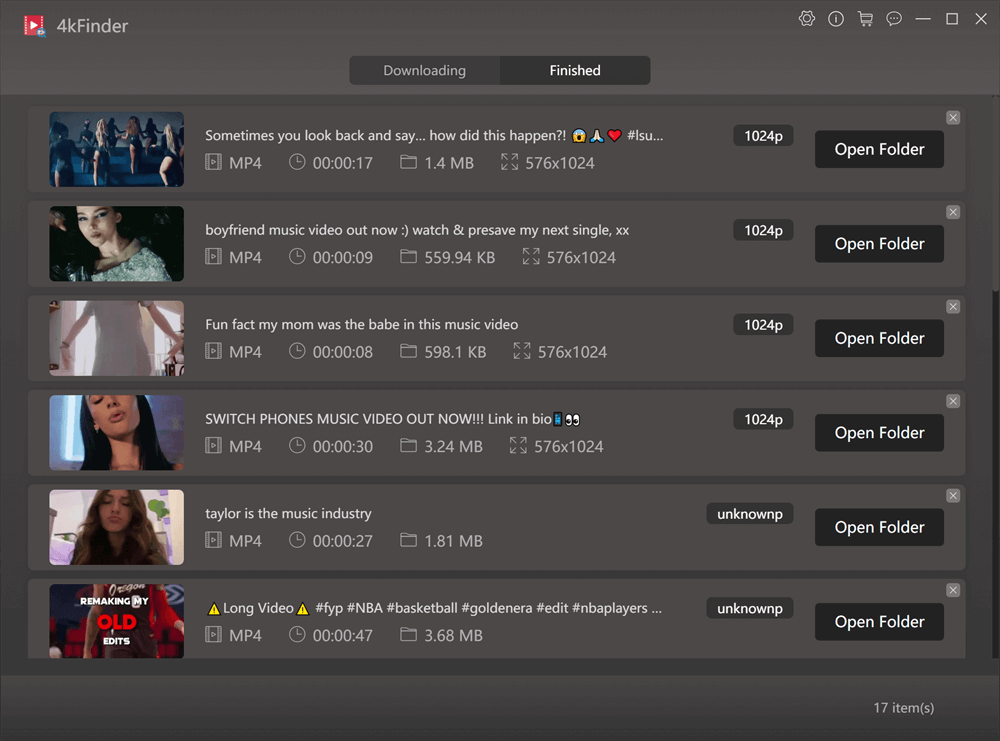
Step 6. Once complete, go to the “Finished” tab. Click the “Open Folder” to open the output Instagram video.
Pros:
- Simple copy & paste URL method.
- 6X speed and batch downloads.
- No need to login Instagram account.
- Supports 1000+ sites, not just Instagram.
- Offers multiple video and audio formats.
- Save videos in HD, 4K, 8K with original audio.
Cons:
- Desktop software, no mobile versions.
- Only allows 5 free Instagram video downloads.
- Can’t download Instagram photos.
2.3 Video DownloadHelper
Video DownloadHelper is another popular Instagram video downloader Chrome extension, available for Chrome and Firefox. As a browser extension, it works similarly to Turbo downloader for Instagram extension, but supports a wider range of websites and video formats. It automatically detects media content playing inside the browser and allows users to download videos with one click. Please note that not all streaming videos are available for download. When it fails, you can switch the iMoveTool Video Downloader or 4kFinder.
How’s how to download video from Instagram using Video DownloadHelper
Step 1. First, go to the Chrome Web Store or Firefox Add-ons page. Search “Video DownloadHelper”, add it to your browser.

Step 2. Open Instagram in your browser, find and play on the Instagram Reel or video you want to download.
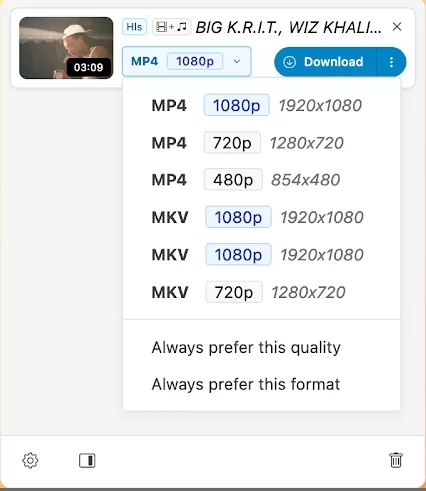
Step 3. The extension icon will become active. Click the Video DownloadHelper icon in your browser toolbar.
Step 4. Select the desired video quality and format, then click “Download” button.
Pros:
- A lightweight extension.
- No account or login needed.
- Completely free, no premium tier.
- works on most websites with video.
- Available on Chrome Web Store and Firefox Add-ons.
Cons:
- Offers a complex UI.
- No batch download for Instagram.
- No HD/4K support – limited to Instagram’s served resolution (often 480p)
- Slower speed than other tools/extensions.
2.4 SaveInsta – Online Instagram Downloader
Replacing of installing Turbo Downloader for Instagram extension or desktop software, using an online Instagram downloader can also help you download videos from Instagram.
SaveInsta is a web-based Instagram downloader that allows users to download Instagram videos and photos directly from browsers without installing software or browser extensions. You can access it in a browser of computers or mobile devices, simply paste Instagram URLs into the website and grab stories, reels, photos, and IGTV videos directly online. However, it is ad-supported and can’t support batch downloads. Also, adjusting output formats or the quality of downloaded videos isn’t supported as well. By comparison, I prefer the more intelligent and efficient desktop software – iMoveTool Video Downloader.
How to Use SaveInsta to Download Instagram Videos?
Step 1. Open Instagram and copy the URL of the target video.
Step 2. Visit SaveInsta website in your browser.
Step 3. Paste the Instagram link into the search field.
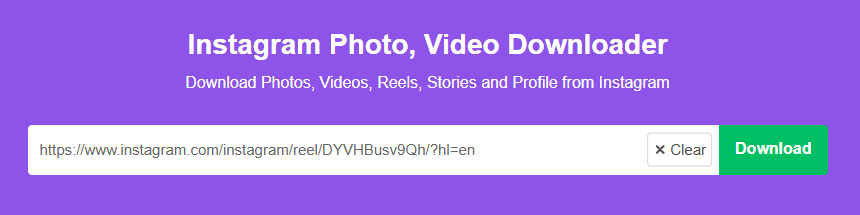
Step 4. Click “Download” button, the website will process the link and generate download options.
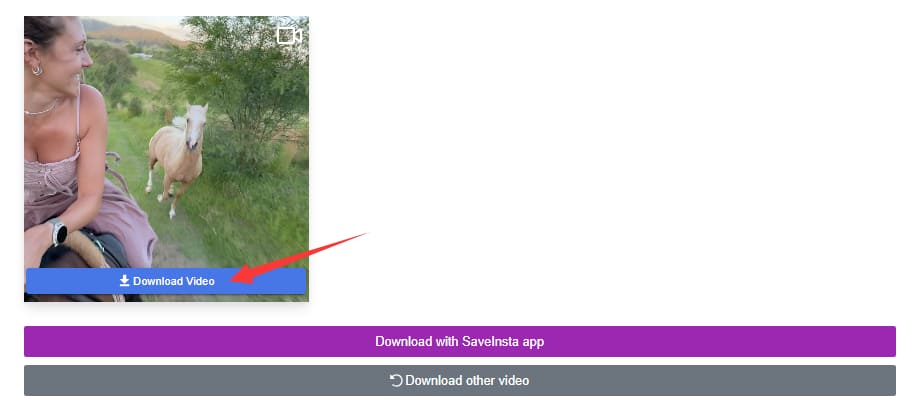
Step 5. Later, a new button will appear saying “Download Video”, click it.
Pros:
- Online tool, no installation.
- Easy to use, no login required.
- Download Instagram videos for free.
- Works on mobile and computer browsers.
Cons:
- Aggressive pop-up ads.
- No batch download.
- Max 720p quality, no HD or 4K.
- Server downtime, occasionally offline for maintenance.
Part 3. Comparison Table of Turbo Downloader for Instagram and Its Alternatives
After extensive testing for Turbo Downloader for Instagram and its alternatives, here’s a quick comparison to help you better understand their differences and choose the best Instagram video downloader for your needs:
| Tool | Type | Supported Platforms | Login Required | Max Quality | Download Speed | Batch Download | Ads-supported | Best For | Price |
|---|---|---|---|---|---|---|---|---|---|
| Turbo Downloader for Instagram | Browser Extension | Sometimes | 720p | Medium | ❌ No | Sometimes | Quick browser downloads | Free | |
| iMovieTool Video Downloader | Desktop Software | Instagram, Facebook, TikTok, Twitter, OTT Platforms, and 8 OTT platforms | ❌ No | 1080p/4K | Very Fast | ✅ Yes | ❌ No | Best overall stability | Free |
| 4kFinder Video Downloader | Desktop Software | 1000+ Sites | ❌ No | 1080p/4K/8K | Fast | ✅ Yes | ❌ No | Online streaming video downloads | Freemium |
| Video DownloadHelper | Browser Extension | Multiple Sites | ❌ No | 720p | Slow | ❌ No | ✅ Yes | Lightweight browser use | Free |
| SaveInsta | Online Tool | ❌ No | 720p | Medium | ❌ No | ✅ Yes | Occasional mobile downloads | Free |
Part 4. Conclusion
To sum up, Turbo Downloader for Instagram is still a popular Instagram video downloader Chrome extension in 2026, offering simple browser integration and one-click downloads for Instagram videos, Reels, Stories, and photos. However, it also has limitations, including limited batch downloading, browser dependency, and unstable compatibility after browser or Instagram updates.
Among all tested options, iMovieTool Video Downloader stands out as the best Turbo downloader for Instagram alternative. It combines fast batch downloading, stable performance, support for multiple social media platforms, OTT streaming compatibility, and a completely login-free experience for Instagram downloads. Now, download the software and grab your favorite Instagram videos quickly and efficiently.
The Latest Articles
– Top 8 Solutions to Download Streaming Video
– Top 10 Free Movie Download Sites Recommended
– 3 Ways to Download Movies to Watch Offline
– 2 Verified Methods to Download X/Twitter Videos to MP4
– Download Twitter(X) Videos on PC, Mac and Mobile Phone
– Download Facebook Videos on PC, Mac and Mobile Phone
– 3 Ways to Download Facebook Video to MP4

iMovieTool Movie Downloader
Download movies to MP4/MKV in 1080P, download movies from Netflix, Amazon Prime Video, Disney+, HBO Max, Hulu, Apple TV+, YouTube, and Paramount+. Download videos from Twitter, Instagram, Facebook, and TikTok for free.








One Reply to “Turbo Downloader for Instagram – 2026 Tested & Review & Alternatives”
Comments are closed.