








 United States (English)
 Japan (日本語)
 Russia (русский)
 Germany (Deutsch)
 France (Français)
 Spain (Español)
 Italy (Italia)
 Portugal (Portugues)
 China (繁体中文)
 Turkish (Türk dili)
 Dutch (Nederlands)
 Korean(한국인)
 Saudi Arabia(عربي)
 Download from Netflix, Disney+, Prime Video, YouTube, and more.

Do you want to download and watch The Rising of the Shield Hero offline? The guide explores how to get the Shield Hero series downloads in full season from streaming apps, and the best streaming video downloader.
“How can I download The Rising of the Shield Hero to watch on my laptop?” If you have ever asked this, you are not alone. With The Rising of the Shield Hero Season 5 officially confirmed, many anime fans are eager to rewatch the epic journey from Season 1 through Season 4. However, poor internet connections during travel or long commutes can break the immersion of this epic isekai adventure.
To enjoy Naofumi and Raphtalia’s journey without buffering or restrictive expiration limits, choosing a reliable the Shield Hero series download method is necessary. In this guide, we’ll walk you two simple and effective methods to get Shield Hero all seasons downloaded, including official streaming apps and professional tools like iMovieTool Video Downloader. With it, you can easily download and save your favorite episodes to MP4 for permanent offline viewing on any device.

Where Can I Watch All the Seasons of The Rising of the Shield Hero?
As of September 2025, the fourth season of The Rising of the Shield Hero has aired 12 episodes, focusing on Naofumi’s journey to Q’ten Lo and the conflicts he faces there.

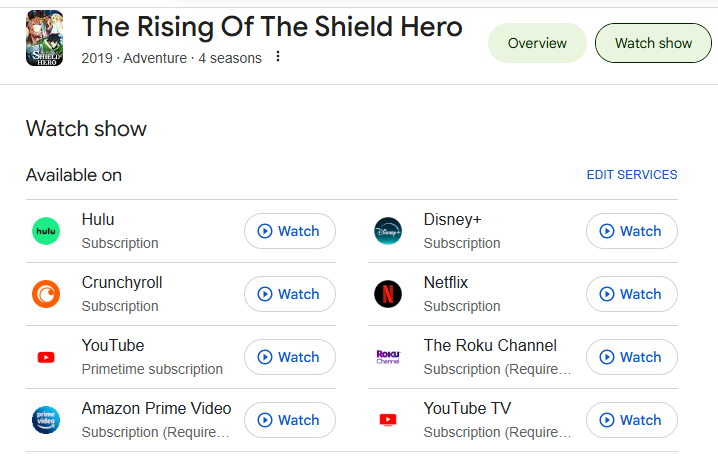
You can watch The Rising of the Shield Hero online on many mainstream streaming platforms, including Netflix, Disney+, Amazon Prime Video, Hulu, Crunchyroll, The Roku Channel, YouTube, YouTube TV and a few others. Alternatively, you can purchase and download individual episodes of the Shield Hero from services like Apple TV and Amazon.
Method 1. Download The Rising of the Shield Hero in the Netflix App
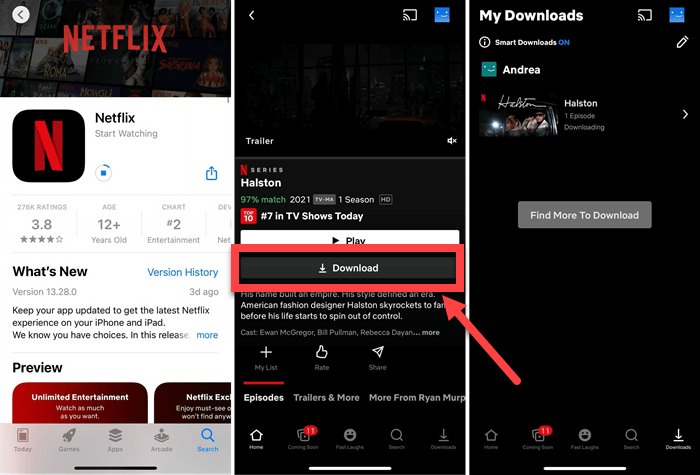
To download The Rising of The Shield Hero, the most straightforward method is to using the official download function provided by streaming platforms. As long as you have subscribed to one of the streaming platforms mentioned above, you can directly download The Rising of The Shield Hero all seasons to watch offline. Below we will take the Netflix app as an example.
Step 1. Install and open the Netflix app on your iPhone, iPad, Android phone, or tablet.
Step 2. Sign in with an active Netflix subscription account.
Step 3. Search for The Rising of the Shield Hero and open the series page.
Step 4. Select the season and episode you want to download.
Step 5. Tap the “Download” icon and wait for the process to complete.
Step 6. Once downloaded, tap “Downloads” tab to access your saved episodes and enjoy offline viewing.
However, whether the Netflix or other OTT platforms, they all imposed certain download limits, including devices limits, expiration dates, titles quantity limits, and others, making it impossible to keep Netflix downloads permanently, including the downloaded Shield Hero episodes. For true freedom with your anime collection, the best method is to download The Rising of the Shield Hero as MP4 files. Keep reading.
Method 2. Download The Rising of the Shield Hero All Seasons to MP4
To overcome streaming platforms restrictions, downloading The Shield Hero as MP4 files comes as a great alternative. That’s where iMovieTool Video Downloader comes into rescue.
iMovieTool Video Downloader is an all-in-one video downloader, developed by TunesBank Inc, so, it also has another name – TunesBank iMovieTool. This versatile and powerful tool empowers users to download shows and movies from major OTT platforms, such as Netflix, Amazon Prime, YouTube, Hulu, Max, Disney+, Apple TV+, Paramount+, etc. Unlike online streaming video downloaders, iMovieTool is virus-free, ad-free, safe and stable.
The video downloader comes with a built-in browser that lets you log into your ad-free/ad-supported account directly, browse and download The Shield Hero series, or other videos to your computer without the streaming apps. It can download The Shield Hero all seasons to MP4 with HD 1080P resolution. What’s more, it supports batch downloads and delivers a 50X super-fast speed, making it a time-saving solution for those wanting to download full seasons of The Rising of the Shield Hero at once.
More Features of TunesBank iMovieTool Video Downloader:
- Supports multiple platforms: Netflix, Prime Video, Hulu, Apple TV+, Max, YouTube, etc.
- Download movies, TV shows from streaming platforms without the official apps.
- Download The Rising of the Shield Hero all seasons in MP4 or MKV format.
- Download movies, TV shows in up to 1080p resolution with original sounds.
- Allows selection of preferred audio tracks and subtitle languages.
- Support batch downloads for entire seasons of the Shield Hero at once.
How to Download Netflix The Shield Hero Series in MP4 1080P?
Let’s explore how to use the iMovieTool Video Downloader, or iMovieTool Netflix Video Downloader to download Netflix The Shield Hero all seasons to MP4 files.
Step 1. Launch iMovieTool and Choose Netflix
Download and launch TunesBank iMovieTool Video Downloader on your Mac or Windows computer, and select the module for your streaming service. For example, here we choose Netflix service to go on.
Next, log in to your Netflix account through the built-in browser to access the full library securely, including the Shield Hero series.
Step 2. Modify Output Settings
Hit on the “Menu” and choose “Preference” option for more settings. From where you can customize the video format, video codec, video quality, audio tracks, and subtitle freely.
Step 3. Add The Shield Hero in 3 Ways
iMovieTool Video Downloader provides three easy ways to locate the anime before downloading.
Way 1: Browse Online Go to “Browse” section, navigate to the Netflix categories online, find The Shield Hero and open the series page manually. Click the “+” icon to add it.
Way 2: Search by Name. Move to the “Search” section. Enter The Rising of the Shield Hero directly in the search bar to find all available seasons quickly.
Way 3: Search by URL. Go to Netflix app or web player, copy the URL of The Shield Hero season 1/2/3/4, and paste it into iMovieTool’s search bar to access the exact season or episode instantly.
Step 4. Begin Downloading Shield Hero Episodes to MP4
Click the “Download” icon next to the title. A new window will pop up. Select the seasons and episodes of The Shield Hero you want to download.
Choose the seasons or episodes you want and click “Download” button. iMovieTool will download the full episodes of the Shield Hero from Netflix web browser at high speed while maintaining original quality.
Step 5. Find the Downloaded Episodes
Once complete, find your output Shield Hero episodes in the “History” section or the designated output folder you set. These episodes are stored in .mp4 format, and you can keep them on your local folder permanently, as well as transfer the episodes to any device for offline playback.
You can now enjoy The Rising of the Shield Hero offline anytime without restrictions!
Final Words
These are the two main methods to easily download The Rising of The Shield Hero all season 1-4. Whether you choose to download The Shield Hero series with streaming apps or use the professional iMovieTool Video Downloader to save entire seasons in MP4 format, each has its own advantages. If you want full control over your anime library and enjoy ultimate offline viewing, we recommend trying using iMovieTool Video Downloader. Click the Download button below to keep the epic isekai adventures on your device forever!
The Latest Articles
– Top 8 Solutions to Download Streaming Video
– Top 10 Free Movie Download Sites Recommended
– 3 Ways to Download Movies to Watch Offline
– 2 Verified Methods to Download X/Twitter Videos to MP4
– Download Twitter(X) Videos on PC, Mac and Mobile Phone
– Download Facebook Videos on PC, Mac and Mobile Phone
– 3 Ways to Download Facebook Video to MP4

iMovieTool Movie Downloader
Download movies to MP4/MKV in 1080P, download movies from Netflix, Amazon Prime Video, Disney+, HBO Max, Hulu, Apple TV+, YouTube, and Paramount+. Download videos from Twitter, Instagram, Facebook, and TikTok for free.







