








 United States (English)
 Japan (日本語)
 Russia (русский)
 Germany (Deutsch)
 France (Français)
 Spain (Español)
 Italy (Italia)
 Portugal (Portugues)
 China (繁体中文)
 Turkish (Türk dili)
 Dutch (Nederlands)
 Korean(한국인)
 Saudi Arabia(عربي)
 Download from Netflix, Disney+, Prime Video, YouTube, and more.

Do you want to watch Dragon Ball Z dubbed offline? Here you’ll learn how to easily and quickly get Dragon Ball Z 1080p downloads on your mobile or computer, even with English dub or subtitles.
If you are a fan of classic Japanese anime, there’s no way you haven’t heard of Dragon Ball Z, one of the most legendary and influential anime series of all time. With explosive battles, epic transformations, and legends like Goku, Vegeta, and Frieza, the series continues to attract both longtime fans and new viewers worldwide. However, for audiences who don’t understand Japanese, watching Dragon Ball Z can be difficult without proper dubbing or subtitles.
Therefore viewers today look for reliable ways to download Dragon Ball Z episodes (English Subbed). If you are one of them, you’ve come to the right place! Here you’ll learn how to download Dragon Ball Z series in 1080p with English dubs/subs or your language at will. Let’s dive in.
Where to Watch Dragon Ball Z Dubbed in English?
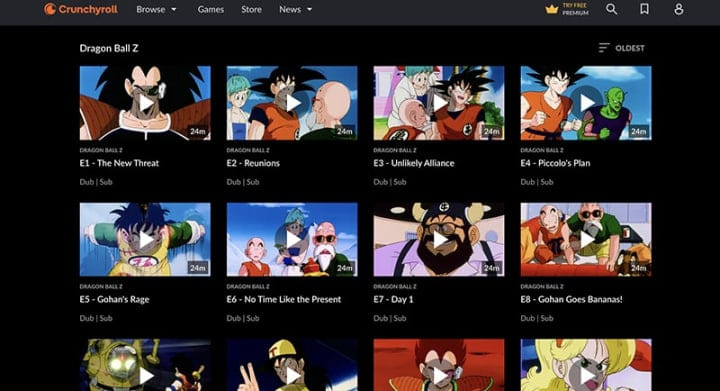
Currently, you can watch Dragon Ball Z dubbed in English on streaming platforms. Crunchyroll provides access to the complete Dragon Ball Z catalog with a paid subscription (starting at US$9.99 to US$17.99/month), allowing viewers to watch Dragon Ball Z in English or Japanese with subtitles depending on regional availability.
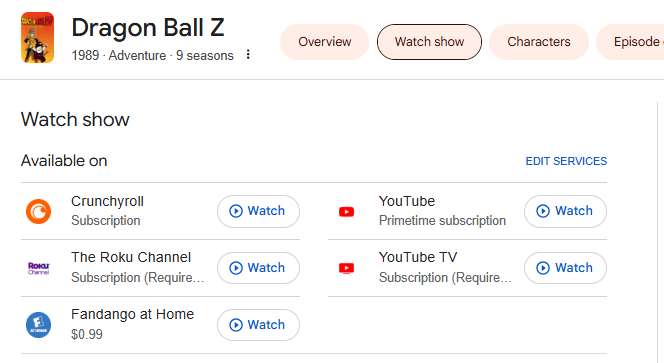
Additionally, Dragon Ball Z: Battle of Gods is available on Netflix with English sub and dub options. Subscribers may also stream Dragon Ball Z on YouTube, YouTube TV, and The Roku Channel. For those who prefer ownership, Dragon Ball Z episodes can be purchased individually on Fandango at Home starting at US$0.99 per episode.
Method 1. How to Download Dragon Ball Z Dubbed in English via Netflix App
Most OTT streaming platforms allow you to download TV shows, movies and other content to watch offline if you have a Premium (ad-free) plan. For selected regions, Netflix provides Dragon Ball Z-related titles with both English subtitles and dubbed versions. Follow below steps to download Dragon Ball Z dubbed in Netflix app:
Step 1. Open the Netflix app on your mobile device (iOS or Android).
Step 2. Log in with your active subscription account.
Step 3. Search for “Dragon Ball Z” in the search bar.
Step 4. Open the title and select the English dub version if available.
Step 5. Tap the “Download” icon to save episodes for offline viewing.
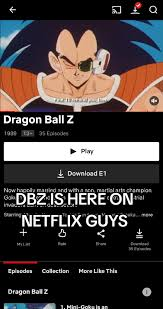
Step 6. Afterwards, you can access downloaded episodes from the “Downloads” section.
However, the video downloads in Netflix or other streaming apps come with several limitations. For example, you can’t download Netflix movies and shows on Mac or Windows, as the offline download only available on mobile devices. Due to DRM protection, Netflix downloads cannot be transferred to computers or external storage. Some episodes may be unavailable due to regional licensing restrictions. Worse, the downloaded episodes have expiration dates (usually 7-30 days), and expire 48 hours after playback begins.
Don’t let these strict limitations stop you! Next, we’ll guide you how to bypass Netflix download limits and download Dragon Ball Z episodes as MP4 files to keep them permanently!
Method 2. How to Download Dragon Ball Z Dubbed in 1080p Permanently via iMovieTool
As shown in Method 1, streaming apps often limit offline viewing with device restrictions, playback expiration, and app-only access. If you want to download the Dragon Ball Z series in English and keep the episodes permanently, you need a professional third-party TV show downloader tool.
TunesBank iMovieTool All-in-One Video Downloader is a professional desktop application, available for Windows and Mac. It is designed to help users download and save streaming videos from 12+ platforms to local MP4/MKV files. With its help, you can easily download Dragon Ball Z dubbed in MP4 1080p with English dubs/subs and watch them on smart TVs, laptops, tablets, gaming consoles, USB drives, and more. Say goodbye to streaming apps!
Built-in Web Browser: The software integrates built-in streaming browsers for platforms like Netflix, Prime Video, Hulu, Max, Disney+, YouTube, Apple TV+, Paramount+, and more. After logging into your streaming account, you can easily search for Dragon Ball Z within the interface and begin downloading episodes in high-definition 1080P resolution.
Multilingual Options: It gives you the ability to download Dragon Ball Z dubbed in English, original Japanese, or other languages while preserving multiple audio tracks and subtitle options.
Batch Download: The software allows users to download the Dragon Ball Z entire series and seasons at once, the download speed is fast, with up to 50X!
Detailed Steps to Download Dragon Ball Z Dubbed in 1080P MP4?
Step 1. Launch iMovieTool and Pick Netflix
Click on the above Download button. Get the TunesBank iMovieTool Video Downloader installed on your Windows or Mac computer. Start the program and select a service. Here we take the Netflix as example.
Next, sign in with your Netflix account within the built-in browser to access Dragon Ball Z episodes available under your subscription.
Step 2. Define Download Settings
Click “Menu” and choose “Preference” to access the settings menu. Here, you will define your perfect output profile. Set Video Format to MP4, Video Quality to 1080P, Audio Language to English, and Subtitle Language to English (or None).
Step 3. Multiple Ways to Add Dragon Ball Z Series
This smart video downloader offers three convenient ways to locate Dragon Ball Z episodes within the platform before downloading.
Browse Online: In “Browse” section, browse the Netflix library in the downloader, find and open the “Dragon Ball Z” series, then click “+” icon to add it to the download queue.
Use Name or URL: In “Search” section, enter “Dragon Ball Z” directly into the search bar to instantly display all available seasons and episodes. Or, copy and paste the Dragon Ball Z episode or season URL into iMovieTool for direct access.
Step 4. Start Downloading Dragon Ball Z Episodes to MP4 1080p
Once you have located the Dragon Ball Z series, click the “Download” icon. iMovieTool will display all available seasons and episodes.
In the pop-up window, you may select individual episodes, or entire seasons. Then, press on the “Download” button to begin downloading all Dragon Ball Z episodes in English. During the process, you are allowed to add more TV shows and movies for batch downloads.
Step 5. Get Downloaded Dragon Ball Z Episodes Dubbed
Upon completion, navigate to the “History” tab within iMovieTool. Here, you will find every successfully downloaded Dragon Ball Z episode listed with its metadata.
You have successfully downloaded all Dragon Ball Z episodes in English, in 1080P, with permanent ownership. Enjoy them right now!
Final Words
This article introduced two methods to get the Dragon Ball Z series downloads in English Dubbed. If you have a Premium subscription to streaming apps like Crunchyroll, Netflix, YouTube, downloading directly is simple and convenient. However, these streaming apps allow limited offline access, restrictions often apply.
Fortunately, TunesBank iMovieTool All-in-One Video Downloader offers a powerful and reliable solution to download Dragon Ball Z dubbed in English or your language. You don’t need to install an extra streaming app. Instead, you can use its built-in web browser to search and download Dragon Ball Z series directly to your computer folder. It supports MP4/MKV in 1080p downloads, thus you can build your own offline anime library and enjoy Dragon Ball Z anytime, anywhere.
The Latest Articles
– Top 8 Solutions to Download Streaming Video
– Top 10 Free Movie Download Sites Recommended
– 3 Ways to Download Movies to Watch Offline
– 2 Verified Methods to Download X/Twitter Videos to MP4
– Download Twitter(X) Videos on PC, Mac and Mobile Phone
– Download Facebook Videos on PC, Mac and Mobile Phone
– 3 Ways to Download Facebook Video to MP4

iMovieTool Movie Downloader
Download movies to MP4/MKV in 1080P, download movies from Netflix, Amazon Prime Video, Disney+, HBO Max, Hulu, Apple TV+, YouTube, and Paramount+. Download videos from Twitter, Instagram, Facebook, and TikTok for free.







