








 United States (English)
 Japan (日本語)
 Russia (русский)
 Germany (Deutsch)
 France (Français)
 Spain (Español)
 Italy (Italia)
 Portugal (Portugues)
 China (繁体中文)
 Turkish (Türk dili)
 Dutch (Nederlands)
 Korean(한국인)
 Saudi Arabia(عربي)
 Download from Netflix, Disney+, Prime Video, YouTube, and more.

Where to watch or download anime for free? Get the best apps, tools and sites for anime free streaming and downloading on mobile, PC, Mac, and free websites. Download anime to MP4 in HD and enjoy offline viewing anywhere.
Anime fans out there! Anime has exploded into a global phenomenon. From timeless classics like Naruto and One Piece to modern masterpieces like Witch Hat Atelier and Jujutsu Kaisen, millions of fans worldwide are eager to watch anime online for free and build their personal collections.
Whether you’re seeking to watch anime online or download anime for free, this guide covers all you need. Here we’ll walk you through the three effective ways to watch and download anime for free, including official streaming platforms, free anime websites, and professional anime video downloader tool that help you download anime free in HD MP4 format. Let’s get started!

Method 1. Watch or Download Anime in Streaming Apps with Free Trial
If you want a safe way to watch anime online or download anime for offline viewing, you can turn to the official streaming platforms. Most streaming platforms such as Netflix, Amazon Prime Video, Disney+, YouTube, Hulu, and Max provide extensive anime libraries, including trending series and exclusive content.
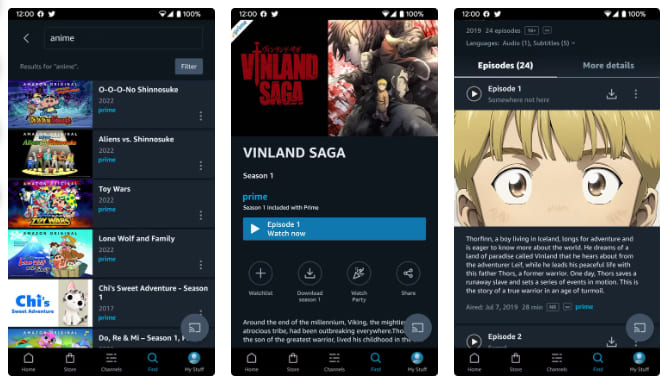
As we all know, these streaming platforms require an active subscription. Luckily, some of these platforms like Amazon Prime, YouTube, Hulu, Max offer a 7-day or even 30-day free trial to new users. During the trial period, you are able to watch anime online for free, and even download your favorite anime videos for offline viewing. Let’s walk through the process using Amazon Prime Video as an example.
Step 1. Visit amazon.com and click “Join Prime”. Amazon typically offers a 30-day free trial for new users. Sign up for Amazon Prime Video and activate the free trial.
Step 2. Open Prime Video app on your mobile or desktop, sign in with your Amazon account.
Step 3. Search for your favorite anime in the search box.
Step 4. Click on the anime title and start streaming instantly.
Step 5. Look for the “Download” button to save anime episodes for offline viewing.
Pros:
- 100% legal and safe.
- High-quality video (up to 1080p).
- Official subtitles and dubs.
- No ads during playback.
- Supports offline downloads.
- Easy to use across devices.
Cons:
- Free trial is limited (7-30 days).
- Downloads are DRM-protected and temporary.
- Downloads expire after trial ends.
- Requires credit card (remember to cancel).
- Not all anime available in all regions.
- Requires subscription after trial ends.
Method 2. Watch or Download Anime in HD MP4 via iMovieTool
When you watch or download anime in streaming apps, you may face various strict restrictions. For instance, you need to keep your subscription active after free trial ends. Your anime video downloads are temporary files with DRM protection, meaning you can only access them within the official app. The video downloads have expiration, 7 days or 30 days. Once start watching, it only last for 48 hours.
To bypass streaming limits and get the ultimate offline viewing experience, professional tools like TunesBank iMovieTool is your best option.
TunesBank iMovieTool is an all-in-one anime video downloader, available on both Windows and Mac. It helps users download anime to computer (via ad-free or ad-supported subscriptions/trials) and save them as high-quality MP4 or MKV files. The software supports major streaming platforms like Netflix, Amazon Prime Video, Disney+, Hulu, Max, Paramount+, YouTube, Apple TV+, and more.
In addition, it has the ability to batch download anime series and movies with English Subs and Japanese Audio! What’s more, iMovieTool ensures stable performance, 50X fast download speeds, and original 1080p video quality. After downloading, you can easily watch anime online on any device or player, anytime, anywhere!
Features of TunesBank iMovieTool Video Downloader:
- Download movies, TV shows from multiple streaming platforms
- Support Netflix, Amazon Prime Video, Disney+, Hulu, HBO Max, and more
- Download anime videos in MP4 or MKV format for playback and saving
- Preserve original video quality with high-bitrate audio and subtitles
- Keep multiple languages and subtitle tracks, and three types of subtitle formats
- Batch download entire seasons or complete series with a single click
- Work at 50X accelerated speed to save hours of waiting time
Simple Steps to Download Anime to MP4 in Batch:
Step 1. Launch iMovieTool and Select a Service
Download and install TunesBank iMovieTool All-in-One Video Downloader on your Windows PC or Mac. Launch the software. Select your streaming platform (here we pick Netflix) from the main interface.
Click the “Sign In” button and log in to your ad-free or ad-supported account (free trial accounts work too).
Step 2. Change Output Settings
Move to the “Menu” > “Preference”. From the po-up window, set Video Format to MP4, Video Quality to high 1080p, and choose your preferred audio and subtitle languages.
Step 3. Search for Anime Movies or Shows
iMovieTool offers three ways to find and add the anime shows and movies you want to download.
Using Name: Type the anime title (e.g., “animation for kids”) into the search bar within the software interface.
Using URL: Copy the URL of the anime page from the Netflix web browser and paste it directly into iMovieTool’s search bar.
Browse Online: In the “Browse” section, you are allowed to navigate your streaming platform organically—browse categories, recommendations, and your watchlist. Once you’ve opened the playback page for the anime episode or movie, click the “+” icon to add to download queue.
Step 4. Start Downloading Anime Movies or TV Shows
Click the “Download” button to start saving anime movies in HD quality. For download anime episodes, hit on “Download” button.
A pop-up window will appear, allowing you to select specific episodes for series. Confirm your choices and click “Download” button.
Tips: Batch mode allows downloading multiple episodes simultaneously.
Step 5. Get Downloaded Anime Videos
Once completed, go to the “History” section to access your downloaded anime videos. You may also locate the output files by clicking the folder icon, you can now enjoy these anime videos offline playback anytime on any device.
Pros:
- No ads or pop-ups.
- Support 12+ platforms.
- High-quality HD downloads.
- Fast and stable performance.
- Batch download supported.
- Permanent offline playback.
- Multilingual subtitles and audio tracks.
Cons:
- Requires an installation.
- Limited feature in free trial.
- Needs streaming account.
Method 3. Watch or Download Anime for Free via Online Websites
While TunesBank iMovieTool remains the best anime video downloader for saving the anime content as MP4 files with HD quality, there are situations where you don’t want to install a third-party software on your computer.
Then, free anime download websites could be a good choice, such as Kissanime, Miruro, Tokyoinsider, 9anime, Animenana, and so on. These platforms offer a large collection of anime titles, including both classic and newly released episodes. Some sites even allow users to download anime free for offline viewing.
However, these websites often lack options for selecting subtitle and audio languages, and their interfaces are filled with intrusive ads, pop-ups, and unstable servers. In addition, video quality is usually limited, downloads are rare, and some episodes may be missing or incomplete. By comparison, we recommend you use TunesBank iMovieTool, which is 100% safe and reliable, no ads, no pop-ups, and offers 1080p HD outputs, multilingual audio tracks and subtitles.
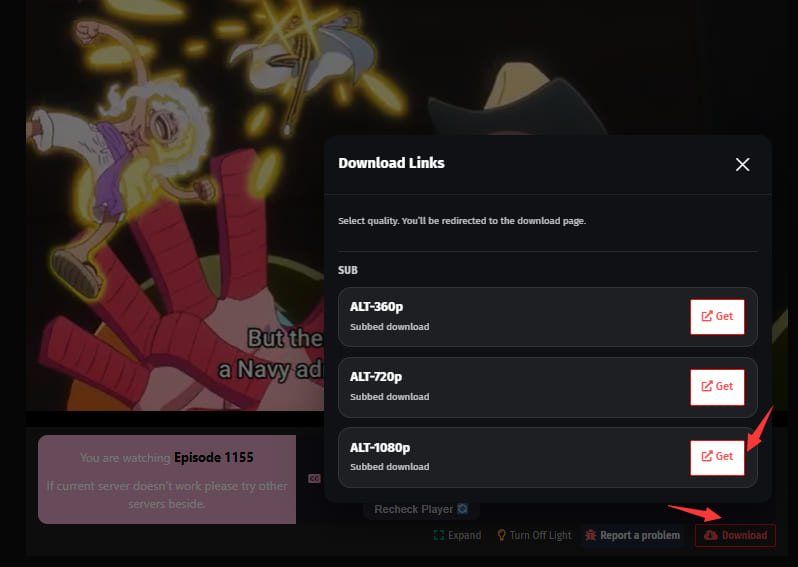
Let’s use Miruro as an example to show how to watch anime online and download anime for free.
Step 1. Open your browser and go to the Miruro website.
Step 2. Browse and find any anime title you like. For example, here I search for “One Piece”.
Step 3. Open the detailed page and select the episode you want to watch or download.
Step 4. Click “Download” button and then choose a resolution, hit on “Get” button.
Pros:
- No credit card required.
- Completely free with no subscription.
- Wide selection of anime, including rare titles.
- Some sites offer free download options.
Cons:
- Intrusive ads and pop-ups.
- Potential security risks.
- Legal gray area, most are unlicensed.
- Sites frequently change domains or go offline.
- Slow download speeds on free servers.
- No official subtitles or dubs.
Conclusion
Whether you’re looking for mobile apps, desktop tools or free websites, there are many ways to watch and download anime for free. Each method has its advantages and disadvantages. If you want a permanent, safe, and high-quality solution, TunesBank iMovieTool All-in-One Video Downloader is the ultimate choice. This professional desktop software allows you to download anime from multiple legal streaming platforms to HD MP4 for offline playback. Try it right now and build your animation collection!
The Latest Articles
– Top 8 Solutions to Download Streaming Video
– Top 10 Free Movie Download Sites Recommended
– 3 Ways to Download Movies to Watch Offline
– 2 Verified Methods to Download X/Twitter Videos to MP4
– Download Twitter(X) Videos on PC, Mac and Mobile Phone
– Download Facebook Videos on PC, Mac and Mobile Phone
– 3 Ways to Download Facebook Video to MP4

iMovieTool Movie Downloader
Download movies to MP4/MKV in 1080P, download movies from Netflix, Amazon Prime Video, Disney+, HBO Max, Hulu, Apple TV+, YouTube, and Paramount+. Download videos from Twitter, Instagram, Facebook, and TikTok for free.








One Reply to “How to Watch or Download Anime for Free”
Comments are closed.