








 United States (English)
 Japan (日本語)
 Russia (русский)
 Germany (Deutsch)
 France (Français)
 Spain (Español)
 Italy (Italia)
 Portugal (Portugues)
 China (繁体中文)
 Turkish (Türk dili)
 Dutch (Nederlands)
 Korean(한국인)
 Saudi Arabia(عربي)
 Download HD movies & TV shows from Prime Video fastly and losslessly.
Wondering how to watch Amazon Prime Video offline? Come here and learn more in this post. We will show you several methods for Amazon Prime offline viewing on all devices: phone, tablet, Mac, PC, USB drive, smart TV, game console, etc.
Can you watch Amazon Prime offline without Internet or WiFi or connections? Absolutely. A slow or unreliable network can easily ruin your streaming experience, especially when you’re enjoying an intense movie scene or binge-watching your favorite TV series. To enjoy a smooth viewing experience, you need to download Amazon Prime Video in advance.
In this article, we’ll guide you how to watch Amazon Prime offline on all devices through 2 methods. You can download Amazon Prime to watch offline on iPhone, Android, Windows, and Mac, as well as smart TVs, game consoles, and any device, even without relying on the Prime Video app. Scroll down to get the step-by-step tutorial!

Part 1. Watch Amazon Prime Offline with Prime Video App
As one of the world’s leading streaming platforms, Amazon Prime Video offers thousands of movies, TV shows, TV sports, originals, and exclusive content. With an active Prime membership or standalone Prime Video subscription, you can stream and watch Amazon Prime movies offline using the official Prime Video app.
-
• An active Amazon Prime membership or Prime Video subscription
• Purchased shows, or rented movies on Amazon for non-subscribed Amazon users
• The latest Prime Video app installed (iOS, Android, Fire Tablet, Windows 10/11, macOS)
• A stable internet connection for downloading
• An enough and efficient device storage available
Don’t have an Amazon Prime subscription? No worry! Check here how to get Amazon Prime Video free trial. If ready, please follow below tutorial to download and watch Amazon Prime offline on phone, tablet, PC and Mac.
Watch Amazon Prime Video Offline on iPhone/iPad/Android/Fire Tablet
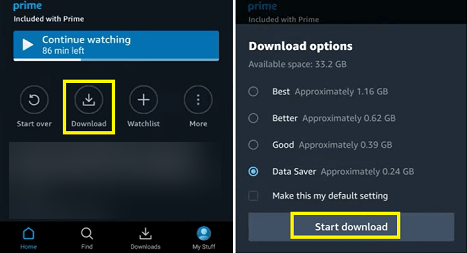
For mobile users, watching Amazon Prime offline is a breeze as the official app provides a convenient download feature. You only need to install the Prime Video app on your mobile phones or tablets, then access your subscribed, purchased or rented content to start downloading. Check below steps:
Step 1. Download and install the Prime Video app from the App Store or Google Play.
Step 2. Sign in with your Amazon account.
Step 3. Browse or search for the movie or TV show you want.
Step 4. Tap the “Download” button, and choose video quality (Good, Better, Best) if available.
Step 5. Once complete, go to the “Downloads” section to watch Amazon Prime videos offline.
Watch Amazon Prime Video Offline on Windows/Mac
Most people prefer to watch Amazon Prime offline in a bigger screen. Unlike Netflix or other streaming platforms, Amazon Prime Video does offer a download function on both Windows and Mac computers. Therefore, you can download Amazon Prime movies, shows on your computer to watch offline. Here’s the detailed steps:
Step 1. Install the Prime Video app for Windows 10/11 or macOS 11.4 and later.
Step 2. Launch the Prime Video app and log into your Amazon account.
Step 3. Find the Amazon Prime movie, TV show or other video you want to download.
Step 4. Open its info page, click “Download” button and select video quality.
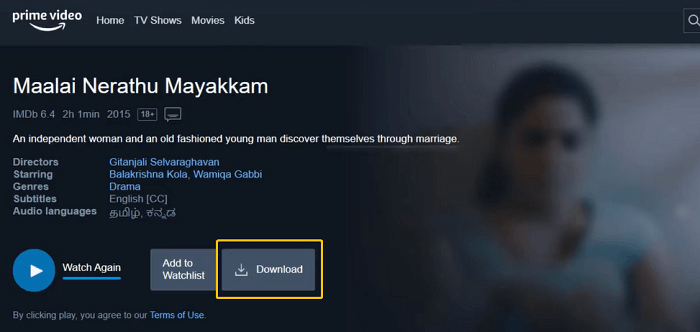
Step 5. After which, go to “Downloads” to start watching Prime Video offline on your PC or Mac.
• Downloads can only be played within the Prime Video app. This means you can’t transfer any Amazon Prime downloads to USB drive, external drive, etc.
• You can download Amazon videos on up to four devices per account, with a limit of 15–25 titles depending on your region.
• Amazon Prime downloads expire after 30 days, or 48 hours after playback begins.
• Not all content is available for download due to licensing and regional restrictions.
To bypass Amazon Prime Video download limits and watch Amazon Prime offline on all devices permanently, the best solution is to download Amazon Prime videos as MP4 files. Keep reading. Scroll down to learn more.
Part 2. Watch Amazon Prime Offline Forever on All Devices (Keep Amazon Videos Permanently) 🔥
There does exist a method to keep and watch Amazon Prime offline permanently – downloading Amazon videos to common MP4 format. Here, TunesBank Amazon Video Downloader is highly recommended.
This dedicated desktop application helps you download any content from Amazon Prime, including TV shows, movies, sports, Originals, purchased or rented videos, etc. More importantly, it can download Amazon Prime Video to MP4/MKV in 1080P resolution, and for sure, the downloaded Amazon videos have no expiration dates and playback restrictions.
Additionally, TunesBank provides 50X fast download speeds and a built-in search engine, making it easy to locate your favorite movies or TV shows. You can search by name or paste the URL, or browse library online directly. Better still, it offers superior audio settings, and multilingual audio tracks and subtitles, delivering an optimal viewing experience. You can freely choose your preferred language to export Amazon Prime movies and shows locally!
After downloading, you can easily transfer Amazon videos to any device such as phone, tablet, USB drive, external drive, SD card, MP4 player and more for offline watching.
Main Features of TunesBank Amazon Video Downloader:
- Download all types of Amazon videos without Prime Video App.
- Download Amazon Prime movies, TV shows in MP4 or MKV format.
- Download Amazon videos in FHD 1080P with original sound.
- Keep original audio tracks and subtitles for Amazon videos.
- Batch download Amazon videos to PC/Mac at 50X speed.
- Watch Amazon videos on computer and any device offline.
How to Download Amazon Video on Computer to Watch Offline?
Step 1. Open TunesBank and Choose Amazon Service
First, download and install the TunesBank iMovieTool Video Downloader on your computer running macOS or Windows OS version. Open the program and select Amazon from the list of supported services.
Step 2. Sign in Amazon Account
Next, you will enter the TunesBank Amazon Video Downloader. Sign in using your Amazon account to access the whole video library.
Step 3. Define Download Settings (Optional)
Move to Menu bar and choose Preference option. Select video format (MP4/MKV), video quality (up to 1080P), audio language, subtitle format, and output folder before downloading Amazon videos.
Step 4. Browse and Add Amazon Prime Video
Go to “Browse” section, you can browse your library online. Scroll down to access the movie, TV show, sport or other content you want to save.
Then, open the movie or show page, click the “+” icon to add it to the download list.
Tips: You may also go to “Search” section, type the movie or series title, or paste the video URL in the search bar to quickly locate your desired content within Amazon Prime Video.
Step 5. Start Downloading Amazon Video on PC
Next, click the “Download” icon to begin downloading the movie from Amazon Prime to local folder.
You can view the download progress in real time and add more videos for batch download.
Step 6. Get Downloaded Amazon Videos
Once completed, go to the “History” section and open the output folder to access your downloaded Amazon videos. They are stored as local MP4 or MKV files for unlimited offline viewing.
Step 7. Watch Amazon Videos Offline on Any Device
You can now transfer the downloaded Amazon videos to your smartphone, tablet, USB flash drive, or external hard drive to watch Amazon videos offline anytime, anywhere.
Part 3. FAQs About Prime Video Offline Viewing
Where Do Prime Video Downloads Go?
Actually, the Prime Video downloads are encrypted cache files and restricted to in-app playback. Here are the typical storage locations for Prime Video downloads on different devices:
On PC (Windows 10/11):
C:\Users\UserName\AppData\Local\Packages\AmazonVideo.PrimeVideo_pwbj9vvecjh7j\LocalState\Downloads
On Mac:
Open Finder > Go > Go to Folder
then enter:
/Users/YourUsername/Library/Containers/Prime Video/Data/Library/com.apple.UserManagedAssets.Dnc1lR
On Android:
/data/data/com.amazon.avod.thirdpartyclient
or
Internal Storage/Android/data/com.amazon.avod.thirdpartyclient
On Amazon Fire Tablet:
Android/data/com.amazon.avod.thirdpartyclient
On iPhone/iPad:
Downloads are stored inside the Prime Video app, go to “Download” section to find the downloaded titles.
Can You Watch Amazon Prime on Multiple Devices at Once?
Yes. You can stream up to three different videos simultaneously using the same Amazon account. However, the same title can only be streamed on up to two devices at the same time. For offline viewing, you can download Amazon Prime videos on up to four devices per account. Or, you can download Amazon Prime videos to no more than four devices for offline viewing at one time.
Can I Watch Downloaded Amazon Prime Movies on An Airplane?
Of course, you can. By downloading Amazon Prime movies in advance on your phone, tablet or laptop, you can access the downloaded movies and watch Amazon Prime offline on a plane without internet or WiFi.
How Long Do Amazon Prime Downloads Last?
Amazon Prime Video downloads are not permanent. Once you download a title, it usually remains available on your device for up to 30 days. When you start watching it, it typically last 48 hours. Afterwards, the downloaded title will be removed from your device. To keep Amazon Prime videos forever, please download Amazon videos to MP4 using TunesBank Amazon Video Downloader.
Part 4. Conclusion
Overall, this post has introduced several methods to download and watch Amazon Prime offline on iPhone/iPad, Android, Mac, Windows, and smart TV, PS4, PS5, Xbox, car screen, MP4 player and all devices with or without the Prime Video app.
For users who want to watch Amazon Prime offline on all devices permanently and without limitations, TunesBank Amazon Video Downloader is the best pick. It allows you to download Amazon Prime to watch offline, save videos in HD MP4/MKV format, and enjoy unlimited playback anywhere. Download it for free and have a try!
The Latest Articles
– Top 8 Solutions to Download Streaming Video
– Top 10 Free Movie Download Sites Recommended
– 3 Ways to Download Movies to Watch Offline
– 2 Verified Methods to Download X/Twitter Videos to MP4
– Download Twitter(X) Videos on PC, Mac and Mobile Phone
– Download Facebook Videos on PC, Mac and Mobile Phone
– 3 Ways to Download Facebook Video to MP4

Amazon Video Downloader
Download movies and TV shows from Amazon Prime Video in MP4 or MKV format with audio track and subtitles kept. Up to 50X downloading speed. Save your favorite Amazon Prime videos to your computer for viewing offline.







